
Introduction
Financing Scheme
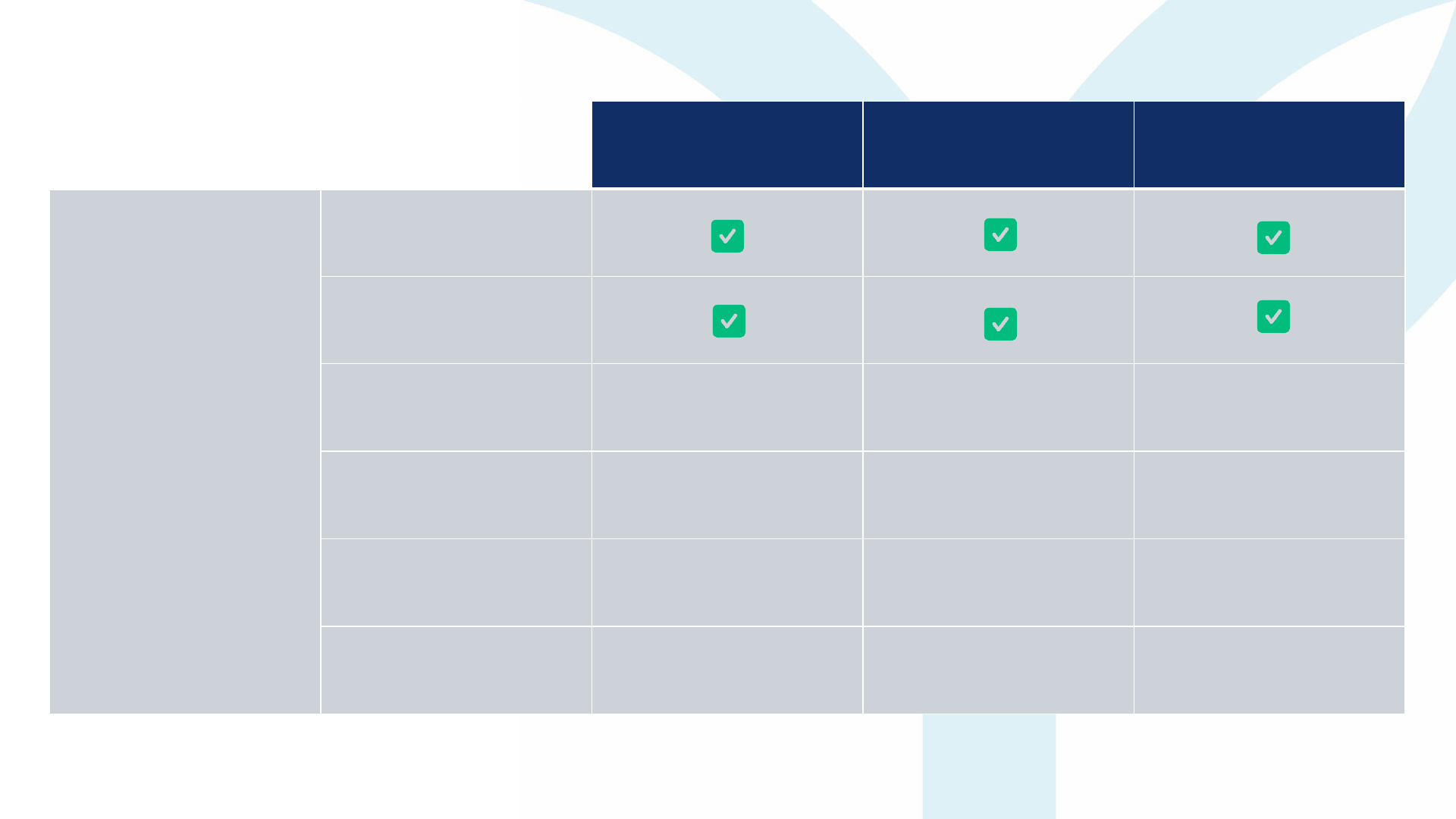
Silver
Up to RM15,000 per application
Gold
Up to RM30,000 per application
Platinum
Up to RM150,000 per application
Training / Tuition fee
Professional / Examination
fee
Yayasan
Peneraju
Monthly Allowance* No No Yes
Financing
Scheme
Repayment* 0% 50% 20%
Scheme's limit for Talents
to reapply
One-time only Multiple times
Multiple times
Convertible to Scholarship
if straight pass*
N/A
(100% Scholarship until
further notice)
No Yes
* The allowance provided under the Platinum Package is applicable solely to participants enrolled in full-time accounting Course and/or programmes.
** “Straight Pass” refers to the successful completion of all compulsory papers of the Course in a single sitting on the first attempt. This conversion is only applicable under the Platinum Package.
# To highlight, any amount, lesser than RM30,000, is not eligible to Platinum
YP Financing Scheme
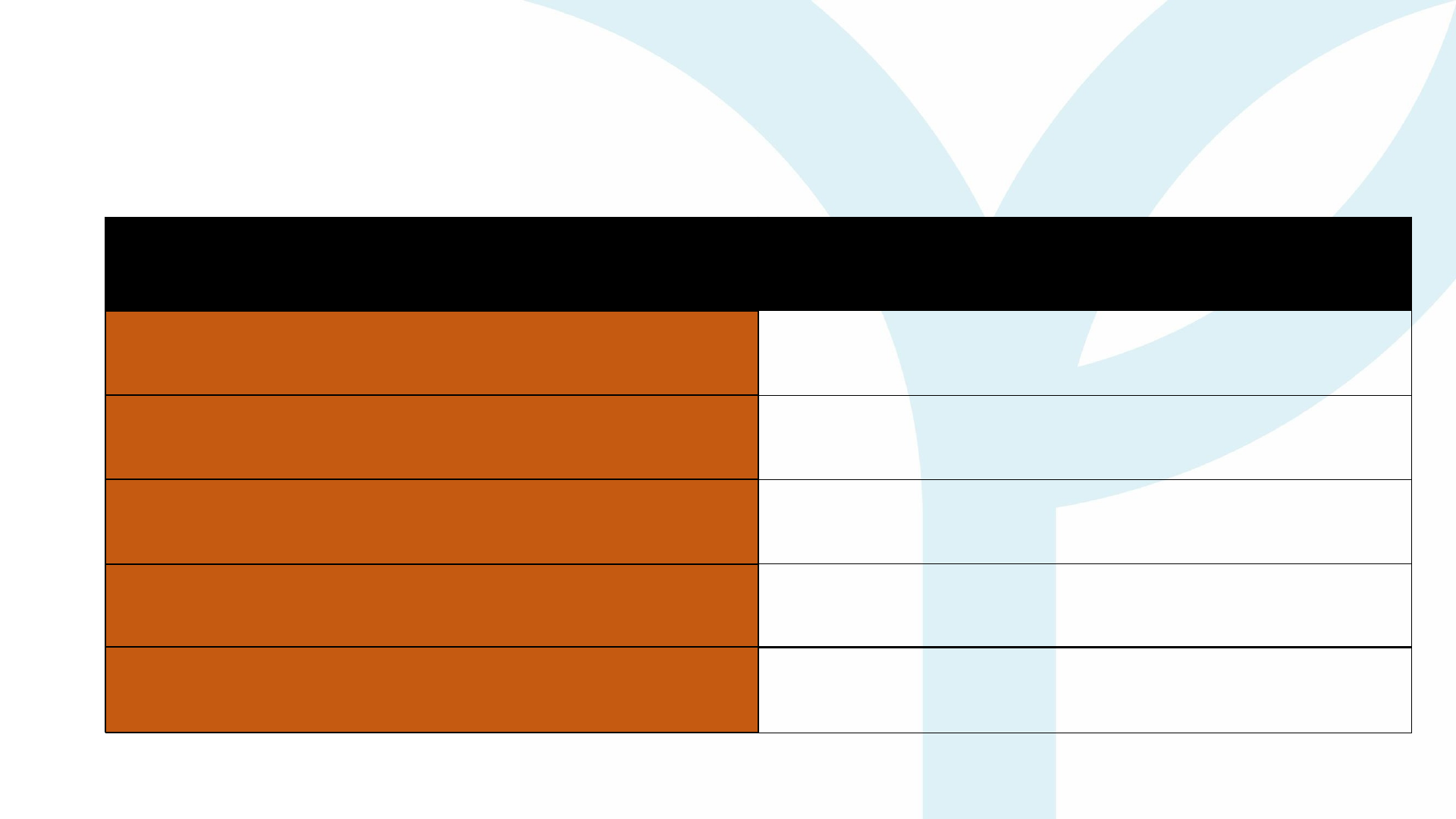
YP Financing Scheme: Facts
Method Details
Payment Recipient Direct to Talents
PIC for Payment to ALTI Talents to manage payment to ALTI
Payment Amount Reference Official Invoice/Receipt issued by ALTI
Ceiling Total Amount Paid As per approved Financing Amount
Deliverables Required
Official ALTI Receipt &
Exam Result (if available)

01
Evaluate applicants for
the courses.
02
Issue Letter of Offer
(LO)/Proof of Registration to
applicants. LO:
A. Should NOT mention YP, as
the training offer is from ALTI.
B. Should include name of talent,
IC number, course of study
similar to ALTI's submission to
YP, and cost of study.
03
Arrange and conduct training
and examination.
04
Liaise with Certification Body
on Talents’ exam
arrangements (where
applicable).
01
Issue official invoice
and/or receipt for
payment to Talents
02
Issue reminder to Talents
on pending payments.
03
Receive and record
payment from Talents
04
Update Yayasan Peneraju
should there be
outstanding payments
OVERALL COURSE MANAGEMENT
INVOICE – RELATED MATTERS
Role of ALTI in Financing Scheme

Application Process
Candidates' Guidelines

This document provides comprehensive instructions on the registration and
application process for the Yayasan Peneraju Financing Scheme through
Peneraju.org. It includes detailed information on the required documents,
authorized officers, document formats, and the overall application process.
Kindly review the FAQ thoroughly and provide accurate information to complete
the online application form at Peneraju.org
Overview
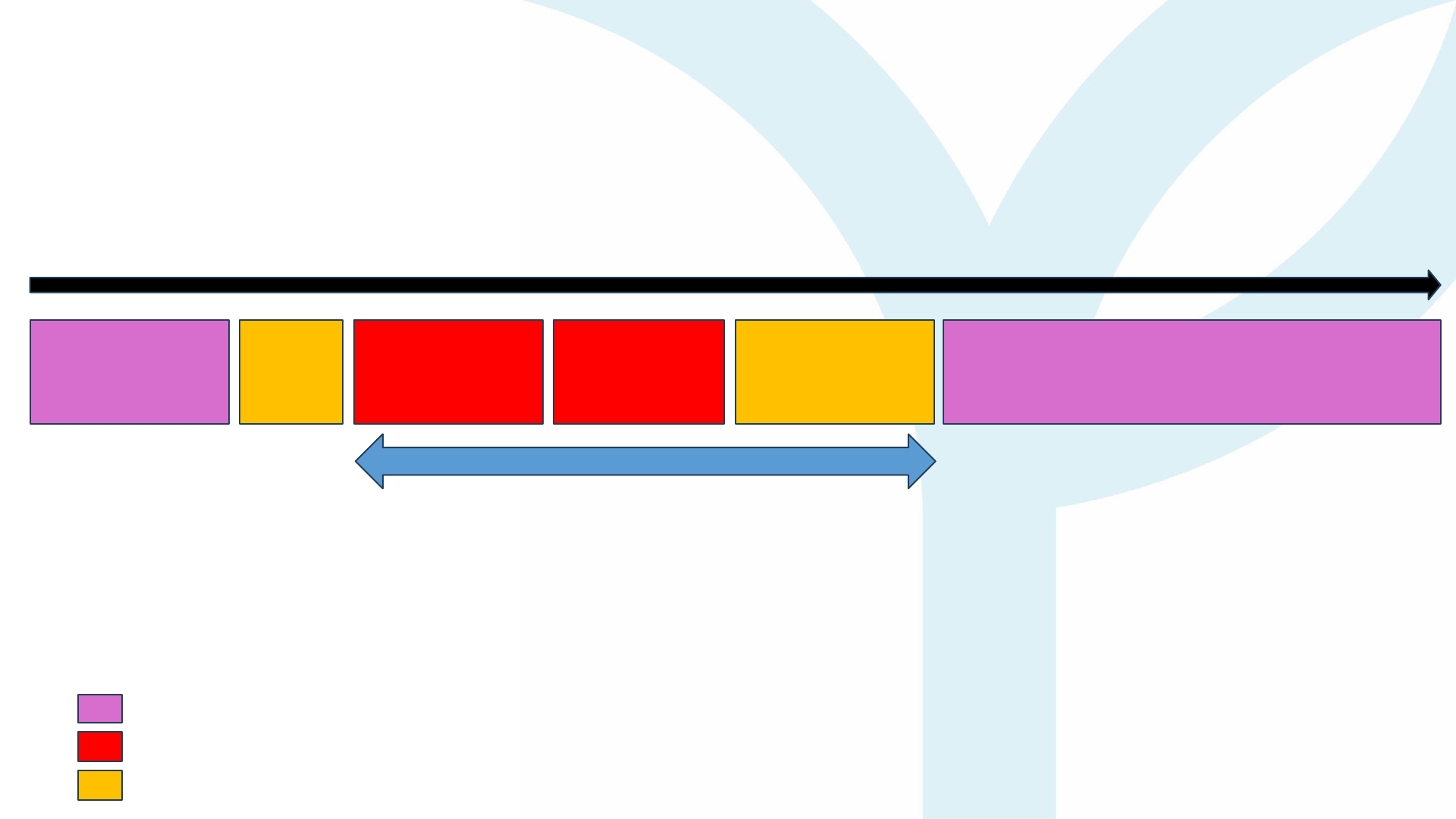
Timeline of Application
Key Roles in Process
Talent & ALTI
Yayasan Peneraju
Talent & Yayasan Peneraju
Apply @ ALTI
Apply
FS
Verification
Training & Certification/Claim & PaymentAcceptance
Approval
21 Working Days*
*However, do take note, it may exceed the 21
working days during peak application season.

How to Register
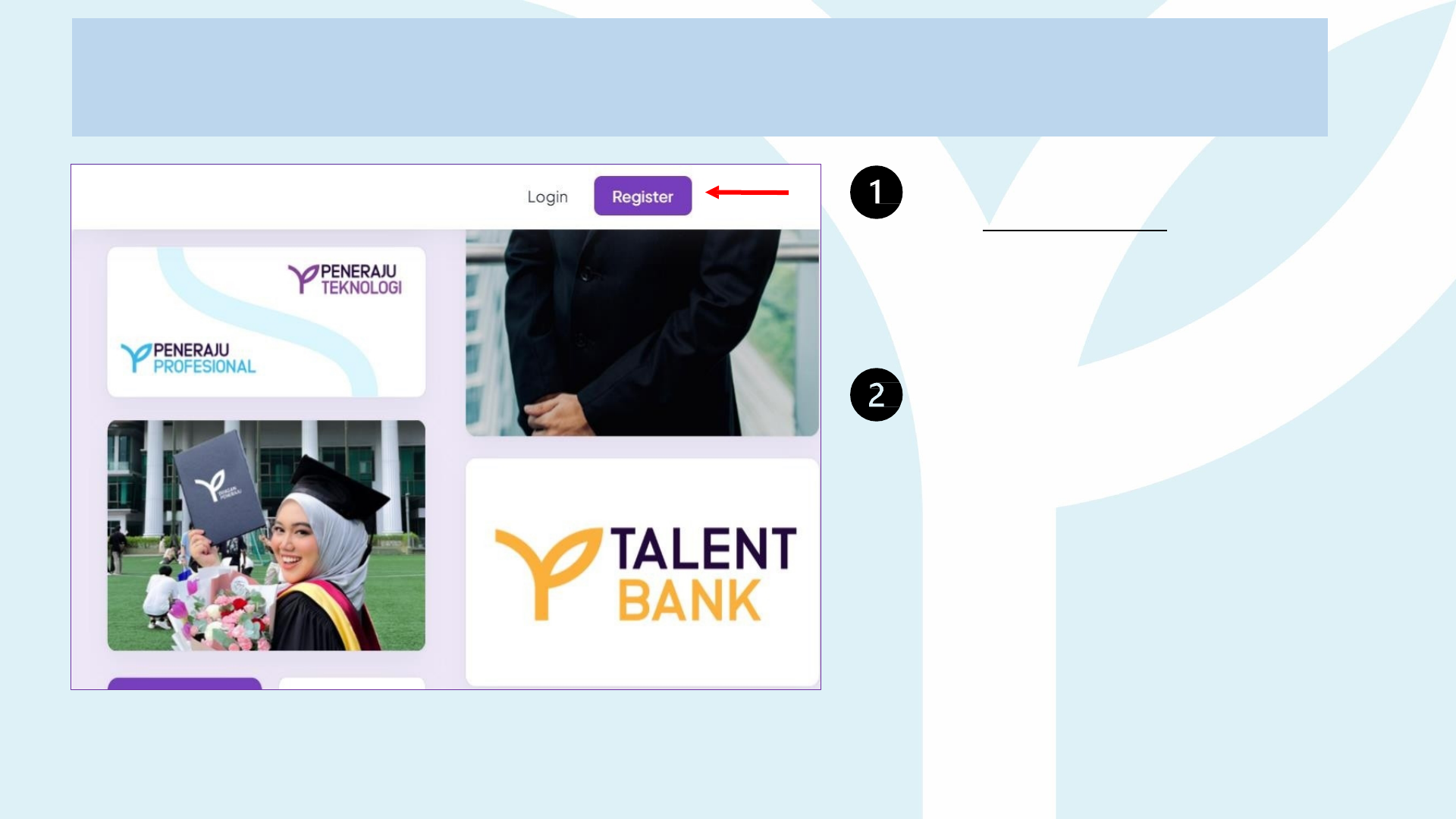
Account Creation
1. Open your web browser and
visit: Peneraju.org
Click on "Register" to
begin
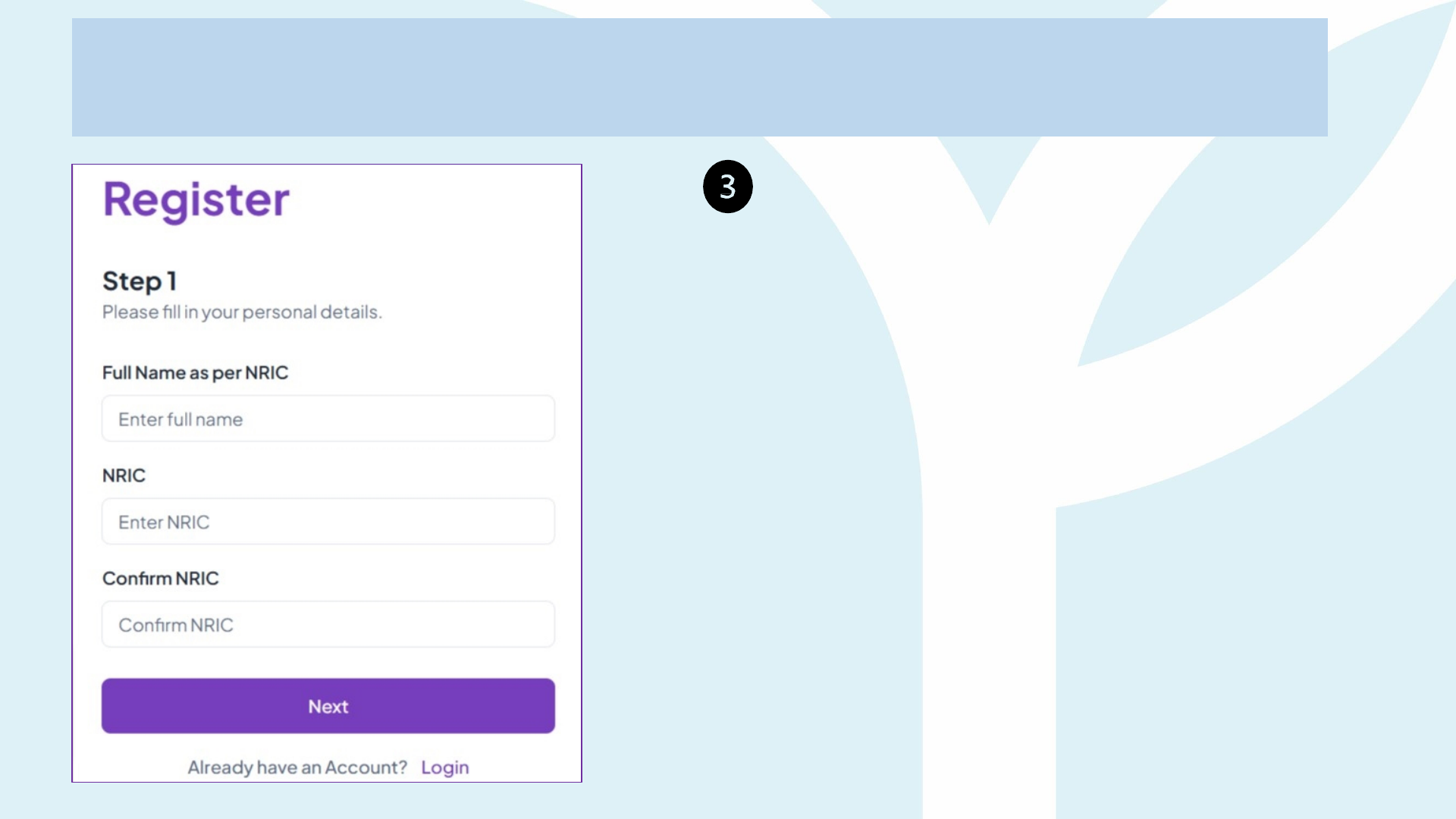
Account Creation
Fill in your personal details
• Full Name as per NRIC
• NRIC
• Confirm NRIC
Click on NEXT button to register.
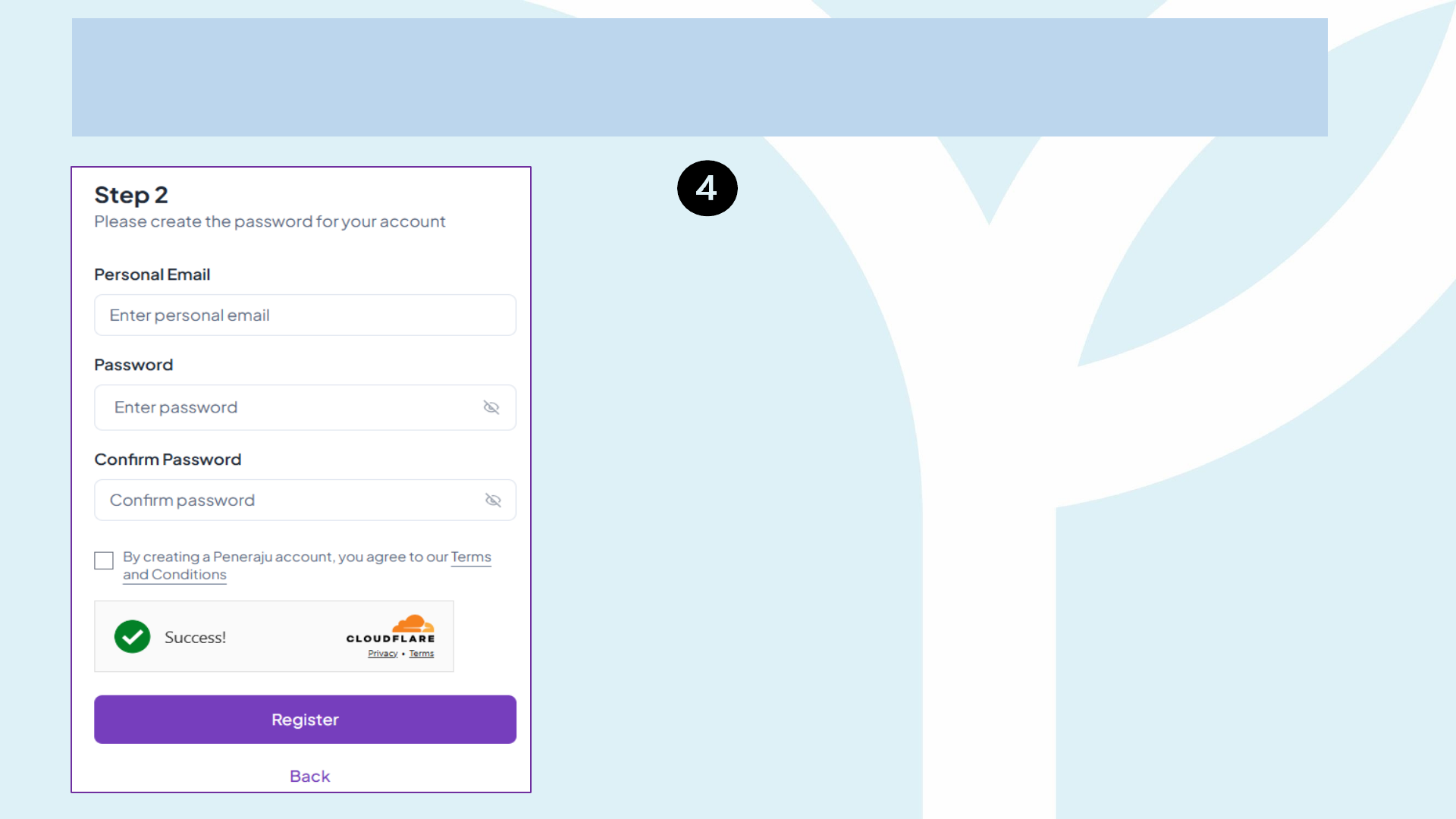
Account Creation
Fill in your personal email details
• Enter personal email address
• Password
• Confirm Password
Click on REGISTER button to
register.
Note: Please insert your personal email address,
not work or business email address.
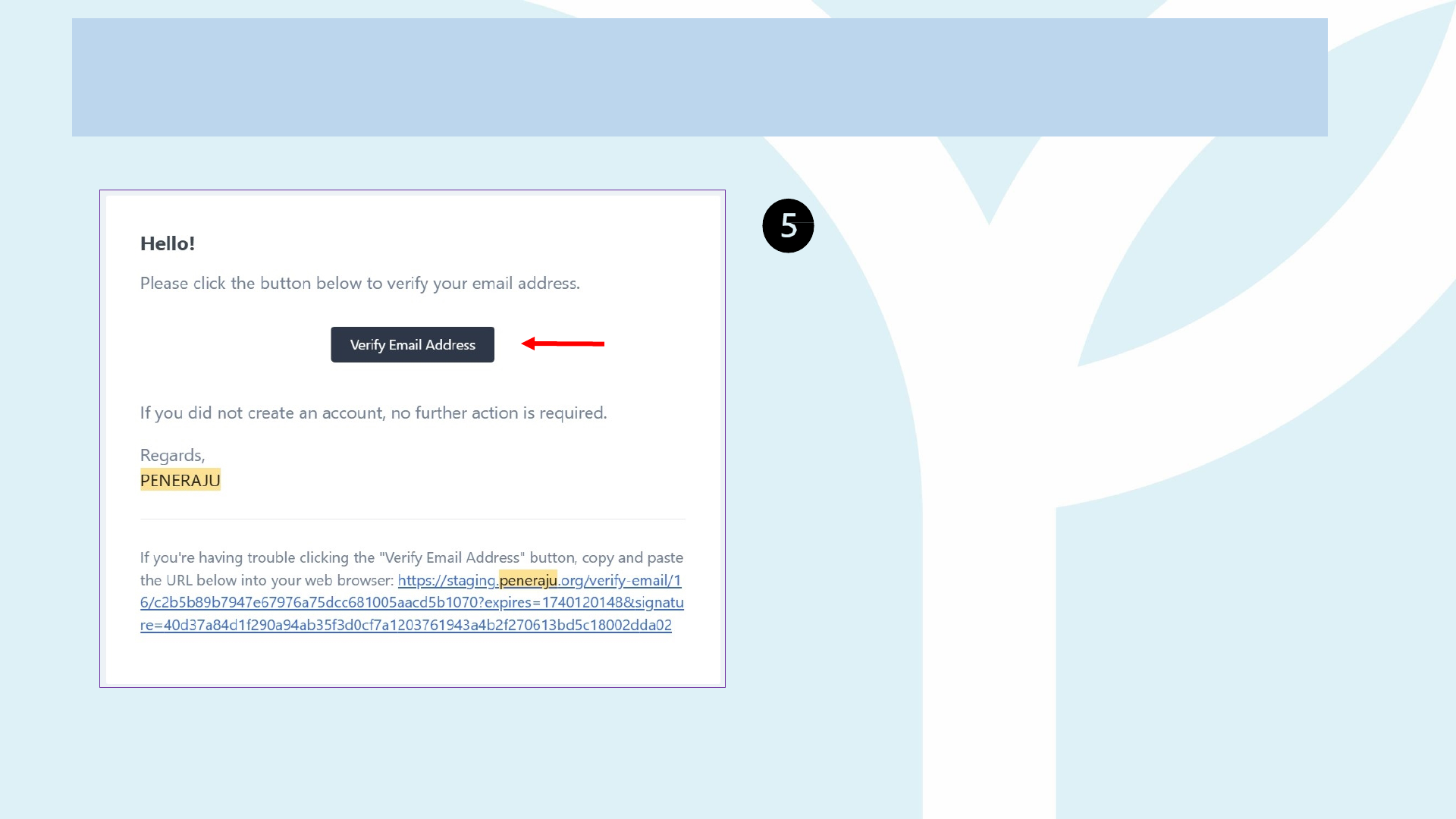
Please refer to your email and
verify your email address
• Click on the Verify Email
Address
• Check Spam/Junk Mail folder if
email is not in inbox
Account Creation

Correct Process for Fixing Key Registration Errors on Peneraju.org
(Wrong details eg full name, NRIC, or e-mail (work/university email) entered at Sign-up)
1. Log in with the credentials you just created.
2. Navigate to Profile ▸ Security.
3. Click Delete Account and confirm the prompt.
4. Auto Log out and automatically return to the home page,
and register again after 24 hours, this time entering the correct
o Full Name (exactly as on NRIC / passport)
o NRIC
o E-mail address
Unverified accounts expire automatically
• Every new registration must be verified within 24 hours (check in Spam/Junk mail too). If the e-mail
address is wrong, the verification link never reaches you, and the system will automatically remove
the profile exactly 24 hours after it was created.
Once an account is deleted, every record tied to that login is wiped, so you can start afresh
with the right details. If you have already submitted an application, such application will be
automatically deleted from the account.
Account Deletion
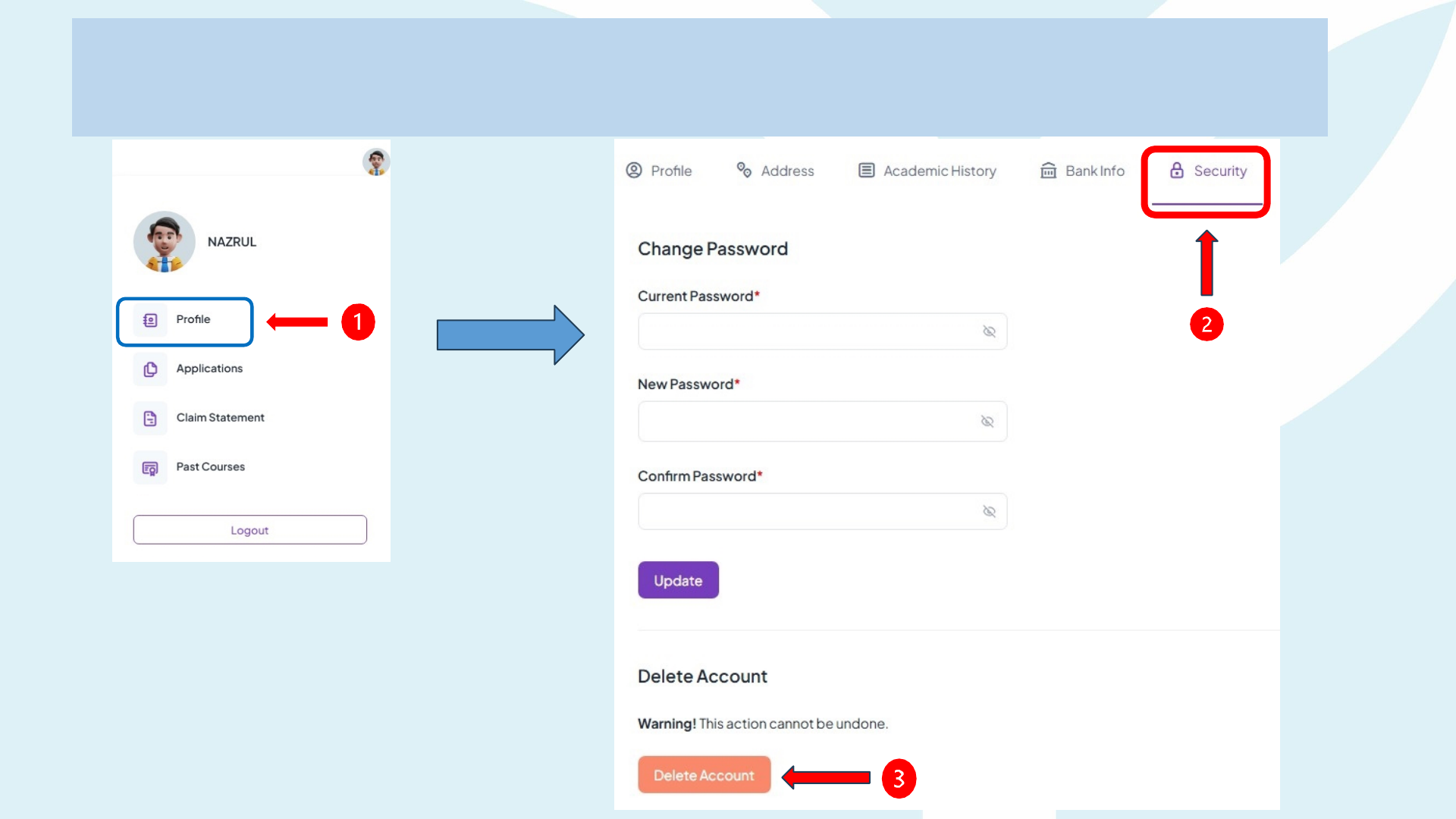
Account Deletion

How to Apply
Application
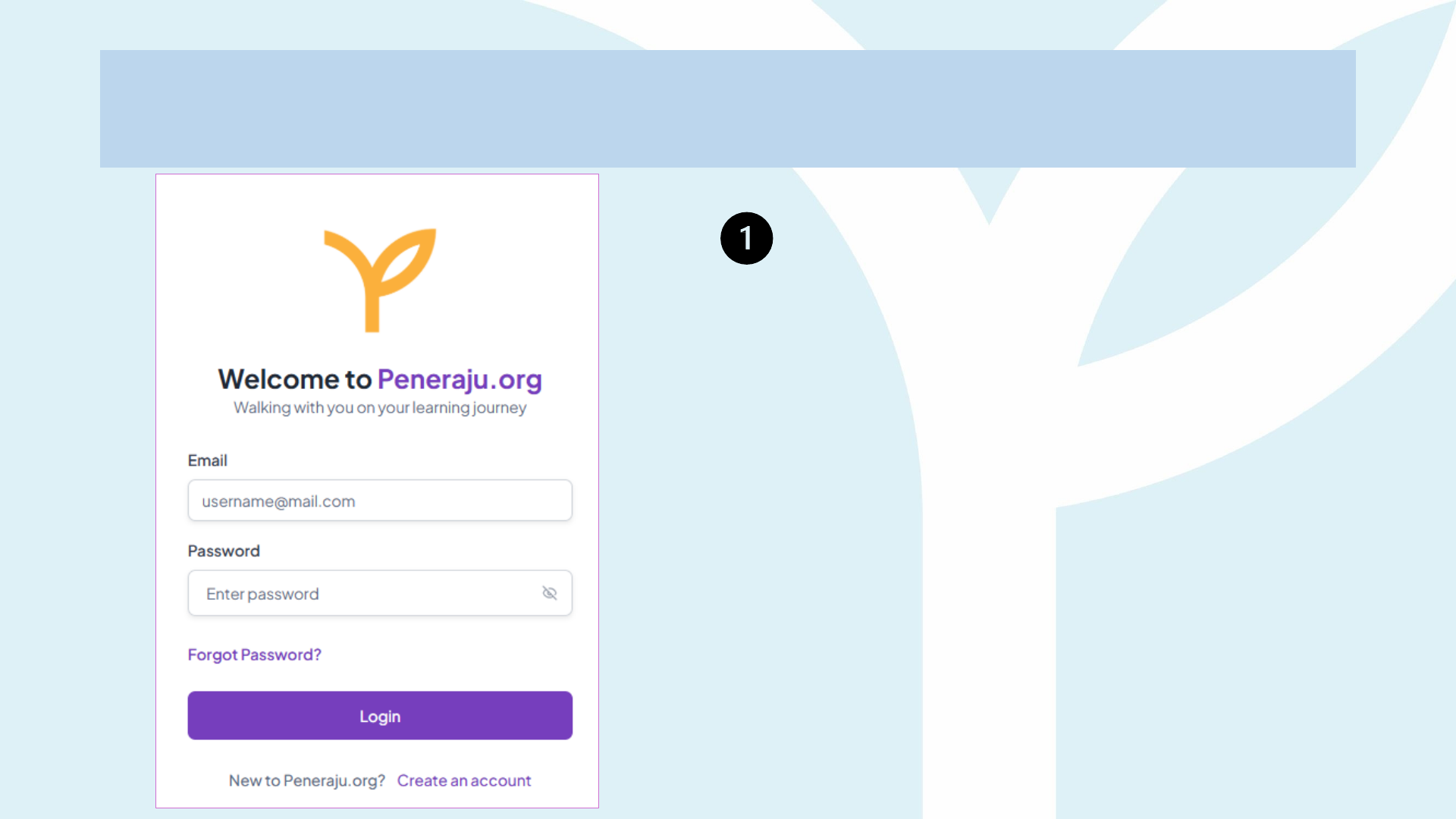
Once account is created, please login to
Peneraju.org
• Enter your registered email and
password
Application
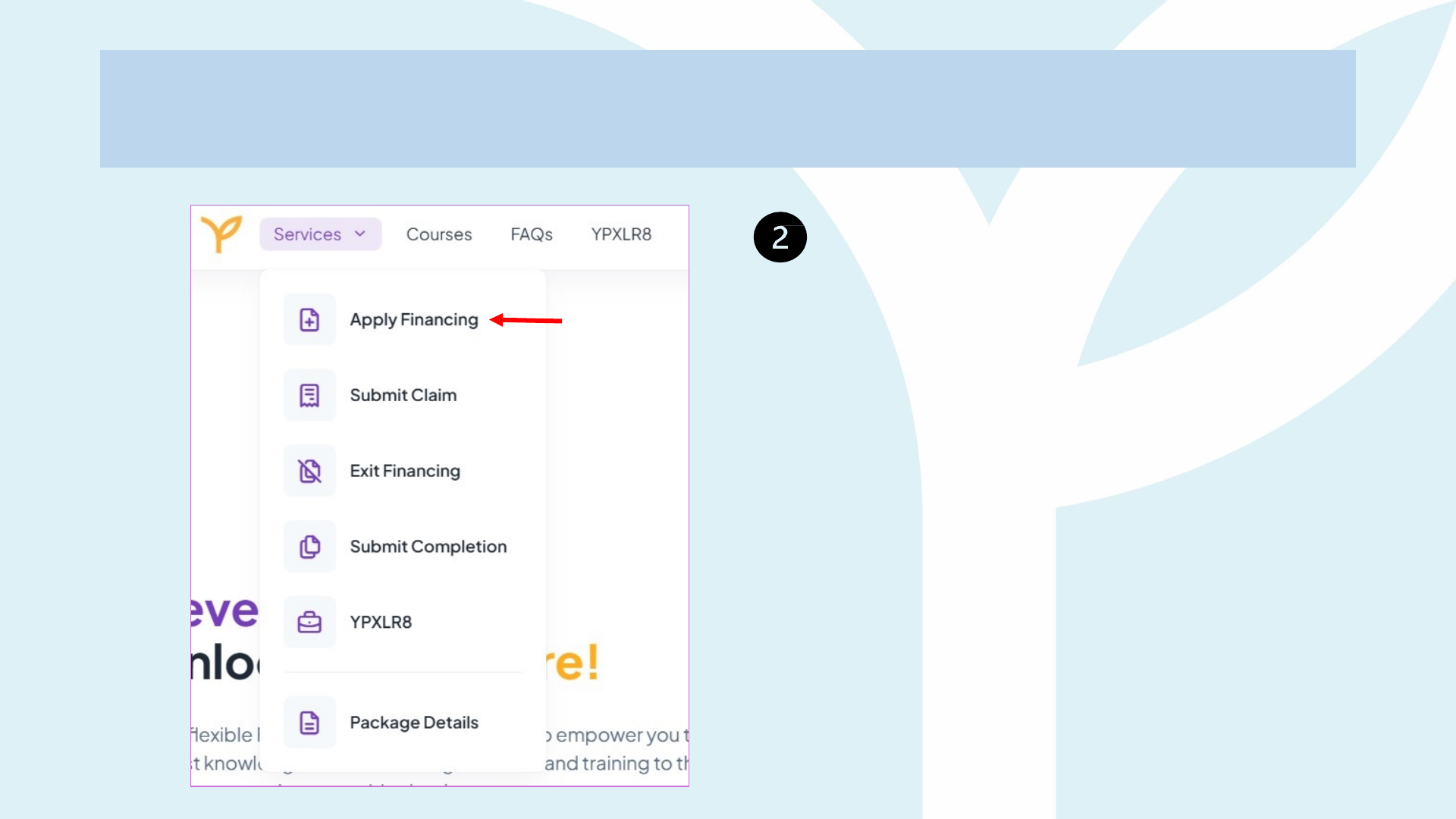
Please click on the Services button on
the left corner of the home page
• Select Apply Financing to
start your application
Application
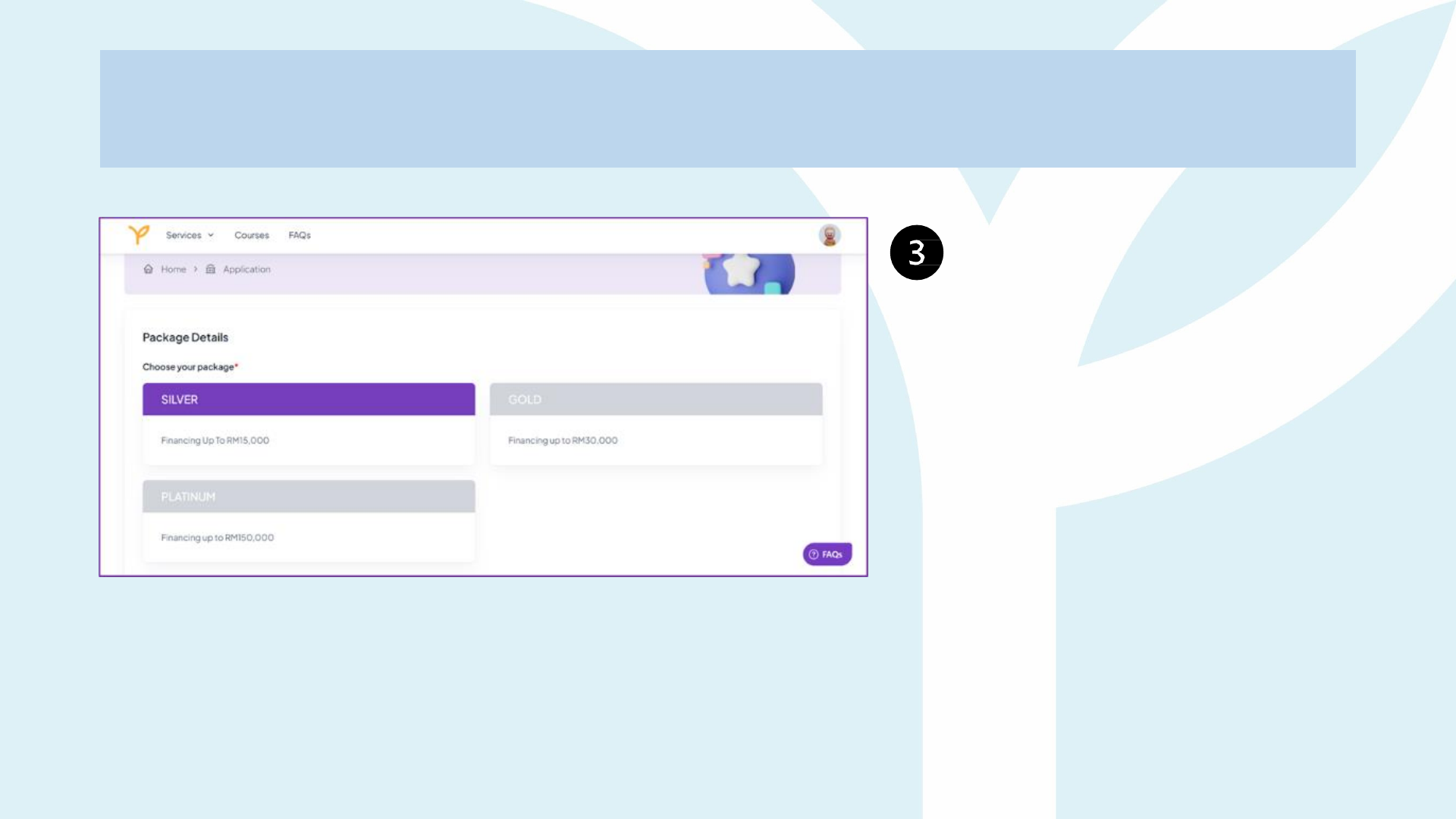
Select one package from
the options provided:
Silver, Gold, or Platinum
based on your preference
Application
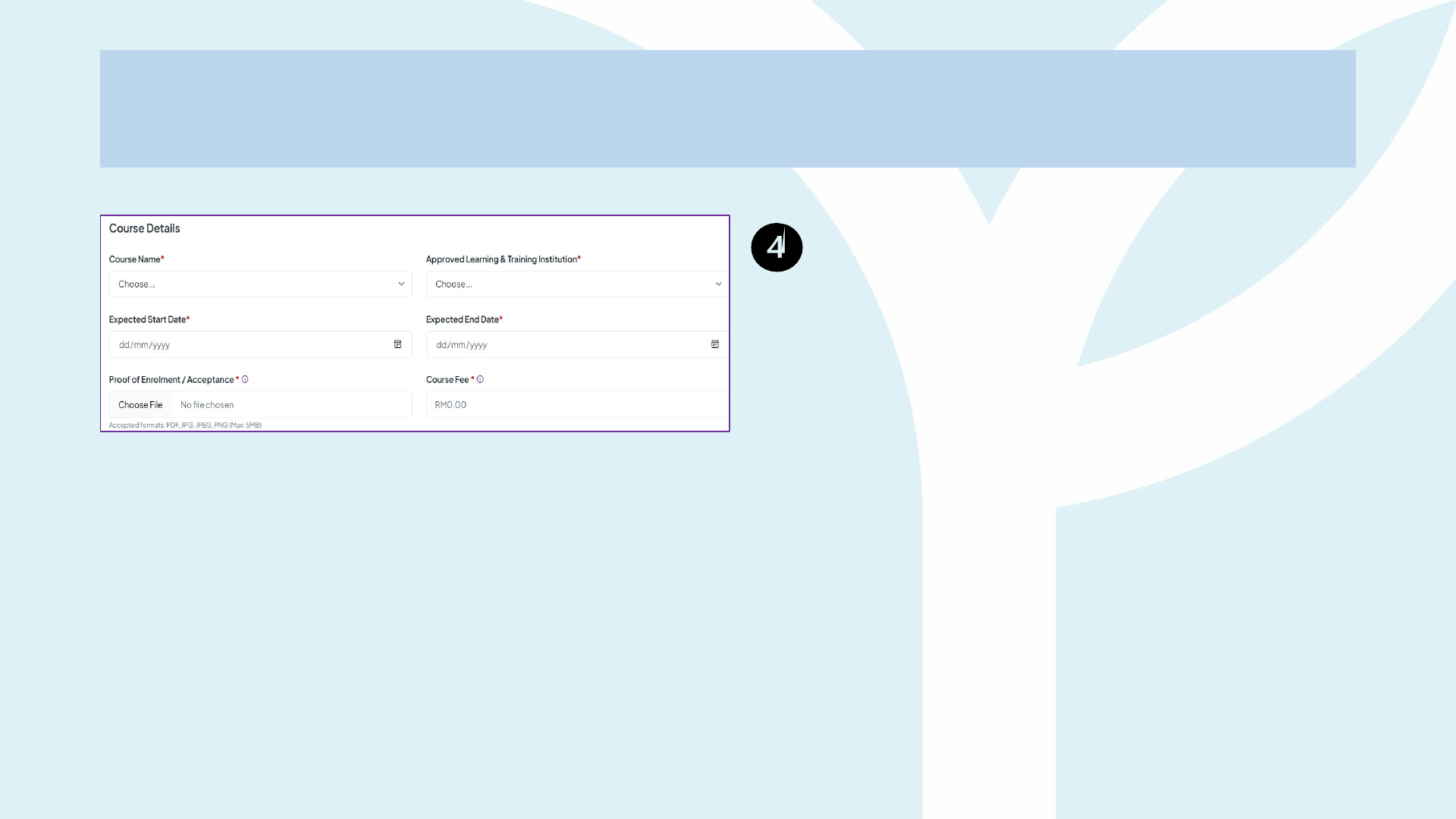
Select Your Course: Choose your
preferred course and secure your placement
at one of our Approved Learning and
Training Institutions (ALTI).
Fill in Course Details: Refer to your
Offer Letter from the ALTI for the
following:
• Expected Start Date
• Expected End Date
Complete Enrolment/Acceptance: Upload
the Offer Letter/Proof of Registration (with
Fee Structure for Professional ONLY) from
your chosen ALTI during the enrolment
process.
Letter of Offer / Proof of Registration must
have:
1. Full Name as per NRIC
2. NRIC number of Applicant
3. Course Name
4. Mode of Study
5. Start Date of Training
6. End Date of Training
7. Fee Structure (if applicable)
8. Confirmation of Current Student Status (if
applicable)

Deferment Due to Company Rules – What
ALTIs Must Do
Common Company-Related Reasons for Deferment
• Business-critical project or peak season prevents study
leave
• Mandatory job rotation / transfer clashes with class schedule
• Overseas assignment issued after enrolment
• Company policy limits release time for new staff in probation
• Unexpected restructuring or long-term secondment
*Key reminder: A deferment without an updated LO may breach the EFSA timeline and push the scholar into Exit Recovery. Always
formalize the new dates up-front.
Scholar Status Required Action Next Step for the Scholar
Already Applied / Accepted
(Active Scholar)
1. Issue an Amended LO with the
extended end-date.
2. Give the LO to the scholar and advise
them to file an Exit Financing request
in
the portal using reason: “Deferment –
Company Requirement.”
• YP Finance & Recovery will close the file.
• Once the Exit is cleared, the scholar may
re-apply under the new timeline.
New Applicant
(Has not yet registered or
submitted financing request)
1. Prepare the Amended LO before
the scholar registers on
Peneraju.org.
2. Ensure the LO shows the correct intake
and extended completion date.
• Scholar uploads the updated LO during
their initial application—no Exit Financing
needed.
Funding for Ongoing Students for
Professional programme
What We Need: Confirmation of Current Student Status Letter
YP can finance students who are already enrolled, but coverage starts only from the
current semester onward. Any fees paid in earlier semesters remain the student’s responsibility.
Compulsory Field Why It Matters
Full Name (as per NRIC) Matches ALTI LO and portal profile
NRIC / Passport No. Unique identifier for financing records
Department / School Verifies the faculty delivering the programme
Programme Name Must align with YP-approved course list
Intake (month & year) Confirms original enrolment cohort
Mode of Study – Full-Time / Part-Time Determines the correct mode of study
Current Semester – Semester X (DD-MM-YYYY →
DD-MM-YYYY)
Defines the current semester
Application
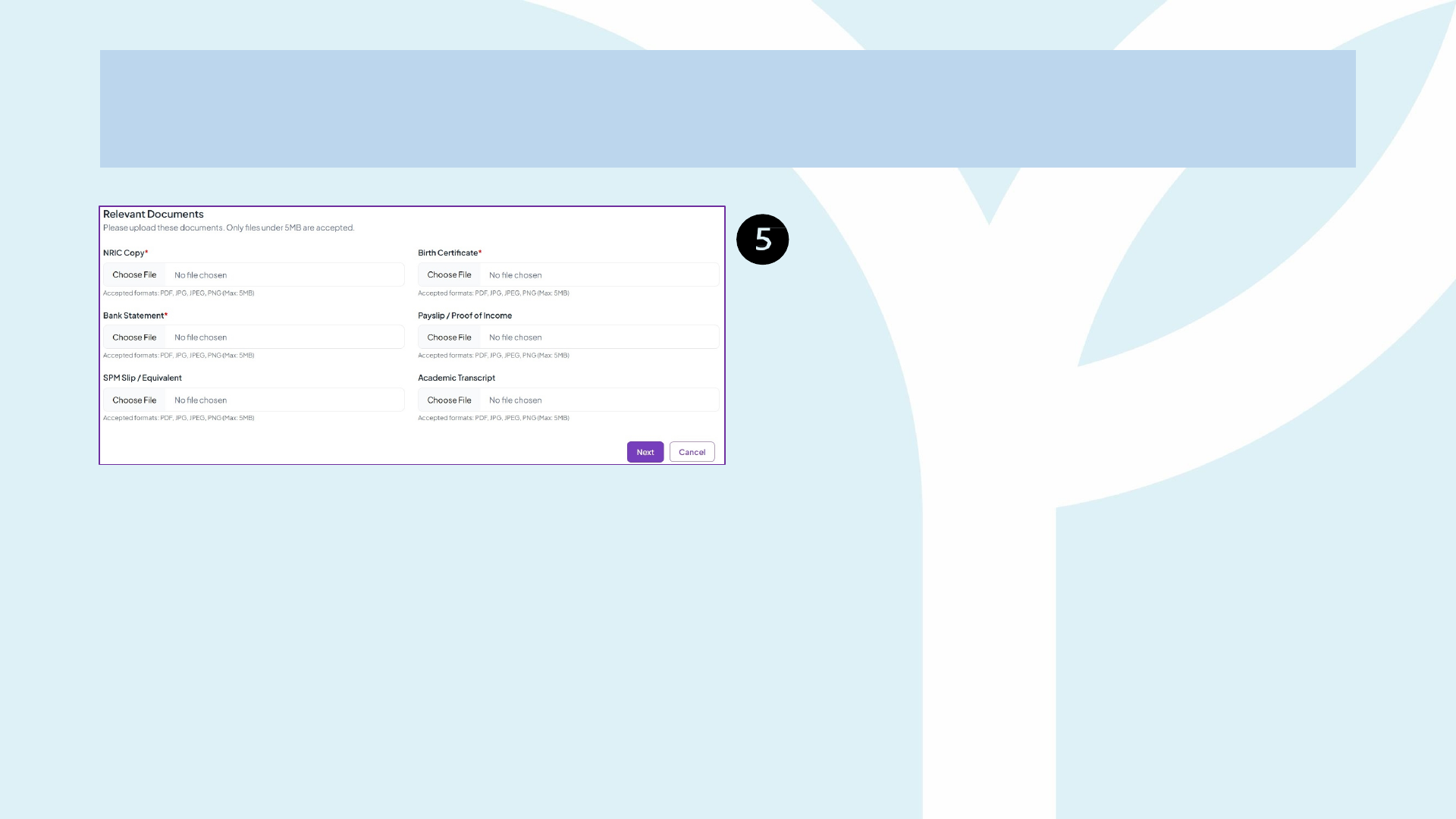
Continue to fill up the application form, upload all the
requested/mandatory Certified True Copy (CTC)
documents and click SUBMIT.
Documents mandatory to CTC:
1. Applicant's NRIC copy (front and back)
2. Applicant's birth certificate copy
3. Applicant's bank statement (with visible Bank,
Bank Account no. and Bank Account Owner
matches with the applicant
Documents optional to CTC:
1. Applicant's latest pay slip
2. Applicant's SPM slip or equivalent (IGCSE)
3. Applicant's academic transcript (STPM, Diploma,
Degree,etc.)
*Please be advised that for post-SPM applicants, it is mandatory
to upload your Certified True Copy of your SPM slip.
Application
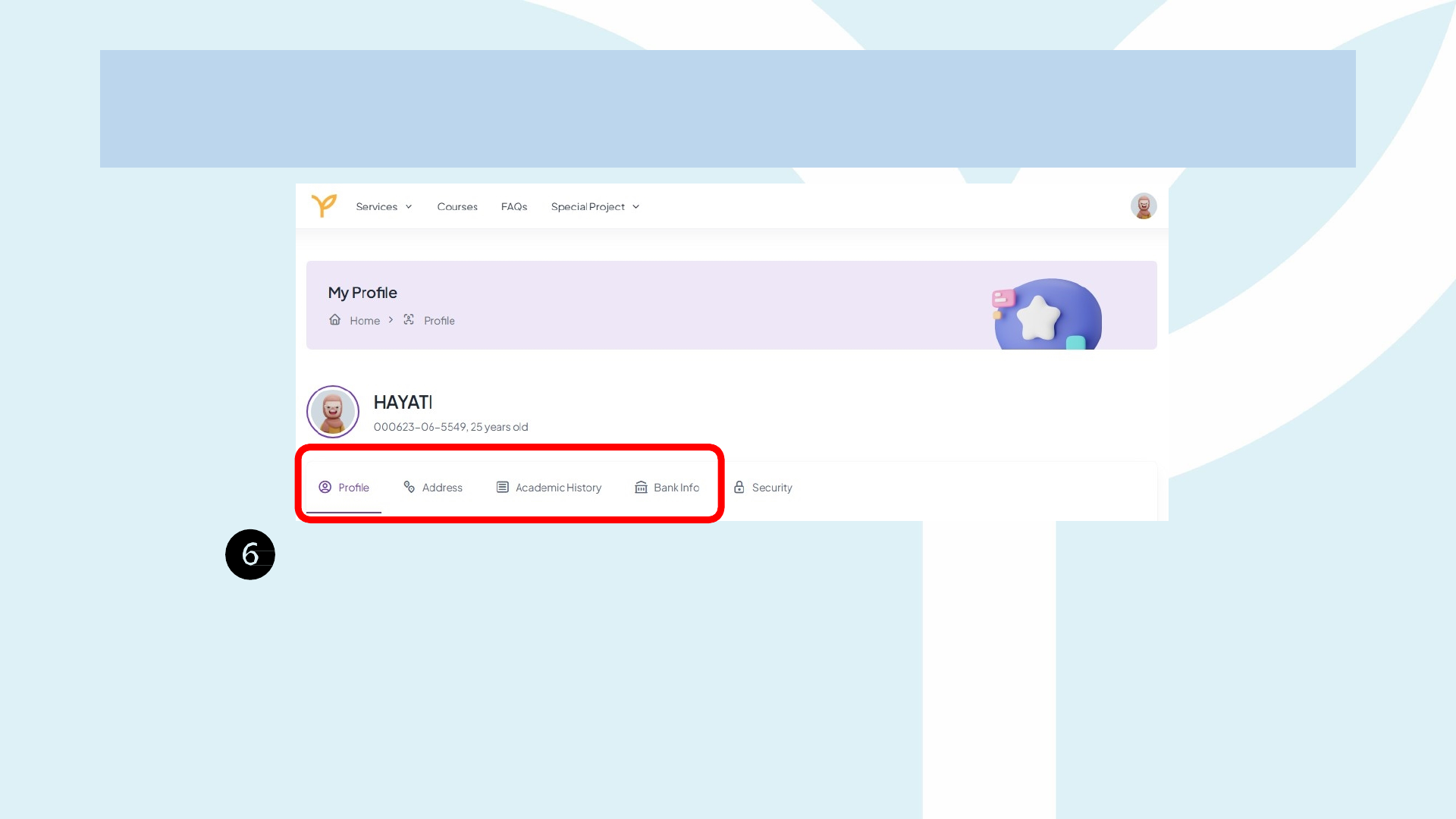
Continue to fill in all your details for the following categories :
- Profile
- Address
- Academic History
- Bank Info
Application
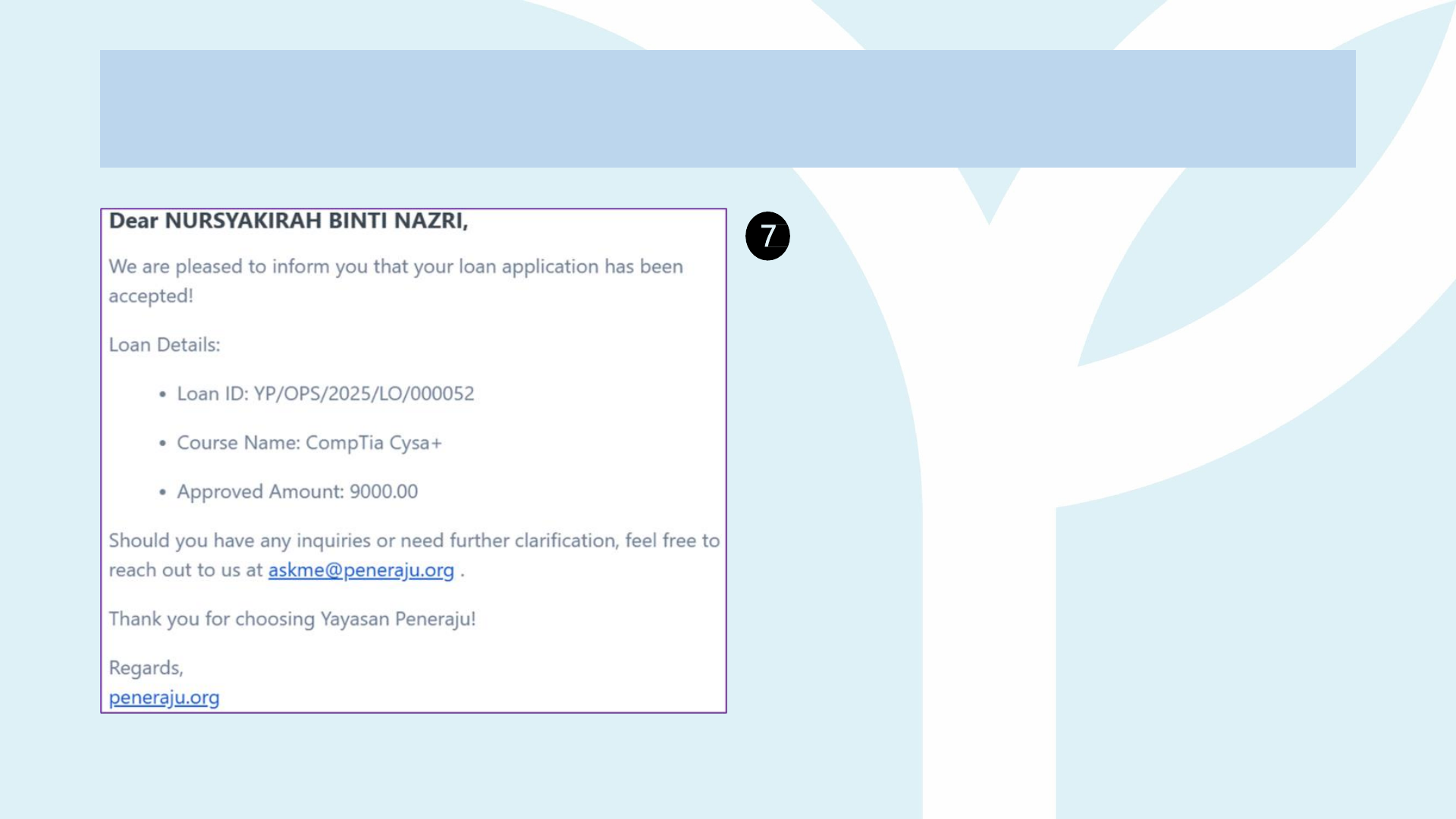
Application Accepted:
You will receive the approval notification
via email and Peneraju.org
Application
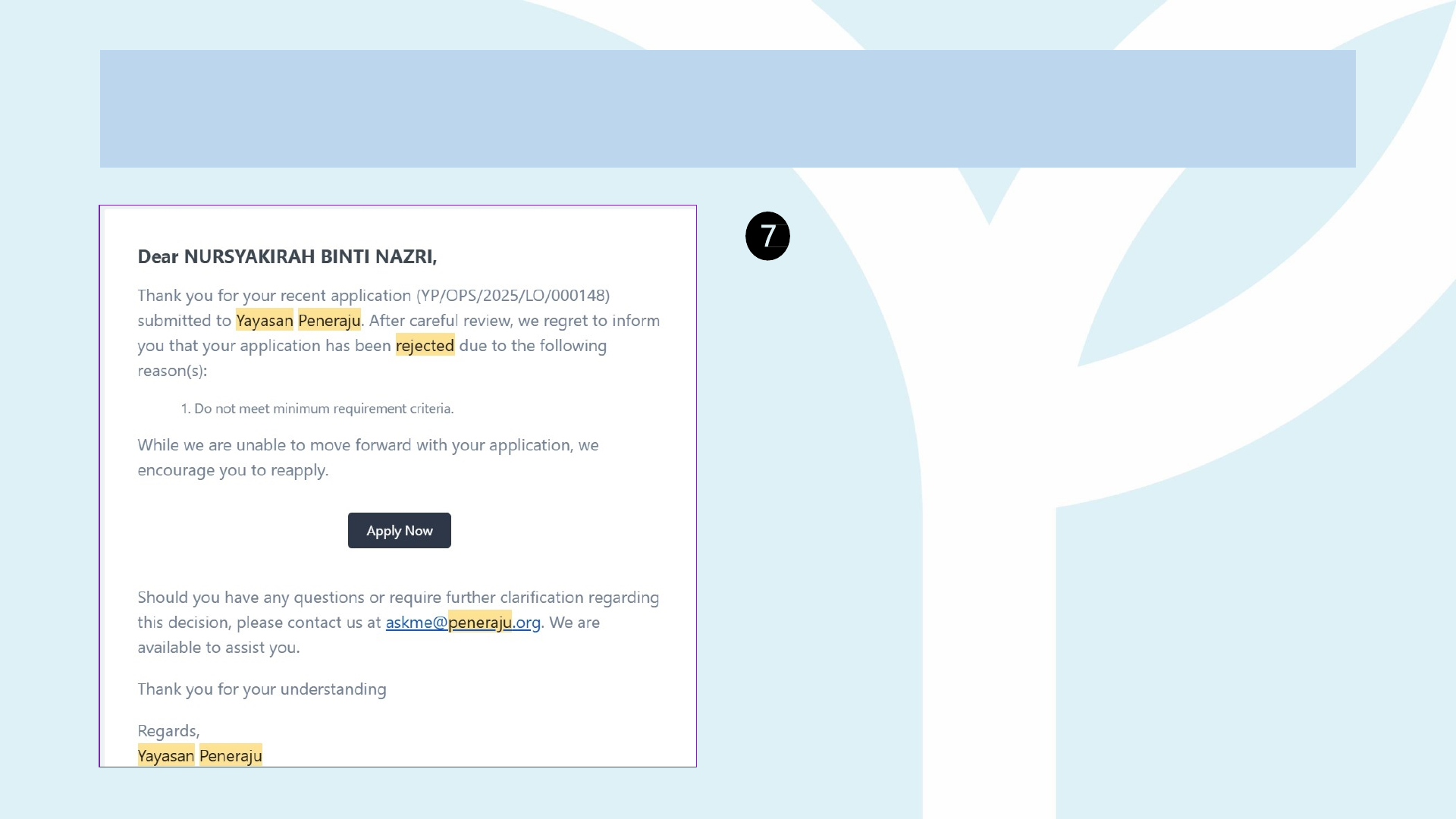
Application Rejected:
You will receive a rejection notification via
email and Peneraju.org. You may reapply for
the financing scheme.
Please log in to your existing account and
submit a new application for your desired
course.

Pending
• What it means – The application
has been submitted and logged in
the system
• Who acts next – YP System
• Typical actions – Initial
completeness check, basic
eligibility flags.
• Tip for ALTIs – Advise
applicants to double-check
document names & formats
before submission; this prevents
early rejection loops.
Review
• What it means – A YP System &
Officer is actively vetting the file.
• Checks performed:
• Authenticity of Offer Letter /
Proof of Registration.
• Programme matches approved
list & session dates.
• Fee breakdown complies with
the relevant financing package.
• Any outstanding repayments
from previous YP schemes.
• Possible outcomes:
• Approved (next stage).
Approved
• What it means – Application
passes all vetting; Letter of Offer
(LO) and Education Financing
Scheme Agreement (EFSA) are
in process of auto-generated.
• Email sent to applicant with:
• LO (PDF, signable).
• EFSA (PDF, signable).
• Deadline (usually 7–14 days) to
sign and upload.
Incomplete
• What it means – LO/EFSA
issued, but signed copies have
not been returned or were
uploaded with errors (e.g.,
unsigned pages, missing witness
signature).
• Applicant options:
• Upload corrected documents
(moves to Signed).
• Risk – If the deadline lapses, the
application auto-expires and must
be restarted.
Signed
• What it means – Applicant has
uploaded the fully signed LO &
EFSA; awaiting YP counter-sign
& acceptance.
• Officer checks:
• All pages signed / initialled.
• Correct IC number and witness
details.
• Dates fall within the valid
window.
Accepted
• What it means – Documents are
verified and counter-signed;
candidate becomes an Active
YP Scholar.
• System unlocks:
• Claim forms for the first
reimbursement /
disbursement tranche.
Application Process

Application
Common “Incomplete” Triggers
(Any one of these ill push the file back to Incomplete. Amend it > re-upload > status
moves
to Signed)
Category What Went Wrong Typical Examples
Missing or wrong
signatures / initials
LO or EFSA not signed in the right spots, no
initials on each page, or e-signature pasted as
text.
• Signature box blank
• No initials bottom-right pages• Applicant signed
in witness box
LO acceptance not crossed Applicant forgot to strike out Reject (or Accept). “Accept / Reject” line left untouched
Witness or guarantor issues
Page 9 witness box unsigned OR guarantor form
(Appendix B) missing / NRIC mismatch.
• No witness on EFSA
• Guarantor NRIC differs from Peneraju.org
Missing pages / extra pages
LO (3 pp) or EFSA (14 pp) not complete, extra
blank pages inserted.
Uploaded file = 11 pages instead of 14
Wrong or altered format
Converted to Word, layout shifted, dates or YP
fields edited.
• Margin moved
• User changed LO date
Unreadable scan / photo
System can’t OCR the file; pages blurry or
cropped.
Taken with phone camera in low light
Incorrect personal data Address mismatch, wrong NRIC keyed in, etc. Mailing vs residential address differ
Late return LO/EFSA not re-submitted by the deadline. 7-day window expired

Application
How to Clear the “Incomplete” Status
• Download fresh documents from the portal Letter of Offer and Education
Financing
Scheme Agreement (LO & EFSA).
• Fill and sign correctly
Strike out Accept / Reject on LO.
Sign the signature area.
Add digital/hand-written initials bottom-right of every EFSA page (except
cover).
Page 9: Applicant + Witness; Appendix B: Guarantor.
• Scan as one clear PDF / merge in one (1) PDF – keep original layout; 3 pages LO,
16
pages EFSA and 17 pages (minor) EFSA.
• Upload in the two required slots
Signed Letter of Offer
Signed Education Financial Scheme Agreement
• Click Submit.

Application Stage – Who Does
What?
Action by Key Actions & Deliverables
ALTI (Approved
Learning
Training
Institution)
1. Issue Letter of Offer (LO) showing programme, intake, study mode, fee, etc.
2. Provide official Fee Structure (semester-by-semester) applicable for certain courses.
3. If the student is already enrolled, prepare a Confirmation of Current Student Status Letter
(one
page, signed, ≤ 30 days old).
4. Assist prospects during briefing sessions—explain guarantor, witness, and signing rules.
5. Respond quickly to YP e-mails that request verification of offer letters or fee details.
Applicant / Talent
1. Create an account on Peneraju.org and complete the profile (name, NRIC, bank details, etc).
2. Upload LO, proof of registration, and supporting docs in PDF.
3. Select the correct financing package that matches the course fee and study mode.
4. Monitor status (Pending → Review → Approved → Incomplete → Signed → Accepted).
5. Download, sign & initial the auto-generated LO & EFSA; strike out Accept/Reject; arrange
witness/guarantor that is required.
6. Scan & upload signed LO/EFSA before the deadline; correct any “Incomplete” status.
YP (Operation,
Finance &
Recovery Teams)
1. Run eligibility and duplicate-funding checks.
2. Verify authenticity of LO / registration evidence, fee structure, etc.
3. Generate LO & EFSA, e-mail to applicant.
4. Review signed copies → counter-sign and set status to Accepted.
5. Unlock first-tranche claim forms and change applicant tag to Active Scholars.

How to Exit Financing
Exit Financing
Exit means the candidate pulls out of the YP financing process for any reason
before completing the sponsored course. It covers two distinct situations:
Exit before Acceptance
The candidate ithdra s before YP countersigns and the status turns
“Accepted.”
• The application is automatically Deleted.
• No funds have moved, so nothing needs to be repaid.
• The candidate is free to start a new application for the same course or a
different one at any time.
Exit after Acceptance
The scholar leaves after YP has accepted them and possibly reimbursed some costs
(tuition, exam fees, allowance).
• YP opens an Exit Recovery case:
• Finance tallies every payment already made.
• Recovery Department issues a Clearance Letter showing either
- a Recovery Amount (to be repaid), or
- a Zero-Balance if no money was disbursed.
• Once any required repayment is settled or if the balance is zero the case is
closed and the individual may apply for another YP scheme.

Exit Financing
Stage Pre-Acceptance
(Pending → Signed)
Post-Acceptance
(Active Scholar)
What “Exit” Means
Candidate withdraws before YP
countersigns the EFSA, so they
never become an Active Scholar.
Scholar terminates or is terminated
after Acceptance but before programme
completion.
Typical Reasons • Change course/certification
• Intake deferred
• Personal matters
• Received another Sponsorship or
Financing
• Drop-out or academic failure
• Voluntary opt-out
• Medical Reason
• Deceased
Key Reference Points • Application auto-deleted in the portal.
• No funds disbursed → no repayment
owed.
• Candidate may re-apply immediately
if circumstances change.
• YP opens an Exit Financing case.
• Finance checks whether any claim
disbursements / reimbursements
have been paid.
• Case is handed to Recovery
Department for clearance.
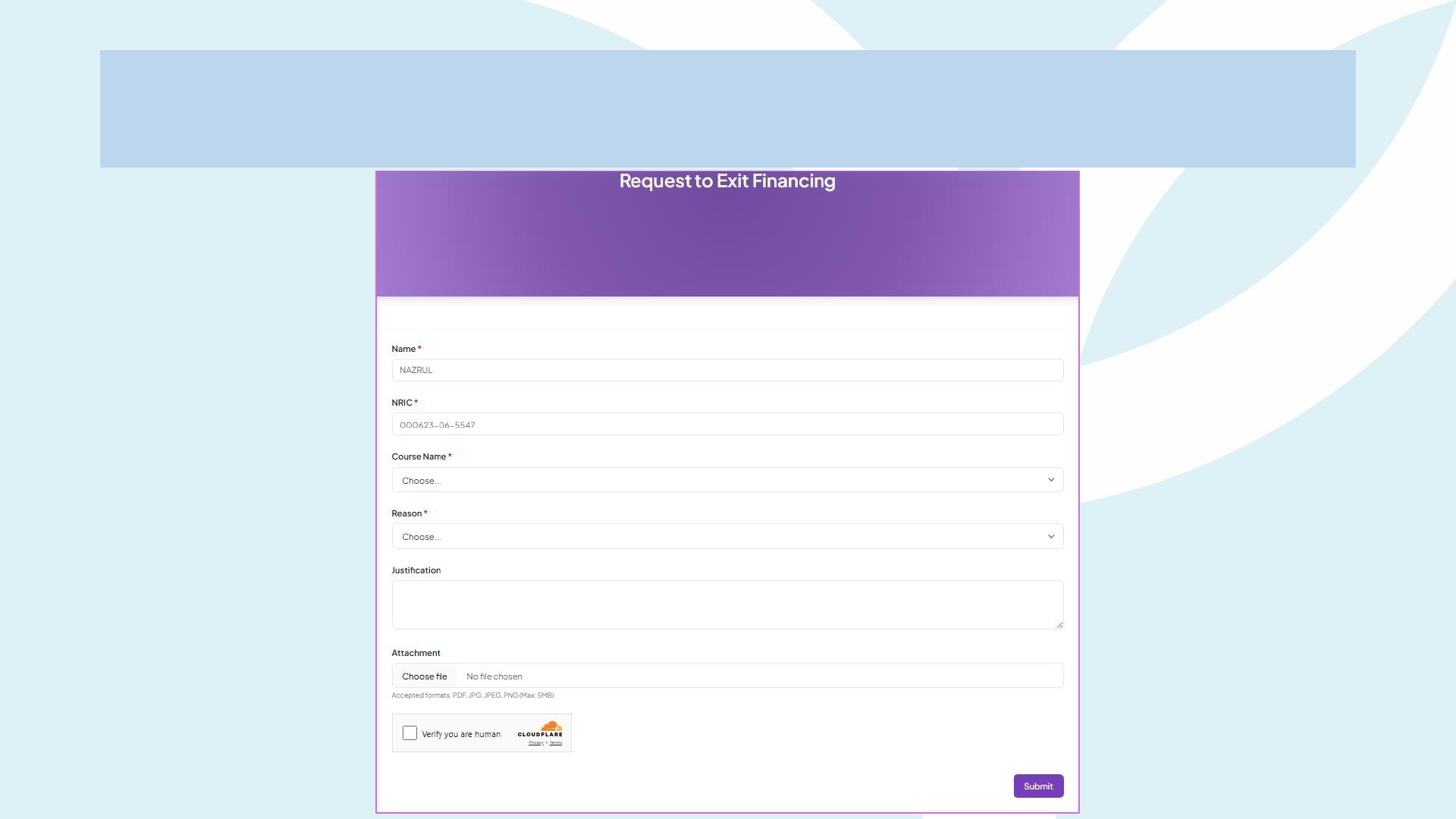
Exit Financing Form
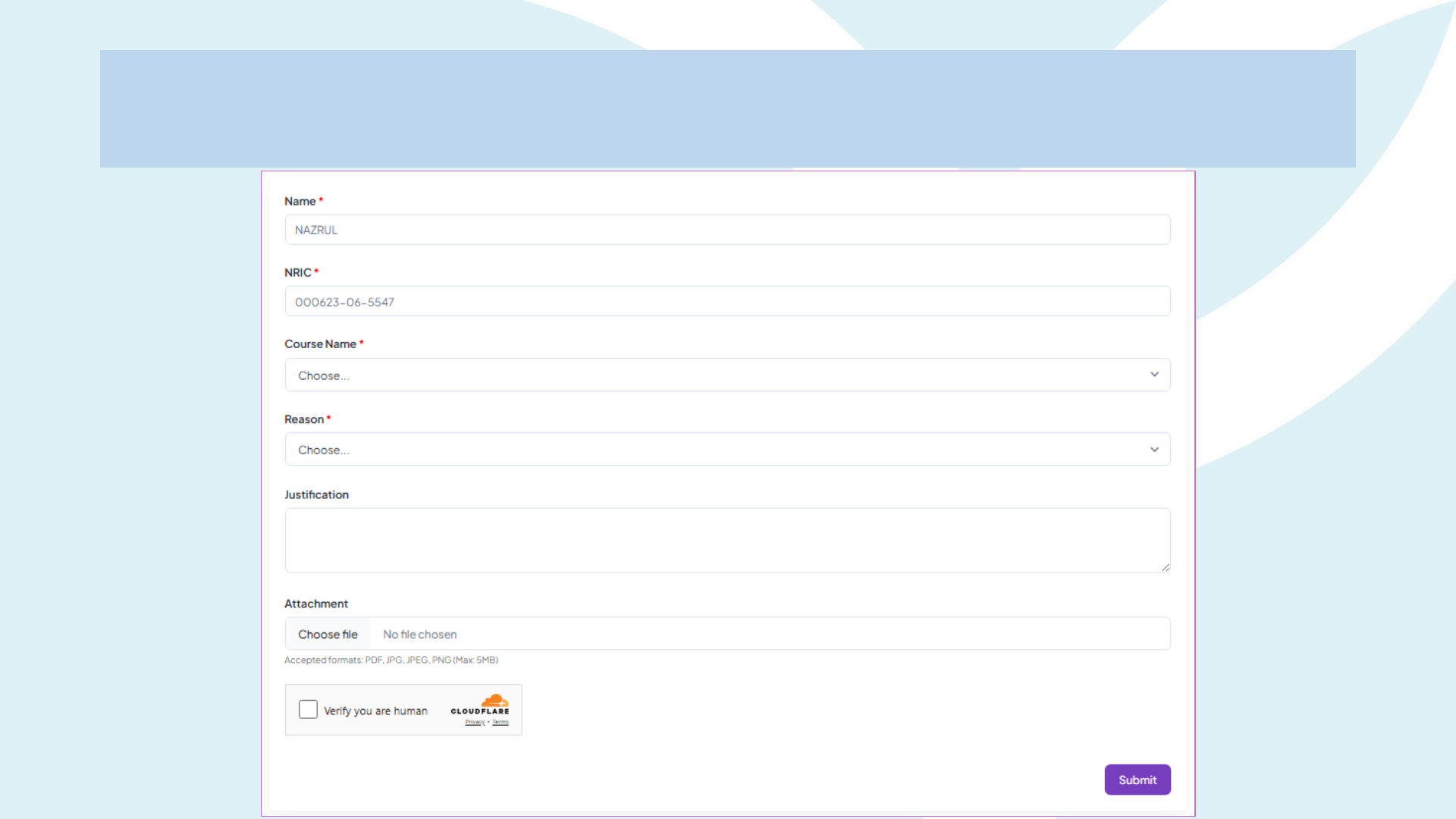
Exit Financing Form

How to Submit Completion

Submit Completion
Completion: the talent finishes all classes and exams within the agreed
timeline, submits the final documents, and makes any last claims.
• If they pass everything on the first try, only Platinum package
financing is converted into a scholarship.**
• Once YP verifies the results and closes the file, the scholar’s
portal badge switches to “Alumni,” giving them access to
Peneraju Alumni perks.**
** Refer to the Financing Scheme Terms and
Conditions

Submit Completion
Term Meaning in YP Context Evidence Required
Completion
Scholar has fulfilled all
academic requirements of
the approved course ithin
the financing time limit.
• Final transcripts / All exam
slips
• Award certificate
• ALTI completion
confirmation letter
Successful Completion
Scholar also meets Platinum
“straight-pass” or
equivalent conditions,
making them eligible for
loan-to- scholarship
conversion.
• All papers passed on first
attempt
• ALTI completion
confirmation letter
• ALTI graduation letter
Programme Closure
YP’s internal step to close the
financing file and migrate
scholar to Alumni status.
• All claims settled
• Completion verified in portal
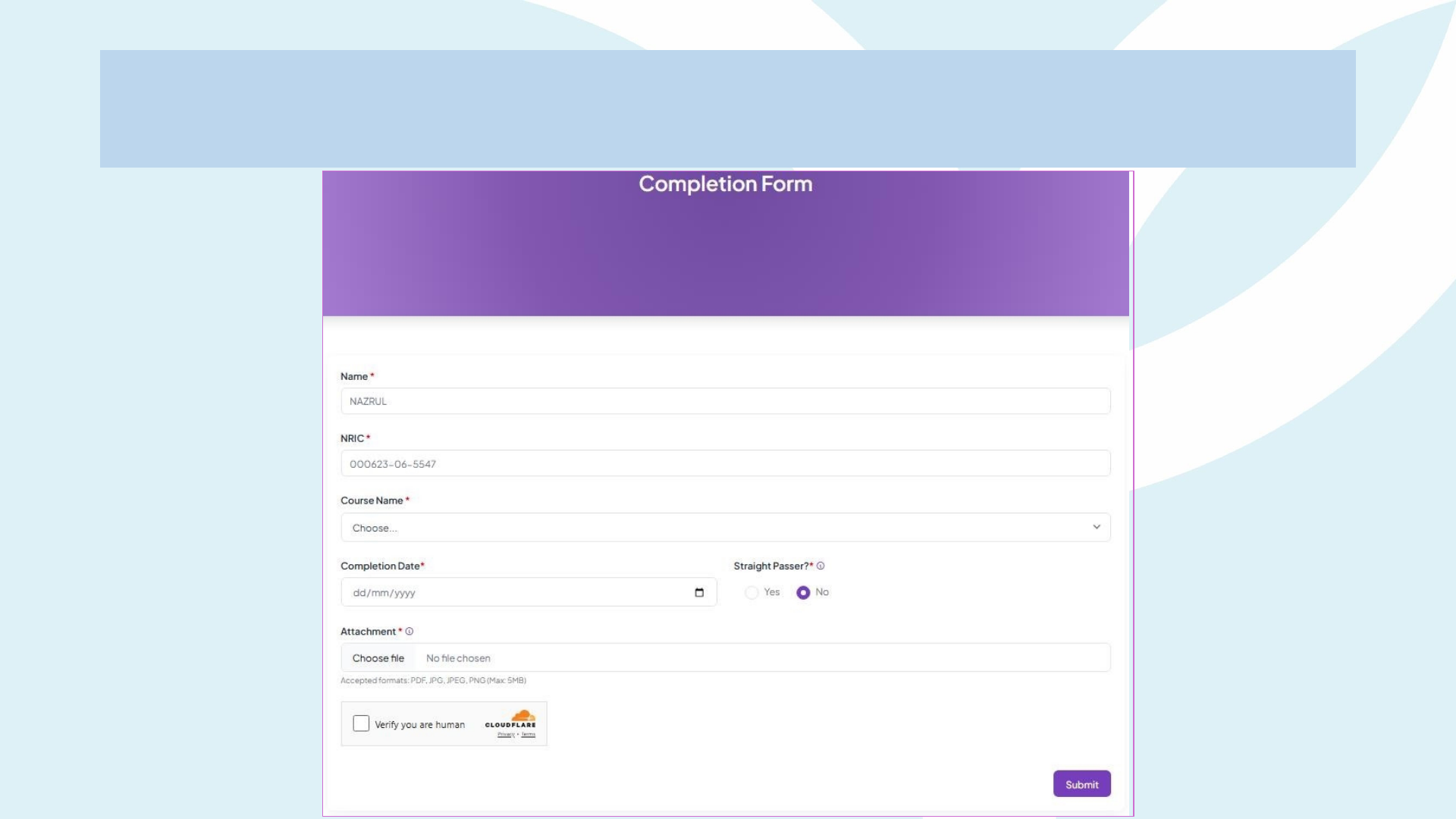
Submit Completion Form
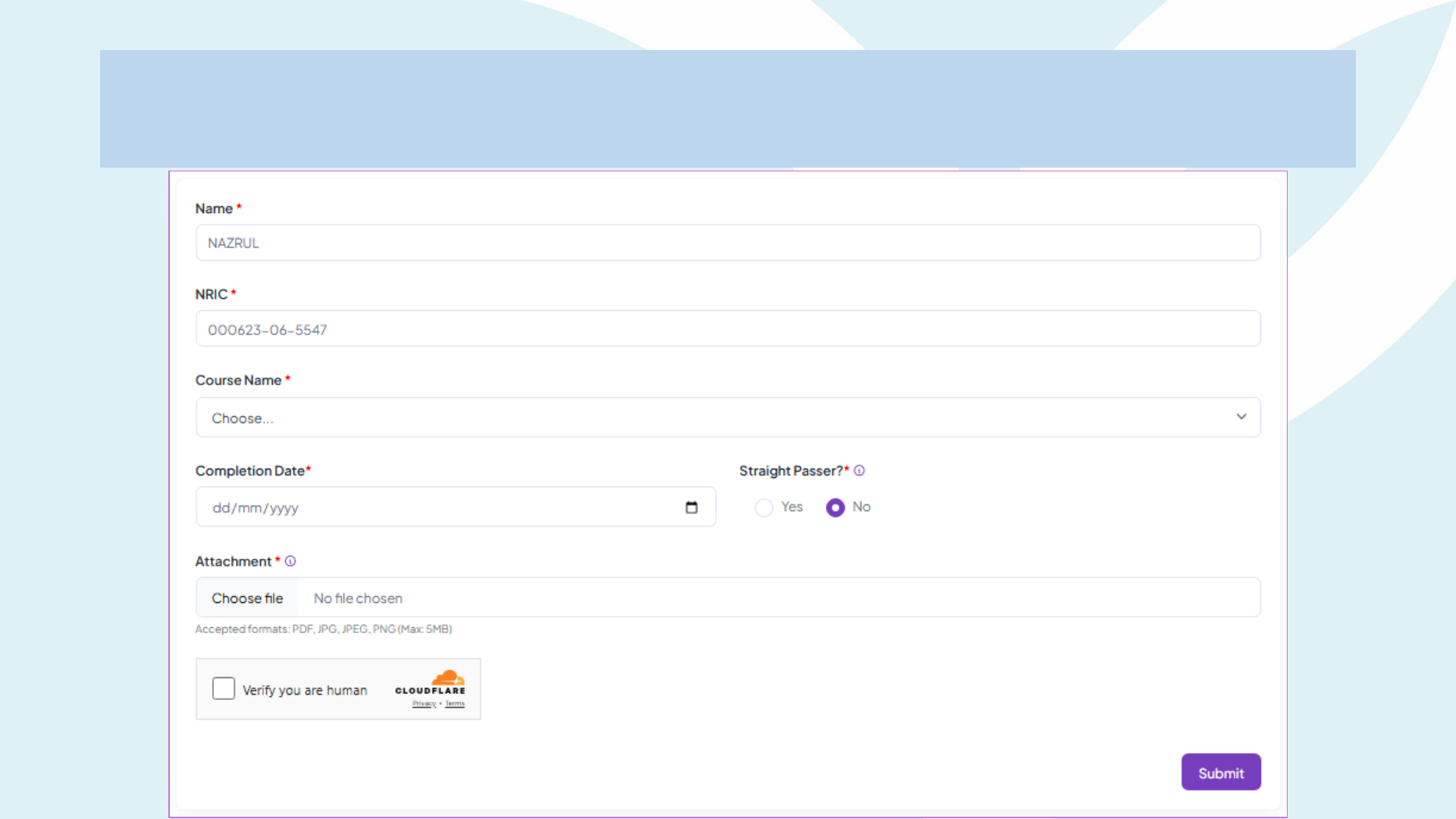
Submit Completion Form

Authorized Officers
Certified True Copy (CTC) Authorized Officers
Categories
1. Management and Professional Officers (Group A - Government Officers Grade 41 and above)
2. Licensed Advocates and Solicitors
3. Justices of the Peace
4. Principals/Headmasters (Government Schools)
5. Police Officers with the rank of ASP or higher
6. Military Officers with the rank of Captain or equivalent and above
7. Village Heads, Imam Masjid, Penggawa, Tuai Rumah, or Mukim Chiefs with official credentials
8. Notary Public
9. Commissioner for Oaths
The required Certified True Copy (CTC) documents may be verified by any of the following authorized
officers:

LO-EFSA Process
Candidates' Guidelines
2
3
5
UPLOAD
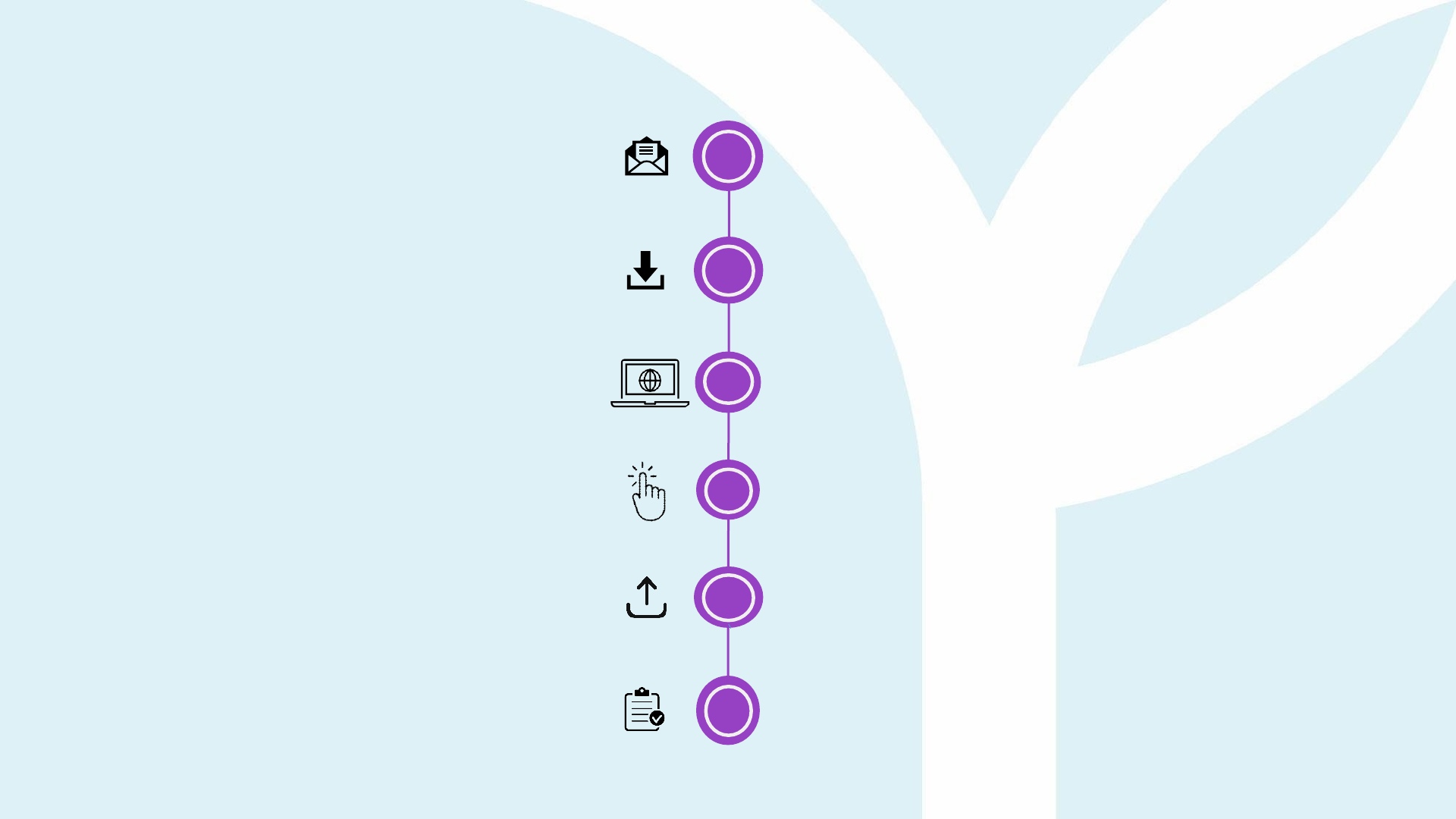
Once your application is approved, you will
receive
1
an email notification. You can also check
your status at Peneraju.org.
Download and review the Letter of Offer (LO)
and Education Financing Scheme Agreement
(EFSA) from your email or at Peneraju.org
If you choose to ACCEPT the offer, fill in the
necessary information in the LO and EFSA and
log in to Peneraju.org using your account
SUBMIT
DOWNLOAD
EMAIL
TALENTS
ACCEPTANCE
FLOW
LOGIN
4
Click on your INCOMPLETE
application
Upload signed LO and EFSA documents at
the DOCUMENT section
Click SUBMIT to complete the submission
of LO and EFSA
CLICK
6

Guidelines for Candidates Wishing to Decline the Financing Scheme Offer
1. Prior to LO and EFSA Acceptance – No Action Required:
• If you do not wish to proceed with our financing scheme, no further action is necessary.
• Letter of Offer (LO) and Education Financing Scheme Agreement (EFSA) that
are not uploaded in your application within 7 working days from the date of
issuance, your application will be considered as rejected/declined by your end.
2. Post LO and EFSA Acceptance – Formal Exit Process:
• Log on to your profile at Peneraju.org.
• Submit a formal request for withdrawal through the Peneraju.org portal
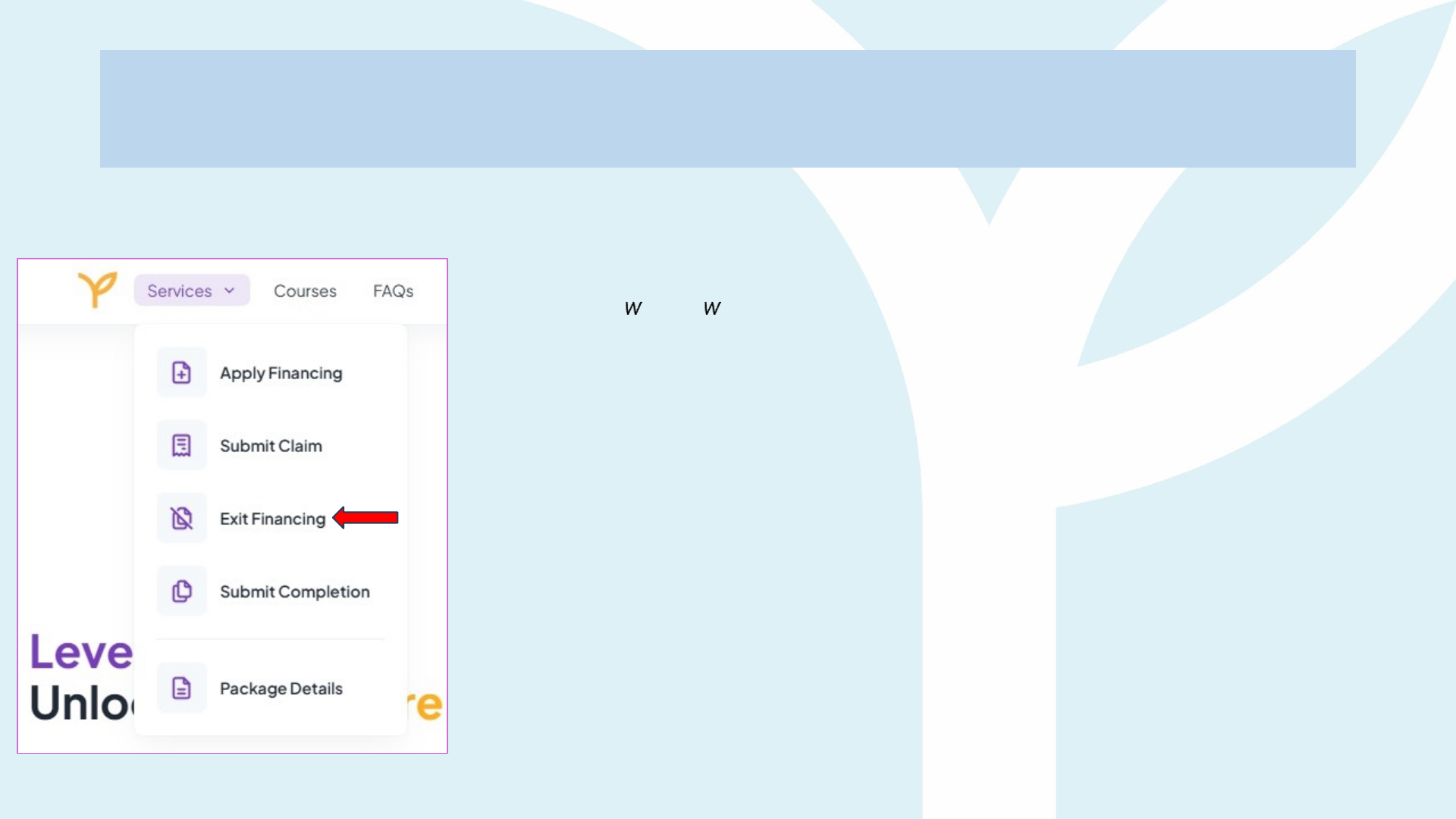
• Click ''Exit Financing'' at the ''Services'' section and fill in the Request for Financing Exit
• Ensure the withdrawal process is completed to formally terminate your application.
• Note that talents exiting the scheme midway of studies may subject to payback for recovery.
3. Contact for Support:
• If you need assistance, please contact our helpdesk team at askme@peneraju.org.
Financing Scheme Offer Rejection
Guidelines

Letter of Offer (LO)

Guidelines and Instructions to Fill in the Letter of
Offer
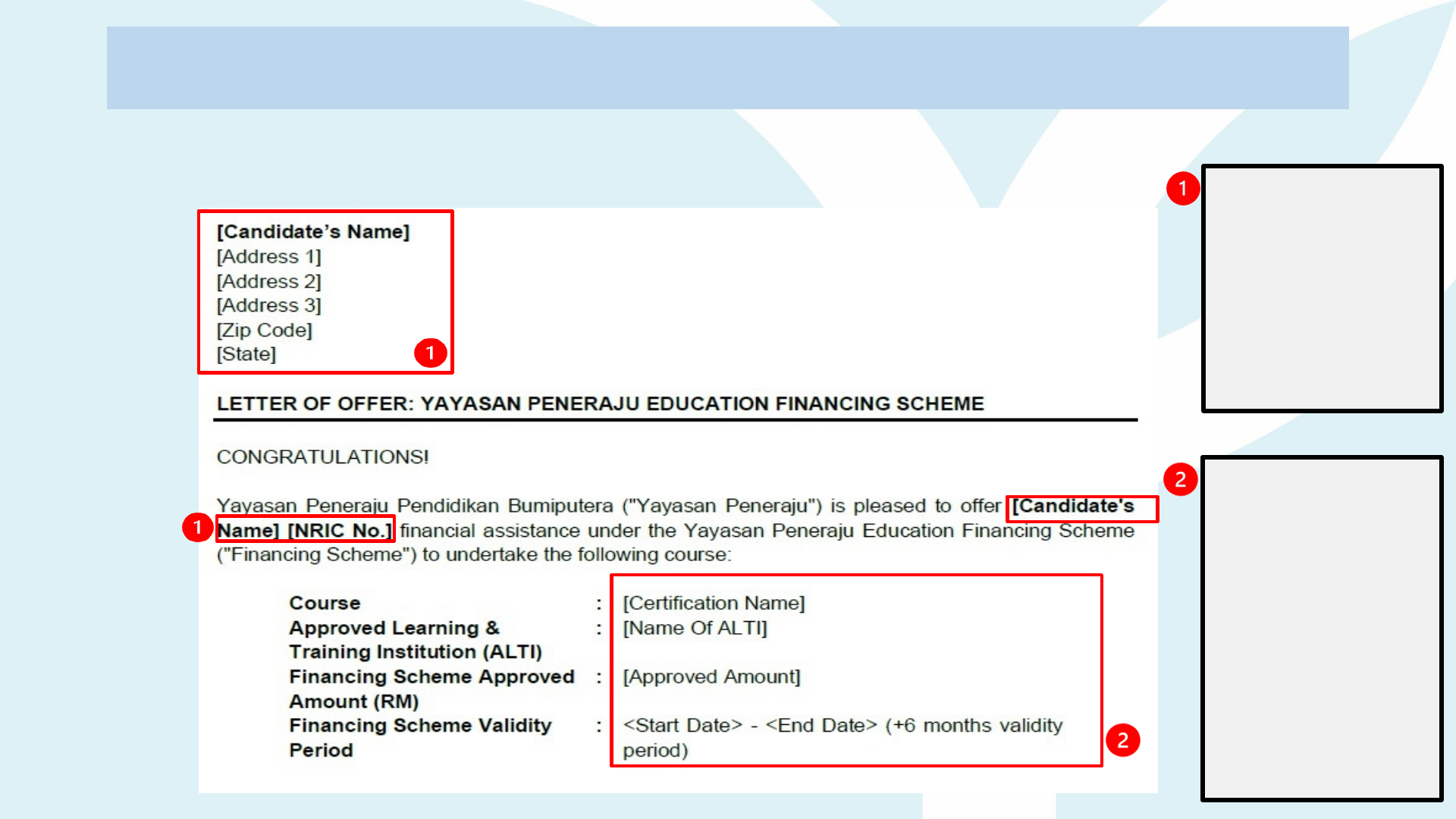
• Candidates must review all details and verify the accuracy of the Name, Mailing Address, and
NRIC number in the Letter of Offer (Refer to Letter of Offer page 1).
• Note on the actions required below:
Documents in Letter of Offer Action Required
Appendix A (Acknowledgement Form)
Refer page 2
Complete the form with accurate information.
Appendix B (Financing Scheme Details)
Refer page 3
Verify that the details of the financing scheme
including the approved amount and course name
match your profile at Peneraju.org.
SAMPL
E
You are required to verify the details and information of the Letter of Offer are correct.
Ensure that
there are no
errors in your
name, mailing
address and
Identification
Card (NRIC)
number
Letter of Offer (refer page
1)
Ensure your
course, ALTI
name,
approved
amount (refer
dashboard in
Peneraju.org)
and validity
period are
correct &
accurate
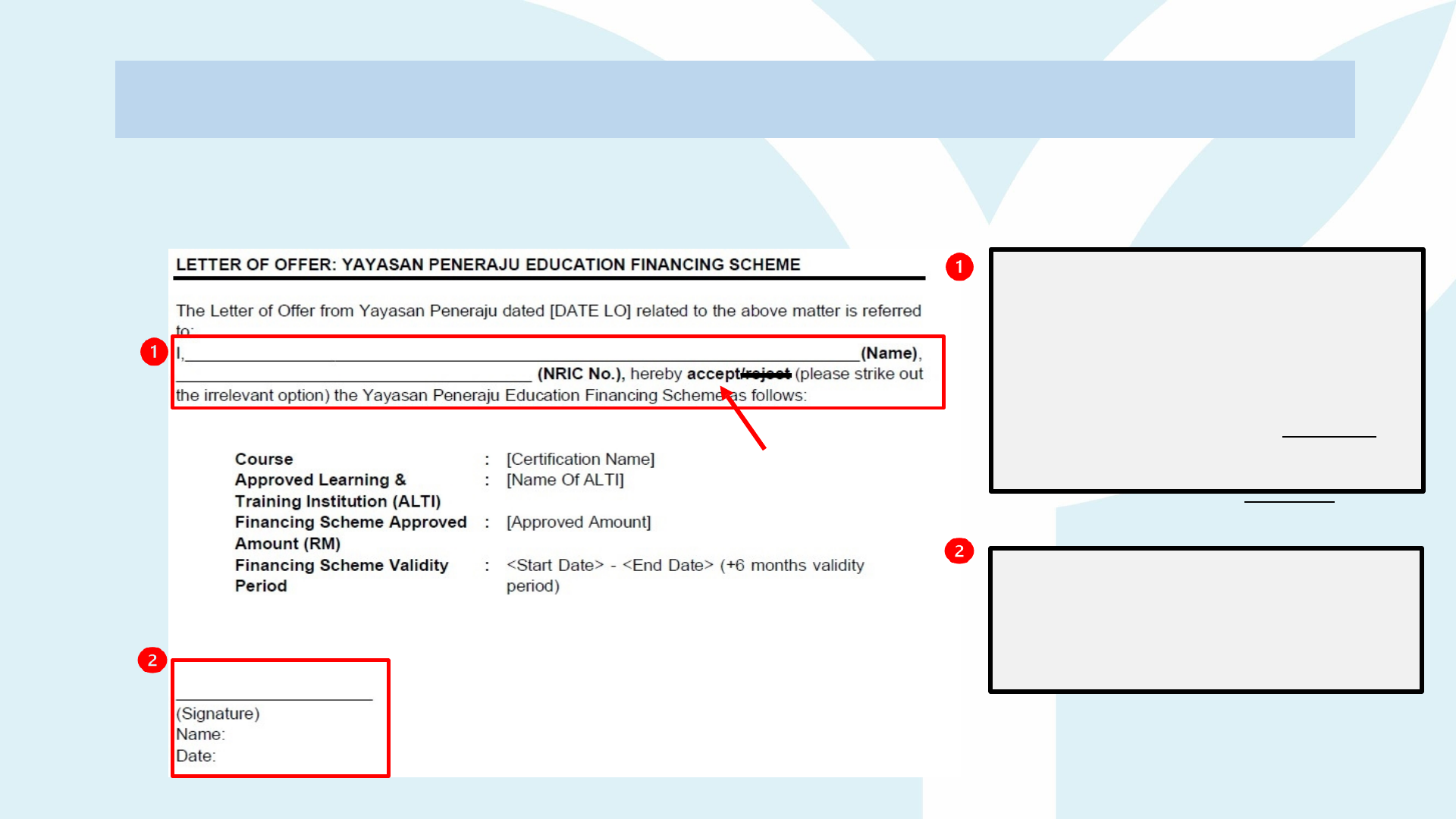
Letter of Offer (refer page
2)
SAMPL
E
APPENDIX A (ACKNOWLEDGEMENT FORM)
You are required to complete and submit the Appendix A (Acknowledgement Form) as an
official response to the offer.
Please fill in your details
clearly and use CAPITAL
LETTERS only.
If you ACCEPT the offer ->
cross out the word 'Reject'.
If you REJECT the offer -> cross
out the word ‘Accept’.
Upon completion, you are
required to place your
signature, put your name and
date at the bottom of the form
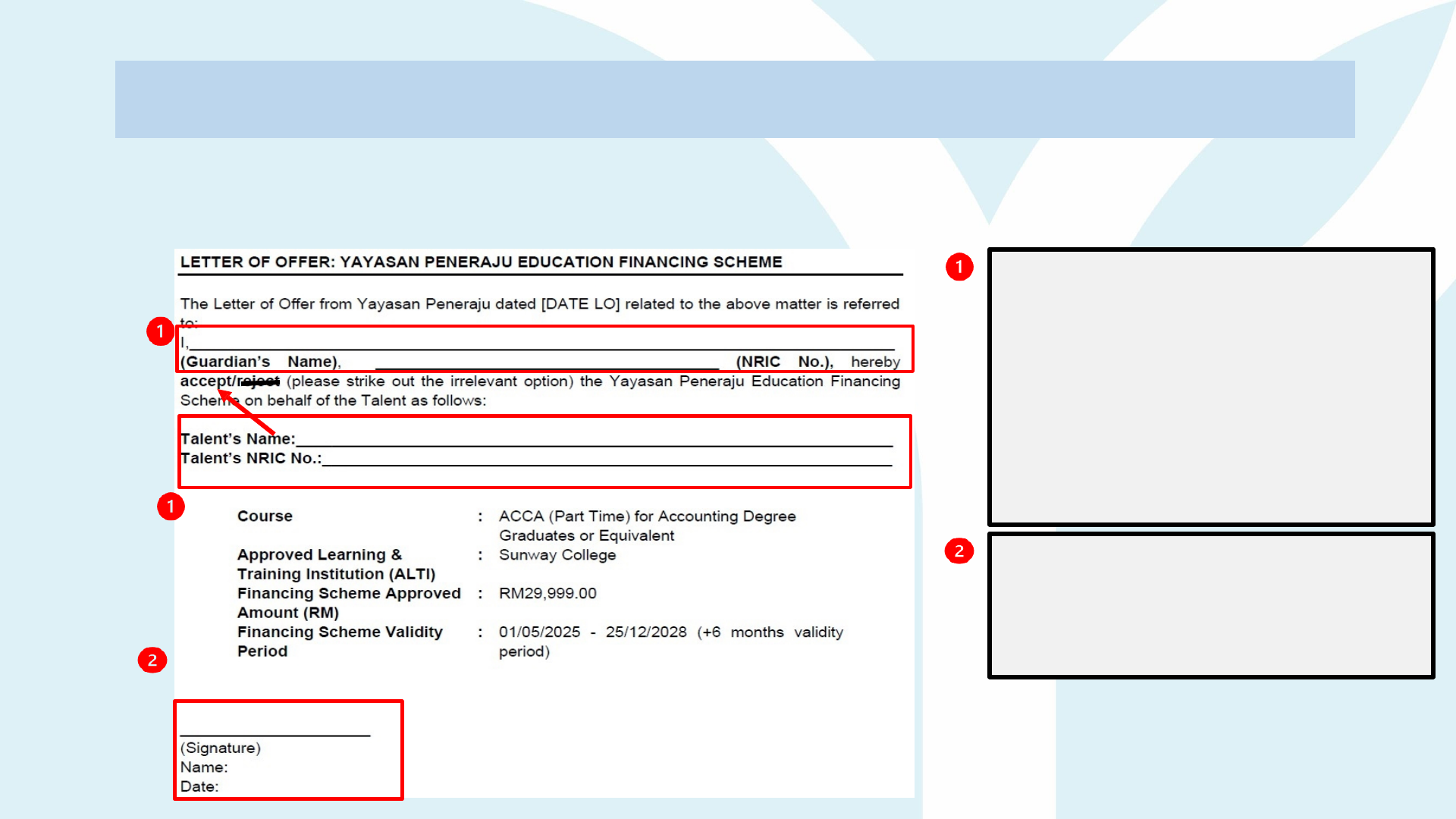
Letter of Offer (refer page
2)
SAMPL
E
APPENDIX A (ACKNOWLEDGEMENT FORM) FOR UNDER 18 YEARS OLD
You are required to complete and submit the Appendix A (Acknowledgement Form) as an
official response to the offer.
Please fill in your guardian's
details and your details
clearly using CAPITAL
LETTERS only.
If you ACCEPT the offer ->
cross out the word 'reject'.
If you REJECT the offer -> cross
out the word ‘accept’.
Upon completion, you are
required to place your
signature, put your name and
date at the bottom of the form
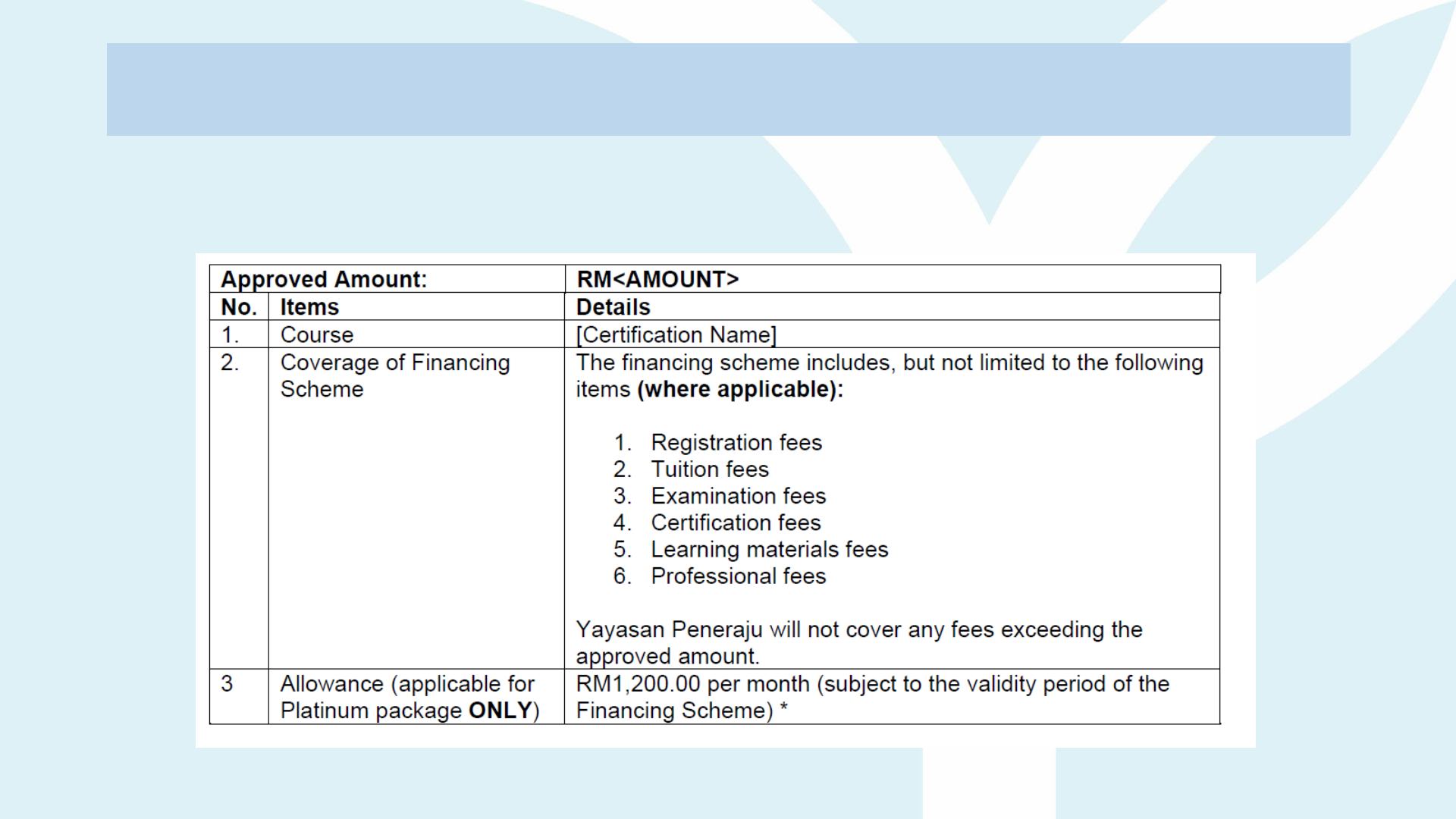
Letter of Offer (refer page 3)
SAMPL
E
APPENDIX B (FINANCING SCHEME DETAILS)
You are required to review the Financing Scheme details
including the Approved Amount, Course, Coverage of the
Financing Scheme, etc.

Education Financing Scheme Agreement
(EFSA)

The Education Financing Scheme Agreement (EFSA) contains seven (7) main sections that require your attention and
action as outlined below:
Documents Financing Scheme Agreement Action Required
Front page of the Agreement (refer Guideline slide 13)
Verify that the date of the Agreement matches the date on Page
1 of the Financing Scheme Agreement
Body of the Agreement – clauses
Read and fully understand the important clauses in the
Agreement. (Page 3-9)
Signatory page - Agreement (refer slide 15)
Fill in your information clearly by providing both your details and the
witness' details. (Page 10)
Appendix A: Talent’s Financing Scheme Details
(refer slide 16)
Check the financing scheme details to ensure the accuracy of all
the information provided. (Page 11)
Appendix B: Guarantee Letter (refer slide 17)
(Only for those who applied PLATINUM package)
Fill in your information clearly by providing both your details and the
guarantor's details (Page 12)
Appendix C: Repayment of Financing Scheme (refer slide
19)
Please note that the repayment financing scheme details
provided are for reference only and are not final. The finalized
details will be issued with the Letter of Disbursement (LOD). (Page
13)
Appendix D: Guardian Letter (refer slide 20)
Fill in your information clearly by providing both your details and the
guardian's details. (Page 14)
Guidelines and Instructions to Fill in
the Education Financing Scheme
Agreement
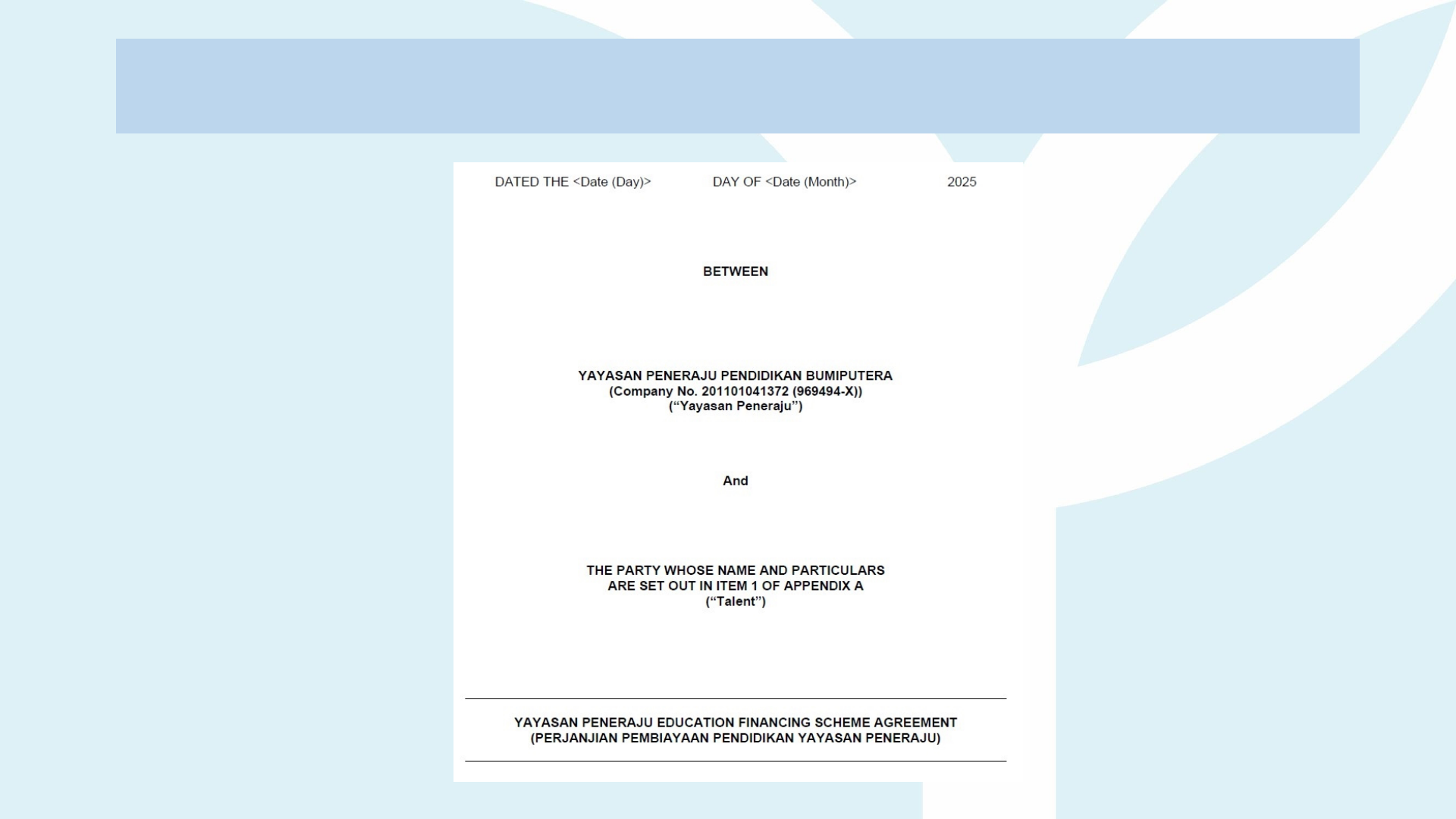
Education Financing Scheme Agreement (EFSA)
(refer front page)
SAMPL
E
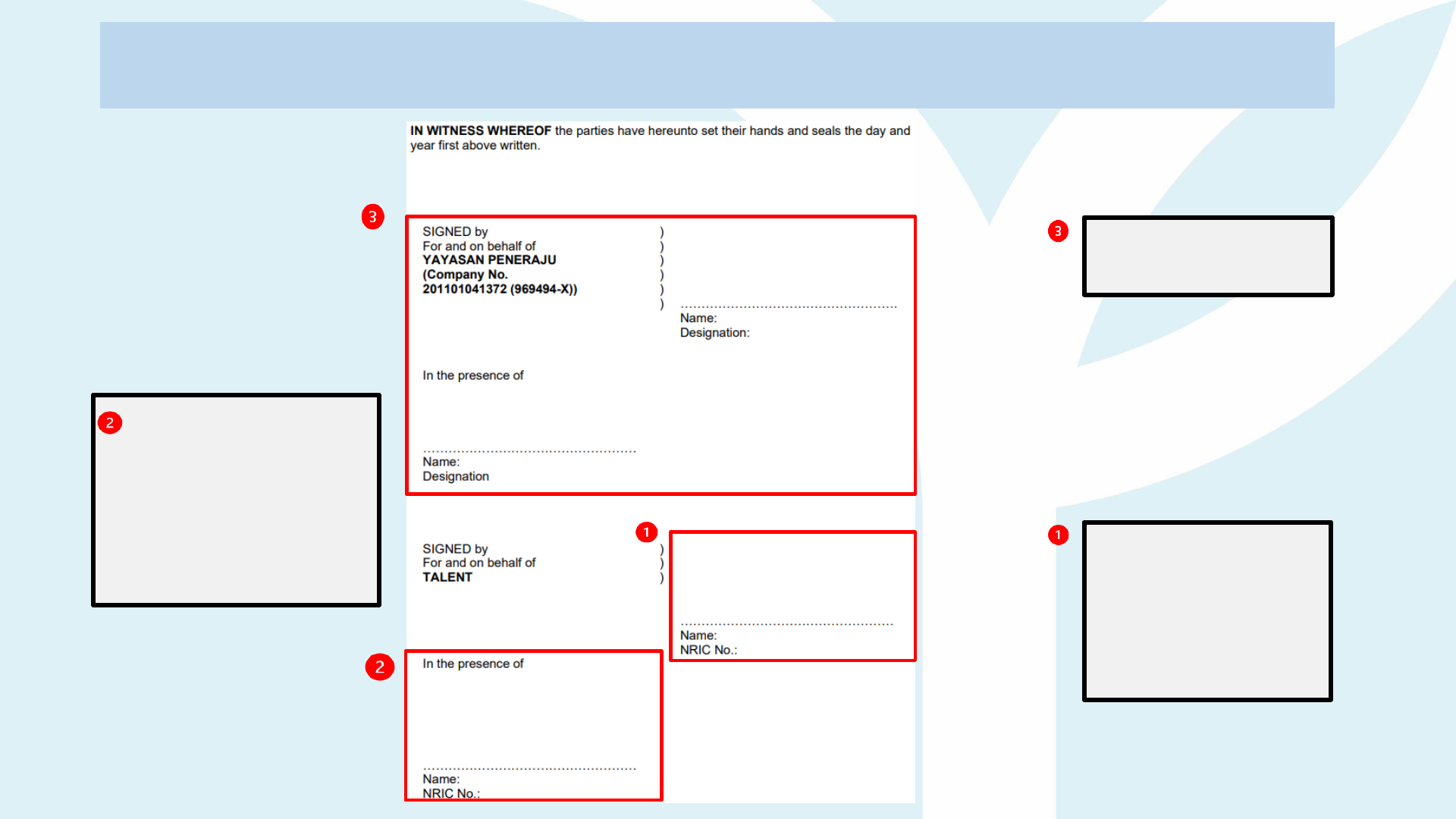
Education Financing Scheme Agreement
(EFSA)
(refer page 10)
''Talents''
Please fill in your
details clearly
and
use CAPITAL
LETTERS
ONLY
''Witness''
Please fill
in
Witness’ details
clearly and use
CAPITAL
LETTERS ONLY
Please leave
this section
empty
Signatory
page
(agreement)
Criteria for Witness is as
follows:
1. Malaysian citizen.
2. Age above 18 years old.
3. Sane and able to
identify Talent.
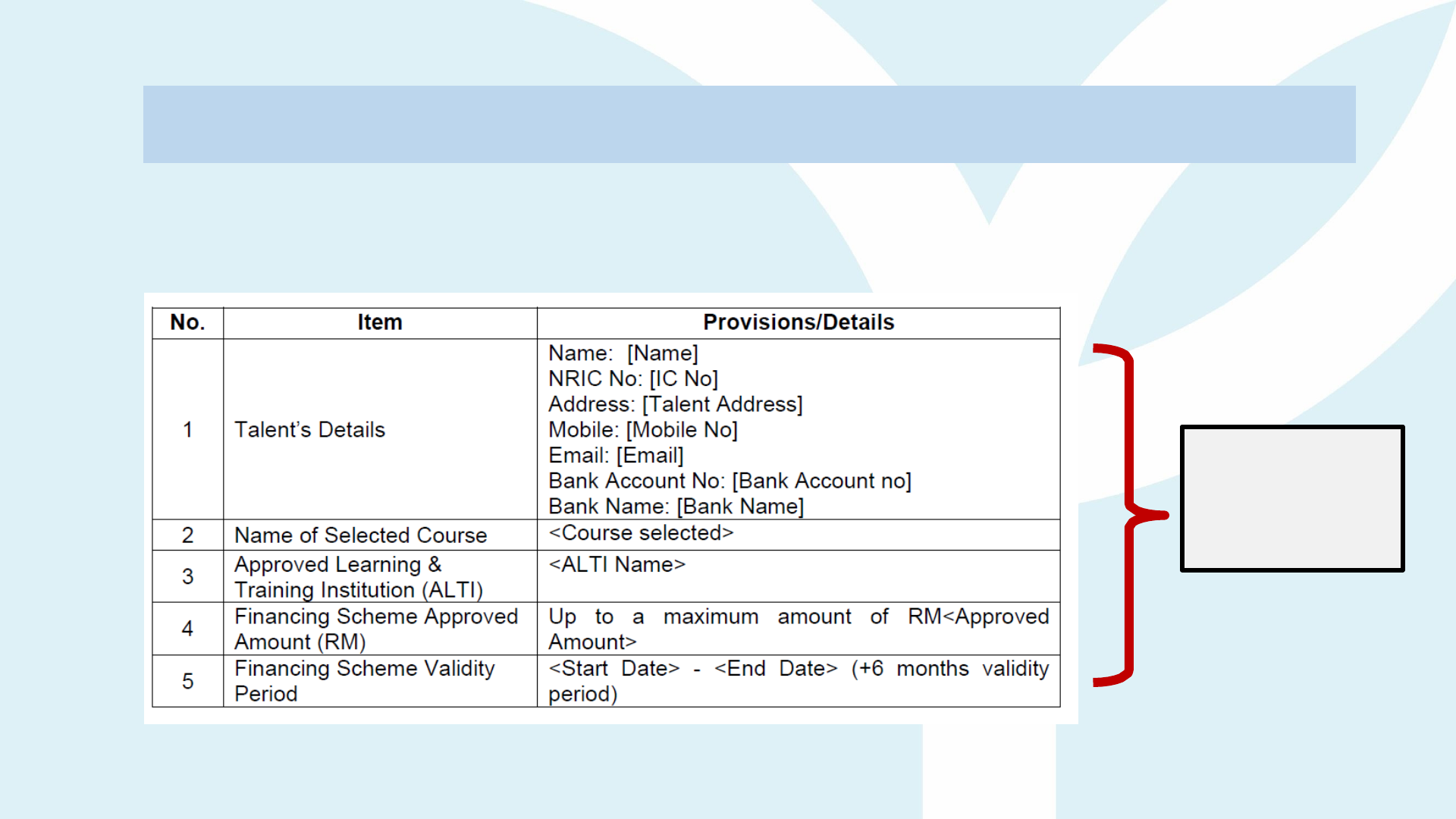
Education Financing Scheme Agreement (EFSA)
(refer page 11)
Ensure all
information
are correct
and accurate.
Appendix A: Talent’s Financing Scheme Details
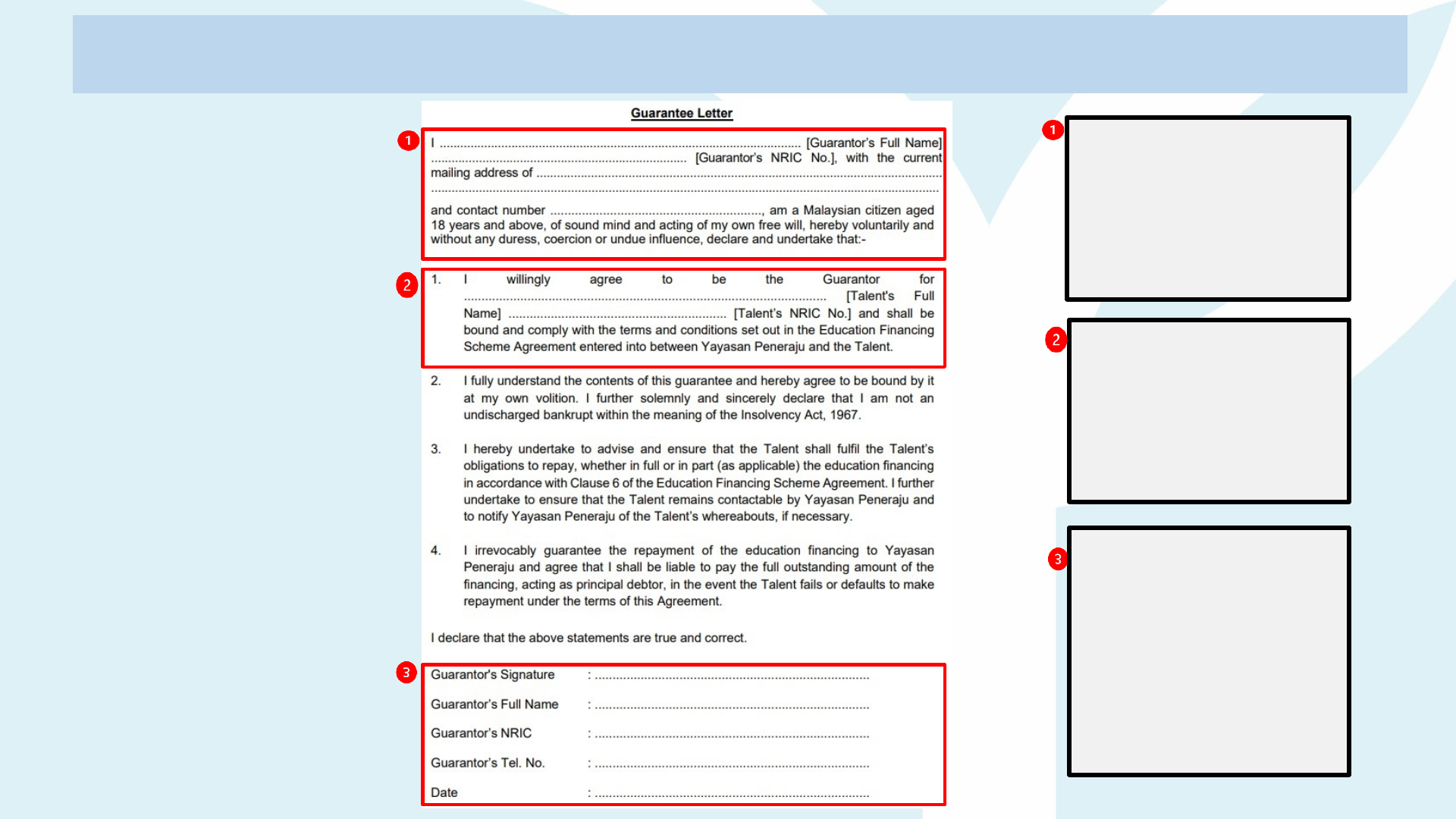
Education Financing Scheme Agreement
(EFSA)
(refer page
12)
Please complete
the guarantor
information clearly
and use CAPITAL
LETTERS only.
Please complete
the Talent's
information clearly
and
use CAPITAL
LETTERS
only.
Appendix B:
Guarantee Letter
(for all package)
Guarantor are
required to
place their
signature
& complete the
information
clearly and use
CAPITAL
LETTERS only.
SAMPL
E

Criteria for
Guarantor
A guarantor is compulsory for all Financing Scheme packages.
The guarantor must be:
• Malaysian citizen, residing in Malaysia
• Between 21 – 60 years old
• Good credit standing with no history of bankruptcy
• A family member or an individual in close relationship with the Talent
• If a guarantor becomes unfit (deceased, mentally unstable, bankrupt, etc) during the duration of the
Financing Scheme agreement, responsibility will be on the Talent to inform Yayasan Peneraju and
provide details of a new guarantor
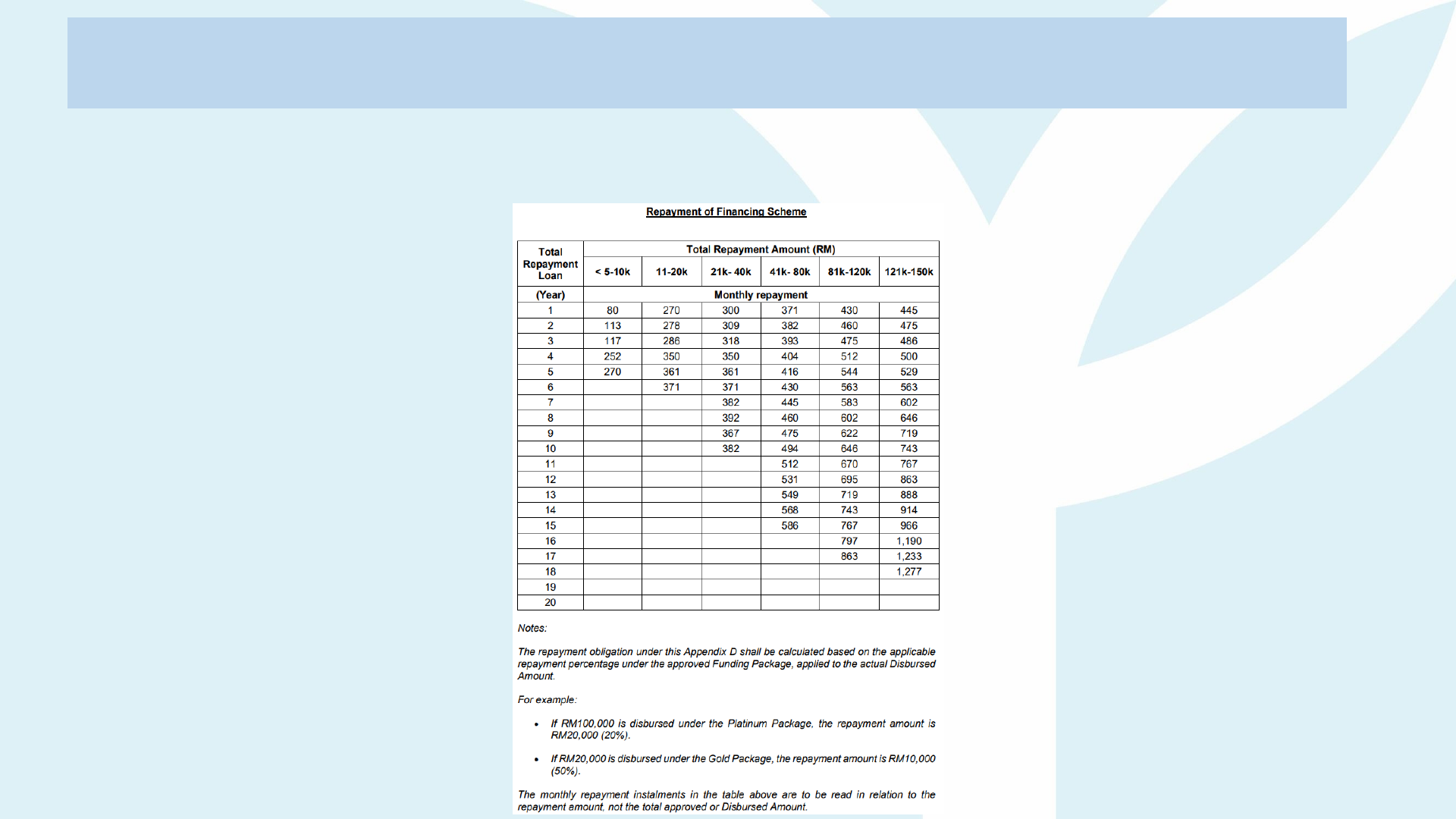
Education Financing Scheme Agreement (EFSA)
(refer page 13)
Appendix C: Repayment of Financing Scheme
The repayment table is for reference purposes only. The finalized repayment details will be shared once
the Talent has completed/exited the Financing Scheme.
SAMPL
E
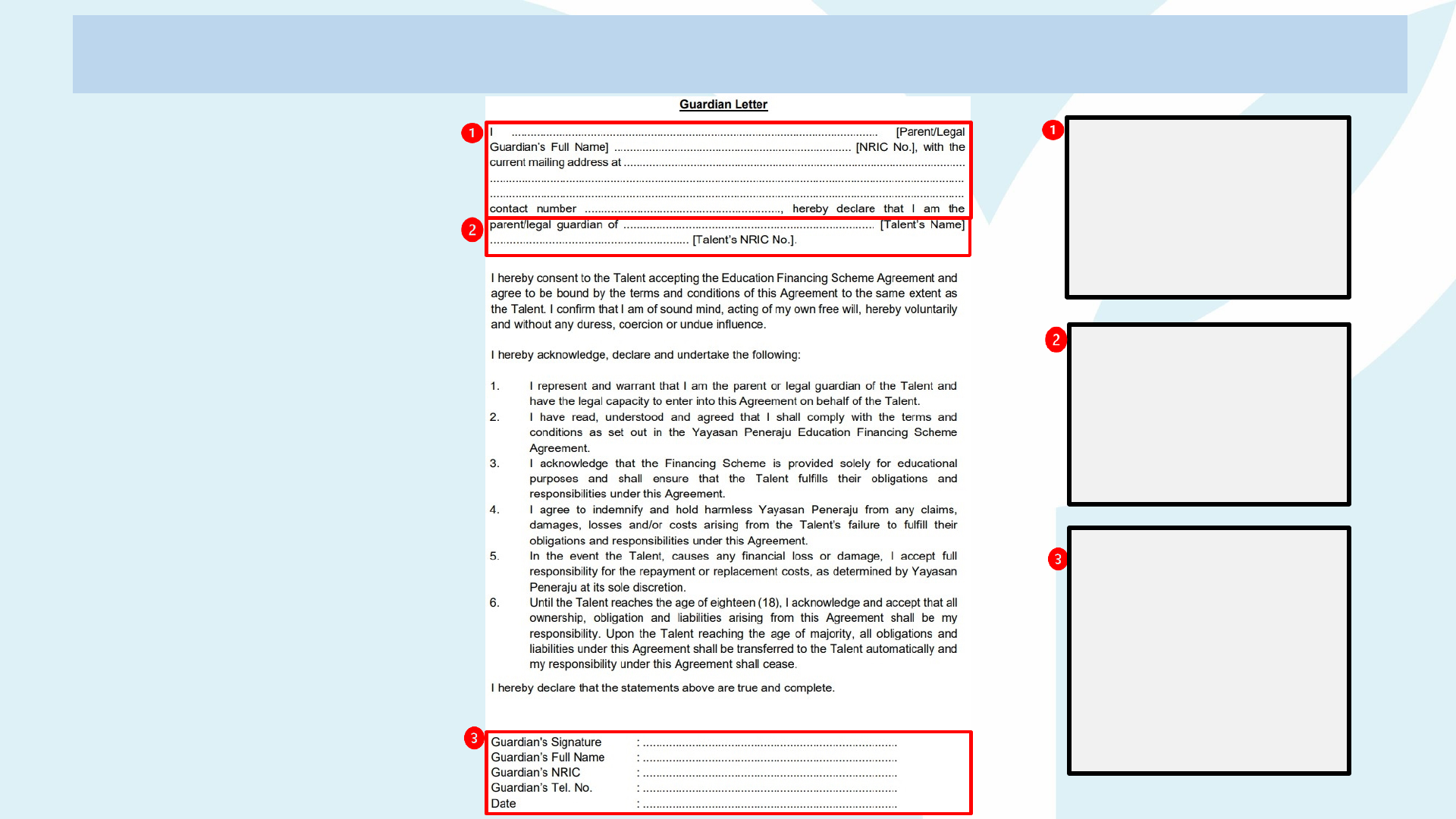
Education Financing Scheme Agreement
(EFSA)
(refer page
14)
Please complete
the guardian
information clearly
and
use CAPITAL
LETTERS
only.
Please complete
the Talent's
information clearly
and
use CAPITAL
LETTERS
only.
Appendix D:
Guardian Letter
(Applicable for
Talents under
18 years old)
Guardian are
required to
place their
signature
& complete the
information
clearly and use
CAPITAL
LETTERS only.
SAMPL
E
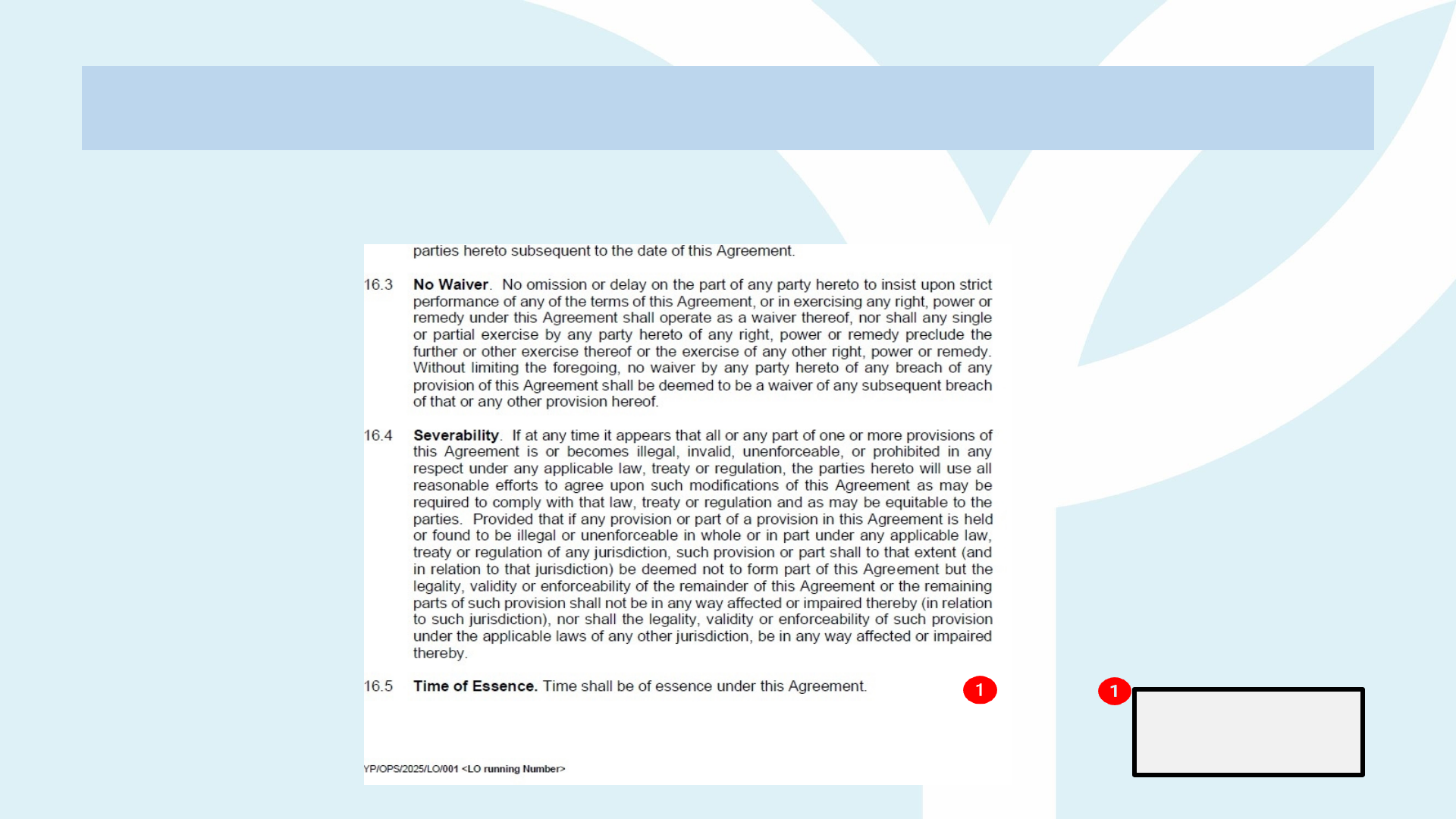
Education Financing Scheme Agreement (EFSA)
Signature/initial
by Talent only
It is compulsory to place your initials at the bottom-right corner of each page of the
Financing Scheme Agreement, excluding the cover page, as follows:
SAMPL
E
Mohd

Important Notice:
• You are required to upload the Letter of Offer (LO) and Education Financing Scheme
Agreement (EFSA) within 7 working days from the date of issuance. Late uploads will be
considered as a rejection of the offer and may require re-application from the beginning.
• The Letter of Offer and Education Financing Scheme Agreement that are
incomplete, not following instructions, or smudged may be returned or rejected.
• Yayasan Peneraju will not be held responsible for any delays caused by such issues.
Strict Compliance:
• If any content in the documents listed is found to have been altered without the
knowledge or consent of Yayasan Peneraju, Yayasan Peneraju holds the absolute
right to revoke the offer.
Stamp Duty Process:
• The stamping process for the Financing Scheme Agreement will be handled by Yayasan
Peneraju.
Important Reminder

What Happens After You Submit the Signed Letter of Offer and Education
Financing Scheme Agreement?
• Email Notification:
• You will receive an email notification on your acceptance status within 14 working
days upon submission of your complete acceptance documents.
• Please check both of your inbox and junk/spam folders for the notification.
• Status Update:
• Once your status changes to "Talent" (in your Peneraju.org Talent Profile), you may
proceed with payment or claim submission.
• Contact for Assistance:
• If your status is not visible, contact the helpdesk team at askme@peneraju.org for
further assistance.
What Next?

Claim Process
Candidates' Guidelines

This guidelines provides comprehensive instructions for talents on how to
complete and submit the claim. It includes guidelines on the required
documents for claims, reminders, and notifications for filling out and
uploading the claim form, as well as confirmation of successful submission.
Overview

Guidelines to Submit Claim
(Disbursement)
STEP 1
STEP 2
STEP 3
TALENT
ALTI
ALTI SUBMIT INVOICE
ALTI send official invoice to Talent for payment
purposes
TALENT CLAIMS FROM YP
Talent submit official invoice to YP for
disbursement
YP DISBURSE TO TALENT
YP reviews the claim. If approved disbursement will
be made to Talent
YP

Guidelines to Submit Claim
(Reimbursement)
STEP 1
STEP 2
STEP 3
STEP 4
TALENT
TALENT
ALTI
TALENT PAYS TO ALTI
Talents make payment to ALTI upon receiving
official invoice
ALTI SUBMIT RECEIPT
ALTI provide an official receipt to Talent as a proof
of payment
TALENT SUBMITS CLAIM TO YP
Talent submits claim to Yayasan Peneraju (YP)
including the ALTI official invoice and receipt
YP REIMBURSES TO TALENT
YP reviews the claim. If approved reimbursement
will be made to Talent
YP

Payment Process Flow
Talent obtains
invoice for
payment
(Performa Invoice
not accepted)
Talent submits
disbursement
claim to YP
Talent receives
claim amount
Talent pays ALTI
Talent submits
proof of
payment (ALTI
official Receipt)
to YP
Talent obtains
invoice for
payment
(Performa Invoice
not accepted)
Talent pays to
ALTI
Talent submits
reimbursement
claim (invoice
and ALTI official
Receipt) to YP
Talent receives
claim amount
Method 1: Disbursement (Advance)
Payment
• Claim-and-Pay method.
• Commonly used for short term or semester-based courses.
Method 2: Reimbursement (Claim) Payment
• Pay-and-Claim method.
• Commonly used for courses that require advance payment prior to financing approval.

How to Submit Claim

This document provides comprehensive instructions for talents on how to
complete and submit the claim. It includes guidelines on the required
documents for claims, reminders, and notifications for filling out and
uploading the claim, as well as confirmation of successful submission.
Overview
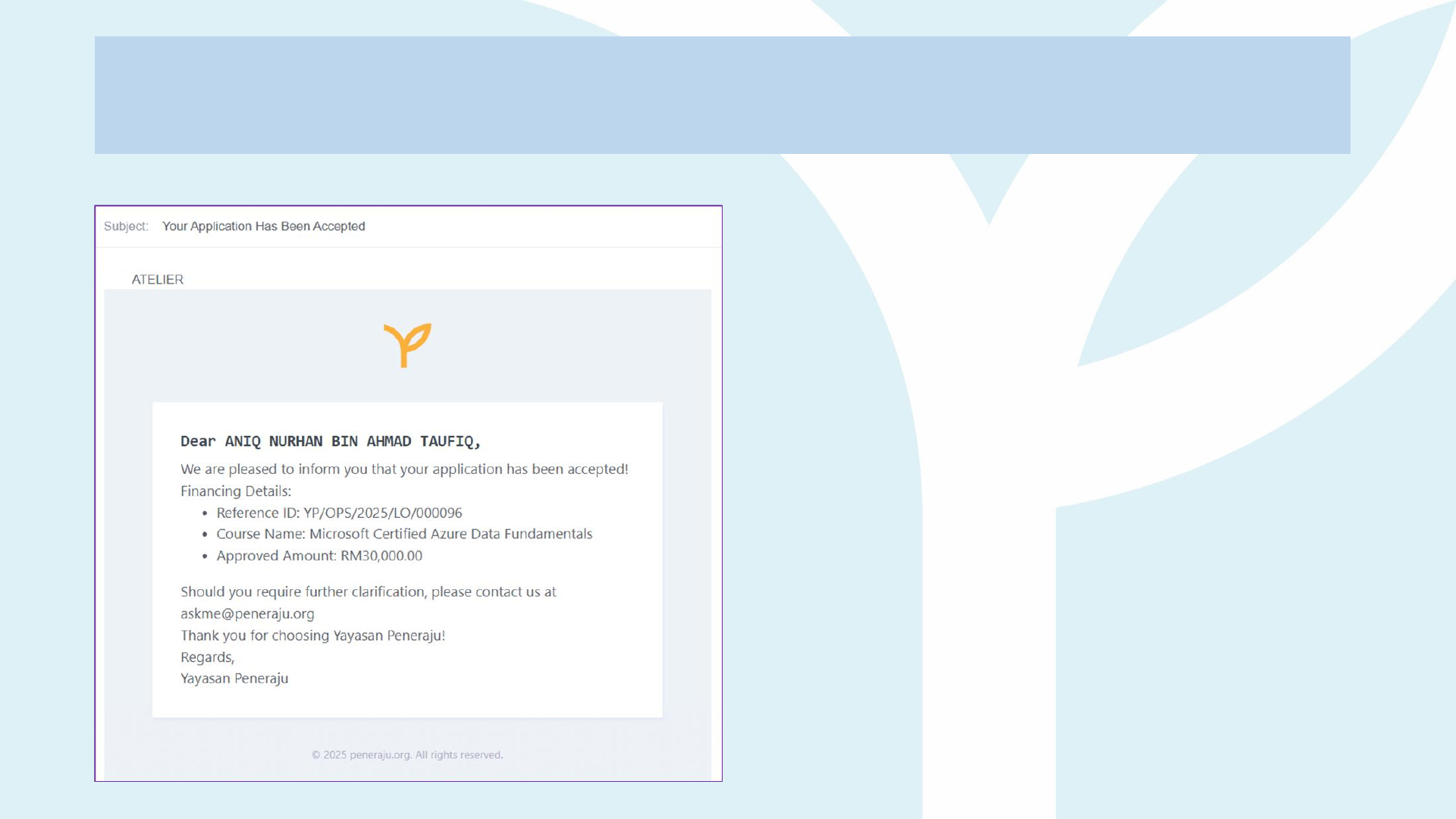
Guidelines to Submit Claim
You will receive a notification email once
your financial scheme application package
is accepted by Yayasan Peneraju.

Guidelines to Submit Claim
Open your web browser
and visit: Peneraju.org
Click on "Login" to
access your profile
Guidelines to Submit Claim
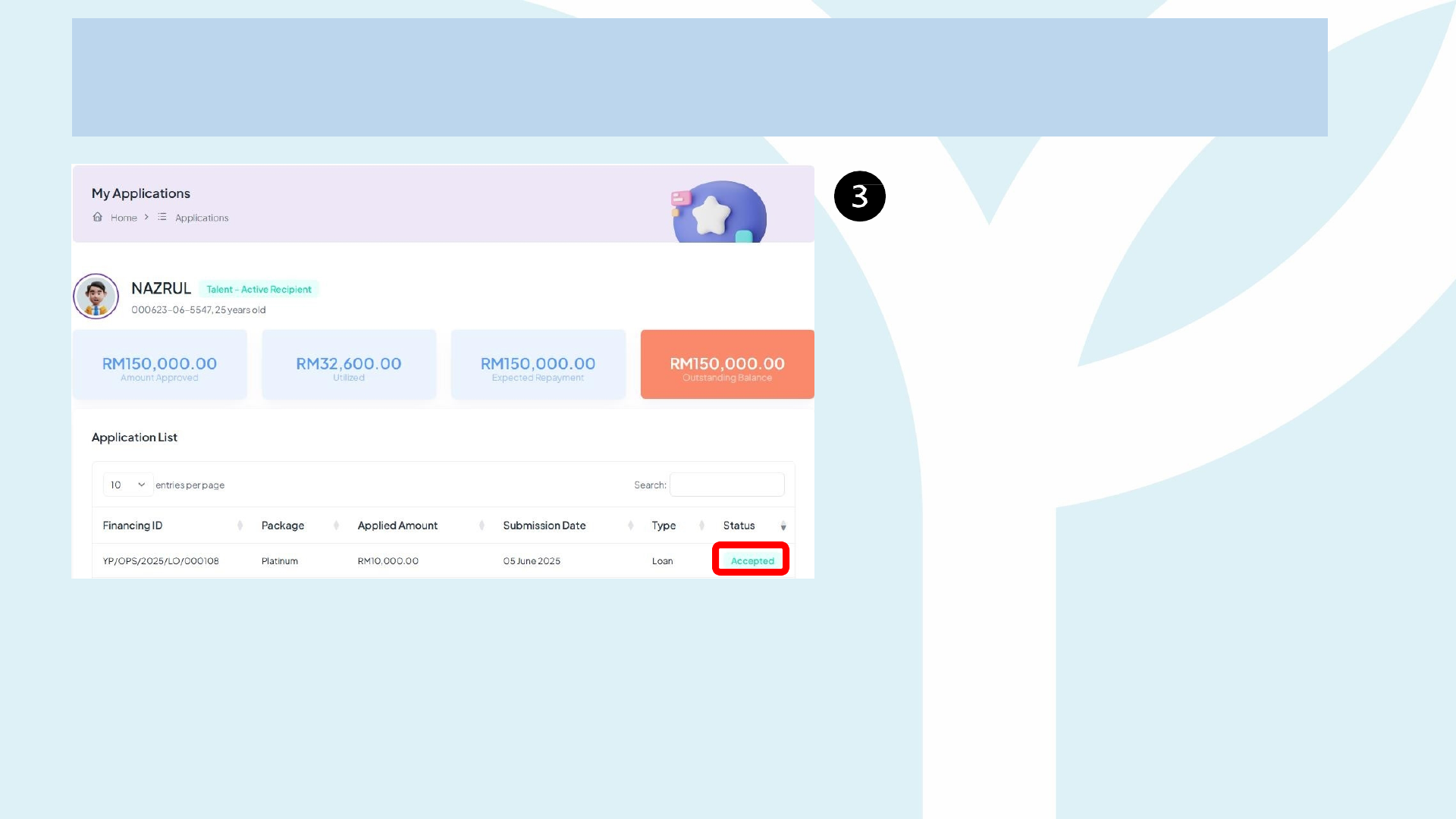
Your status will be updated to
"Accepted" upon the
successful application.
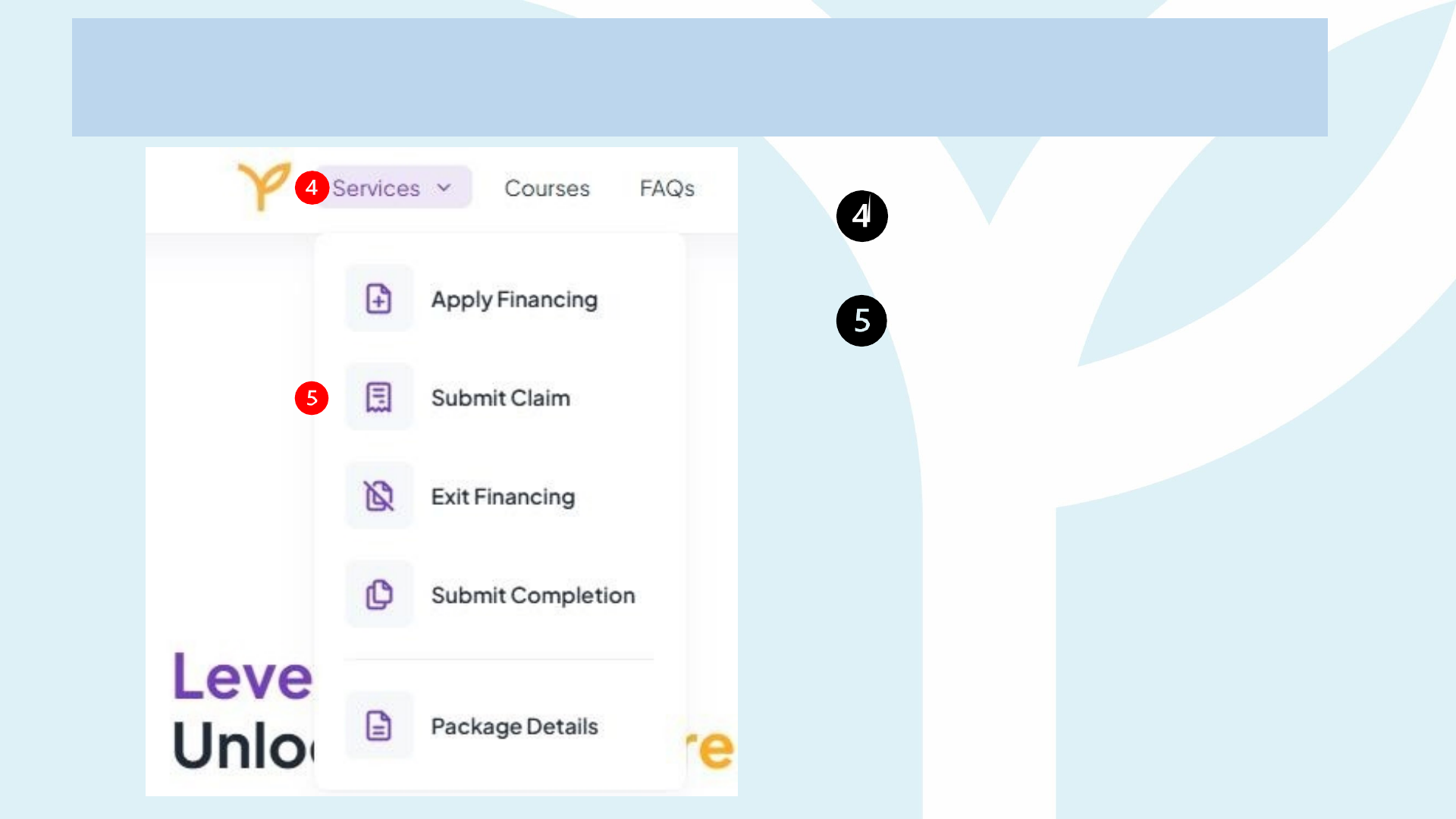
Guidelines to Submit Claim
Click ''Services'' on top left
Click ''Submit Claim'' menu.
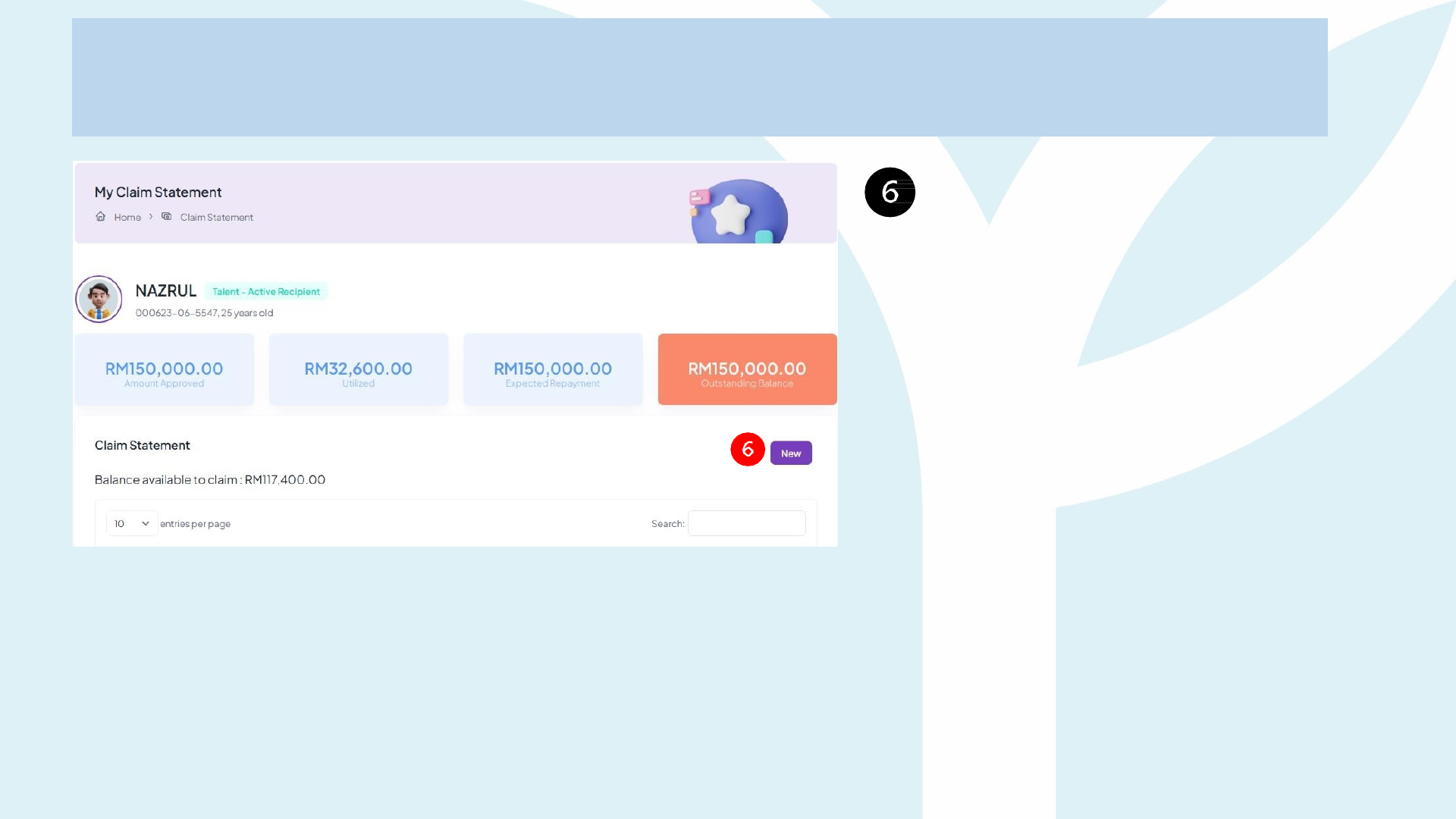
Guidelines to Submit Claim
Click on "New" to start your
claim submission
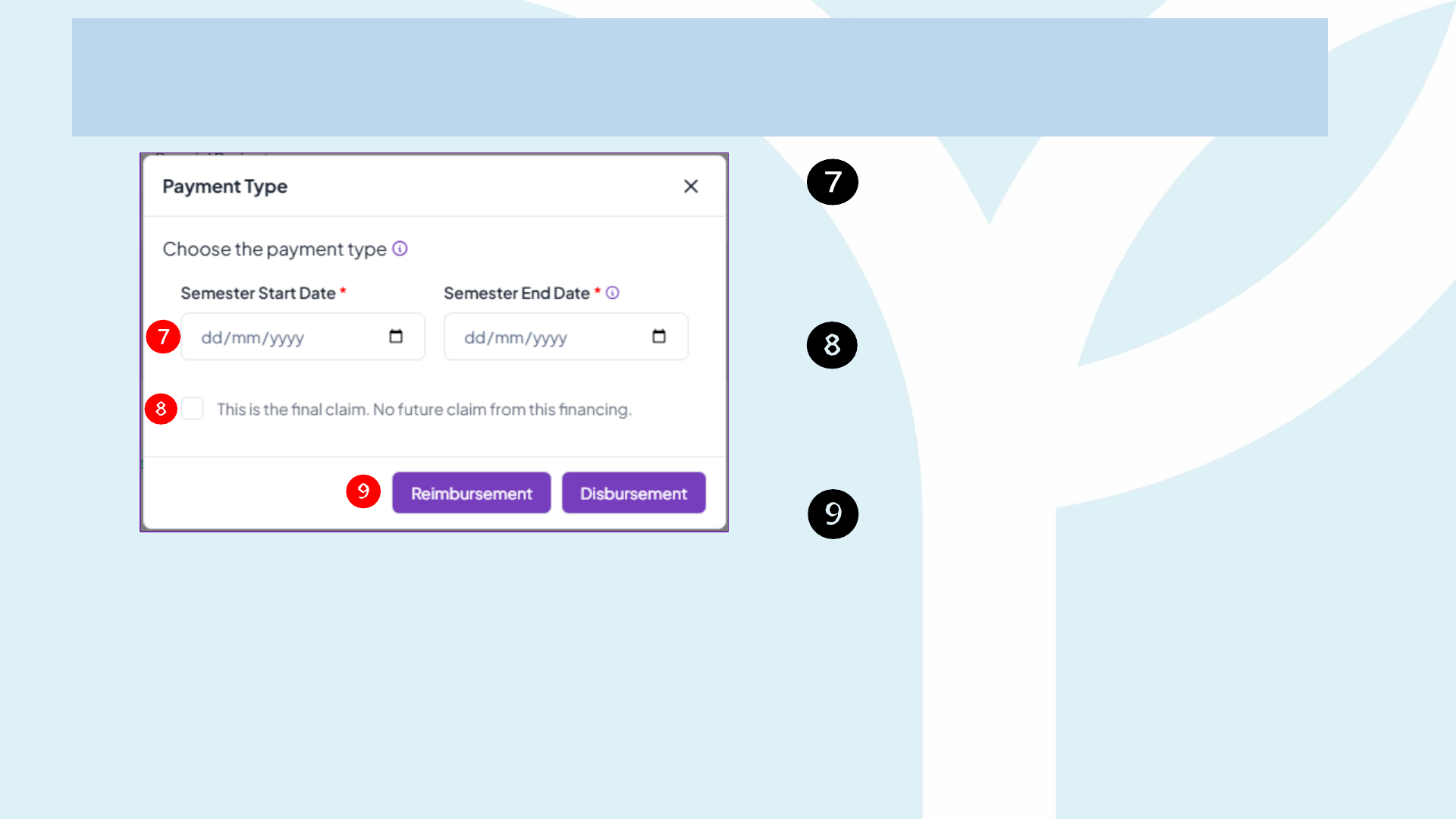
Guidelines to Submit Claim
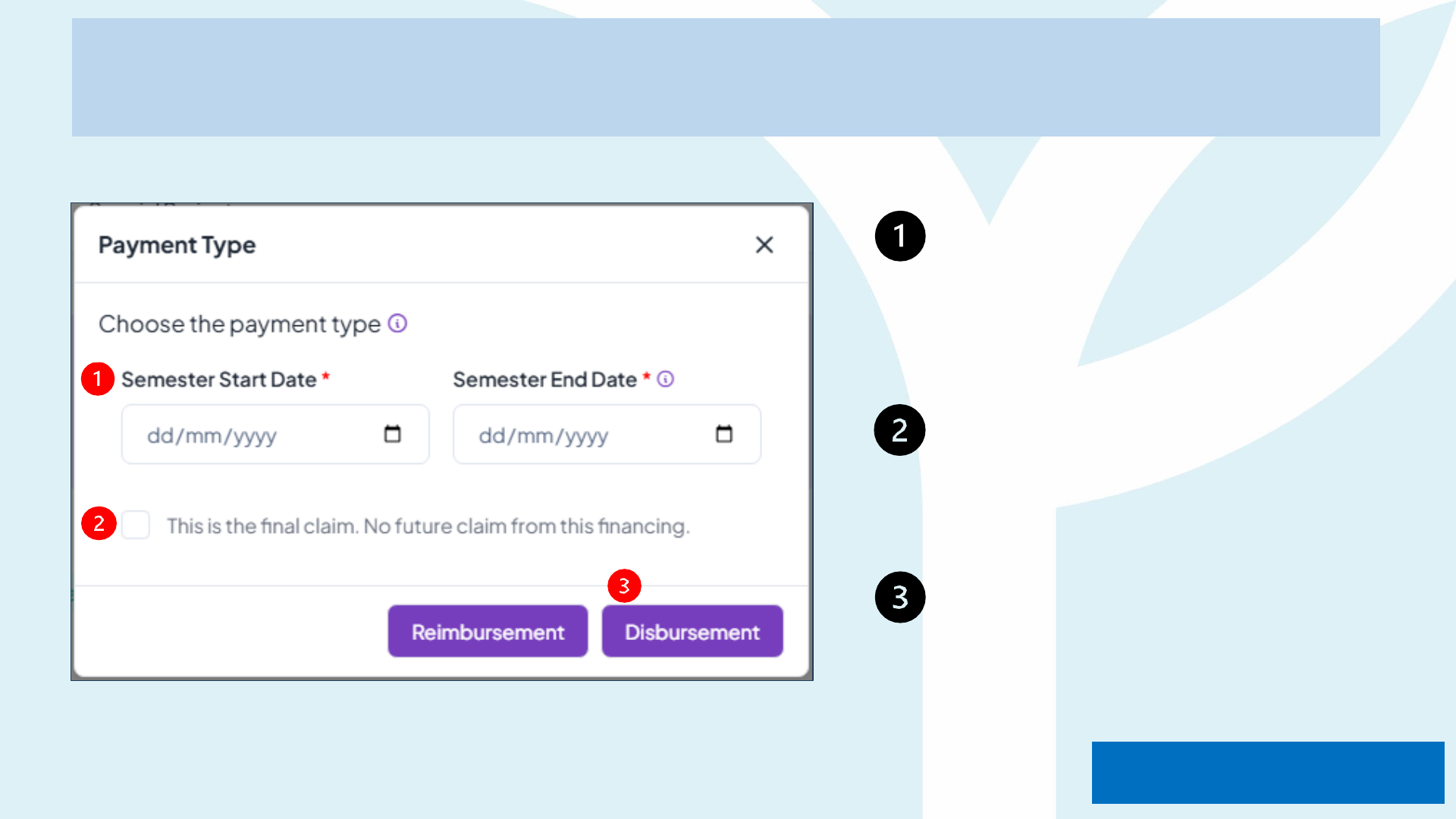
Enter the Semester Start Date
& Semester End Date based
on registration letter etc.
Tick on "final claim" if you are
making a final claim, if not
untick this box.
Choose your submit claim
1. Disbursement or
2. Reimbursement
Guidelines to Submit Claim
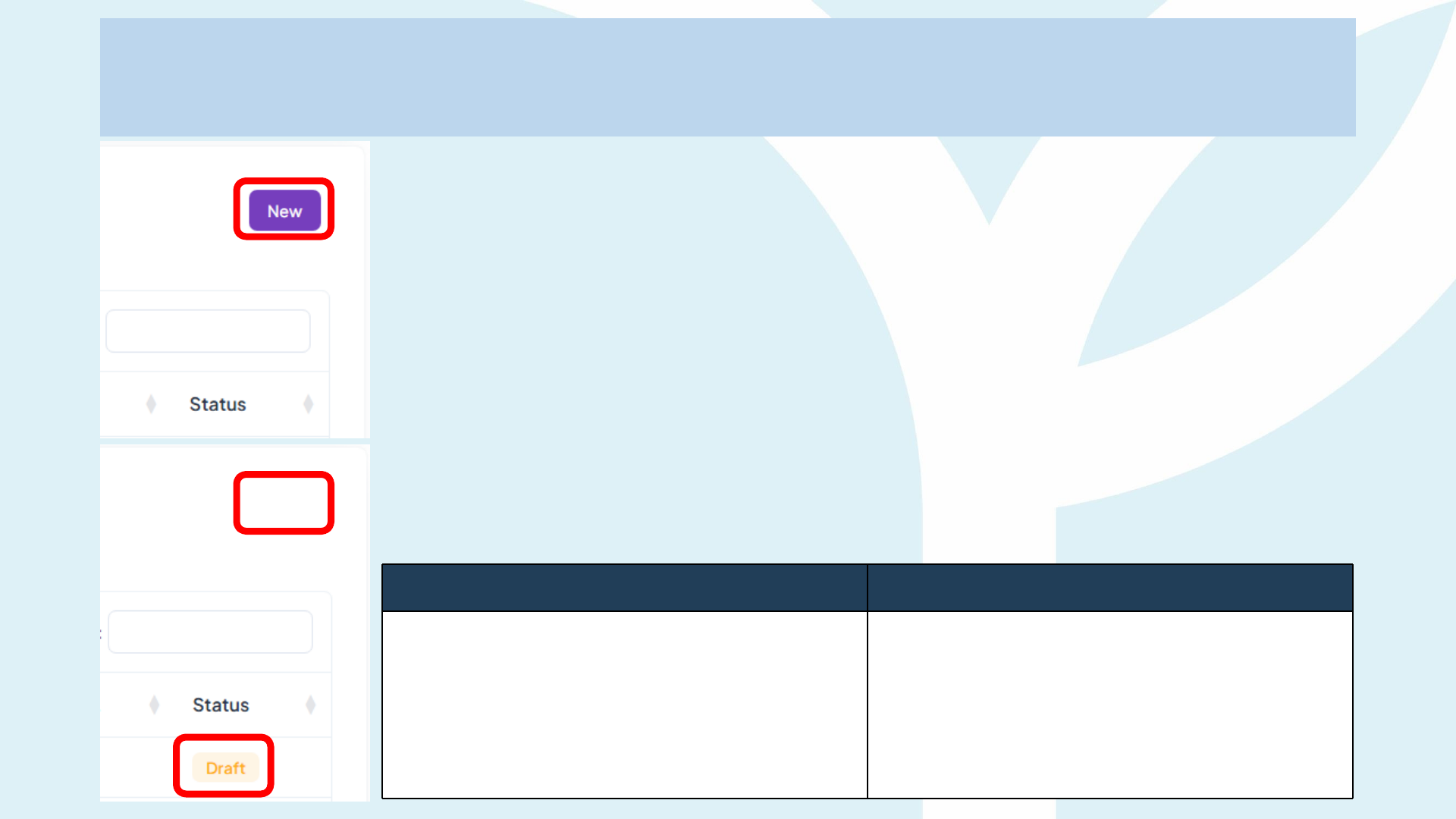
How the “Draft Lock” Works on the Claim Statement Page
• Click New → Draft Created
• The moment you hit New, the system auto-generates a blank Draft row
(amount = RM 0.00).
• You are taken into the claim-entry form.
• Back Out Early? The Draft Stays
• If you exit the form without submitting, that Draft remains in your table
(see second screenshot).
• While any Draft exists, the system prevents duplicate work and
disables a fresh New claim.
Two Options Only
If you still need the claim If you want to start over
Click the Draft row to reopen it, finish
entering the line items, then Submit.
Click the delete icon inside the Draft
to remove it. Once the Draft is gone,
the purple New button re-appears
(first screenshot) and you can start a
brand-new claim.

Payment Methods
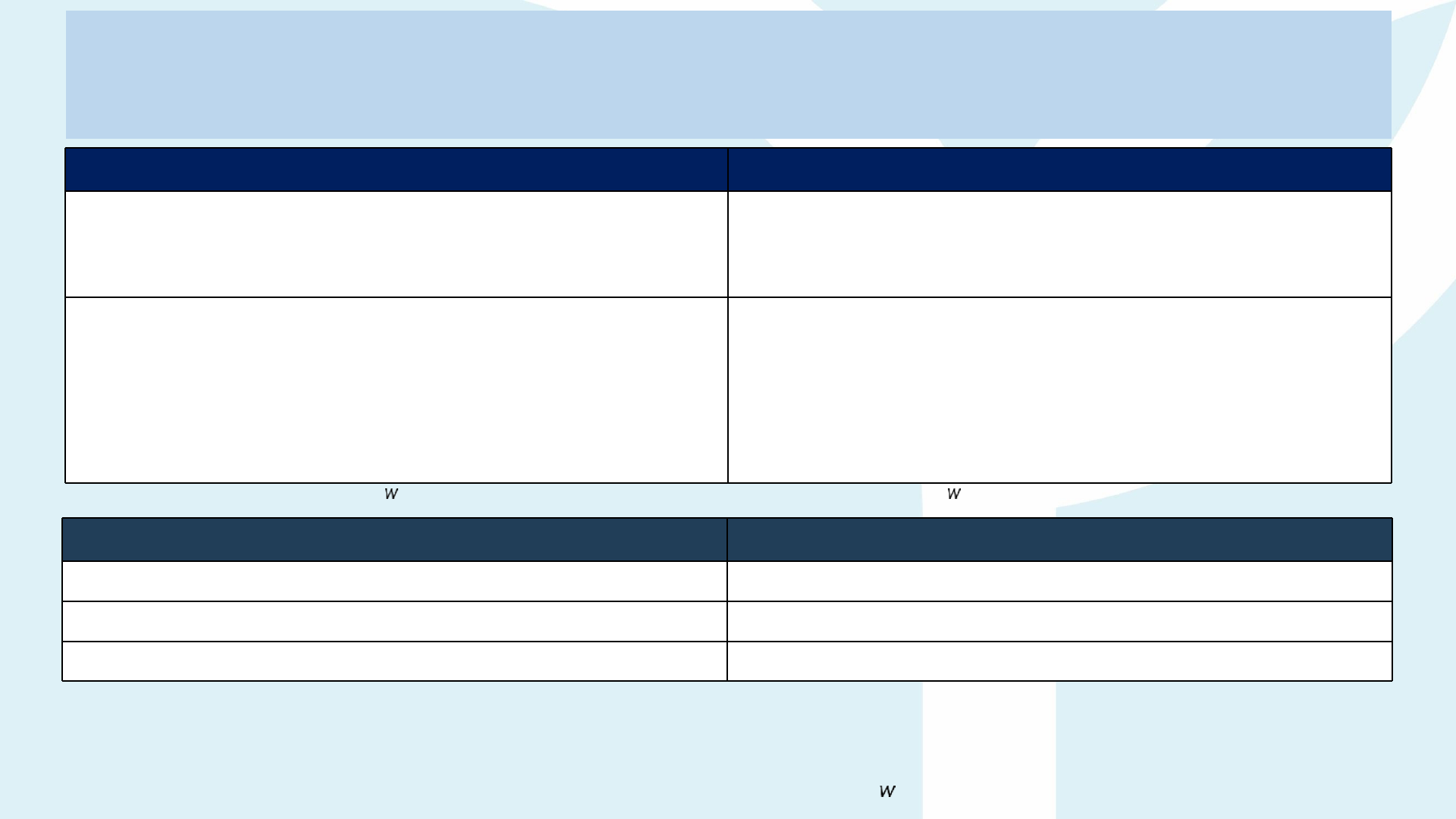
Type of payment Payment Method
Reimbursemen
t (Pay &
Claim)
1. Talent makes payment directly to ALTI.
2. Talent claims reimbursement from Yayasan Peneraju with
providing proof of payment by upload to Peneraju.org
Disbursement
(Invoice
Method)
1. YP disburse the approved amount to talents via their
personal bank accounts.
2. Talents are required to pay to ALTI and provide the proof of
payment and upload it to Peneraju.org
Split Your Claim Lines When One Receipt
Covers Multiple Fees
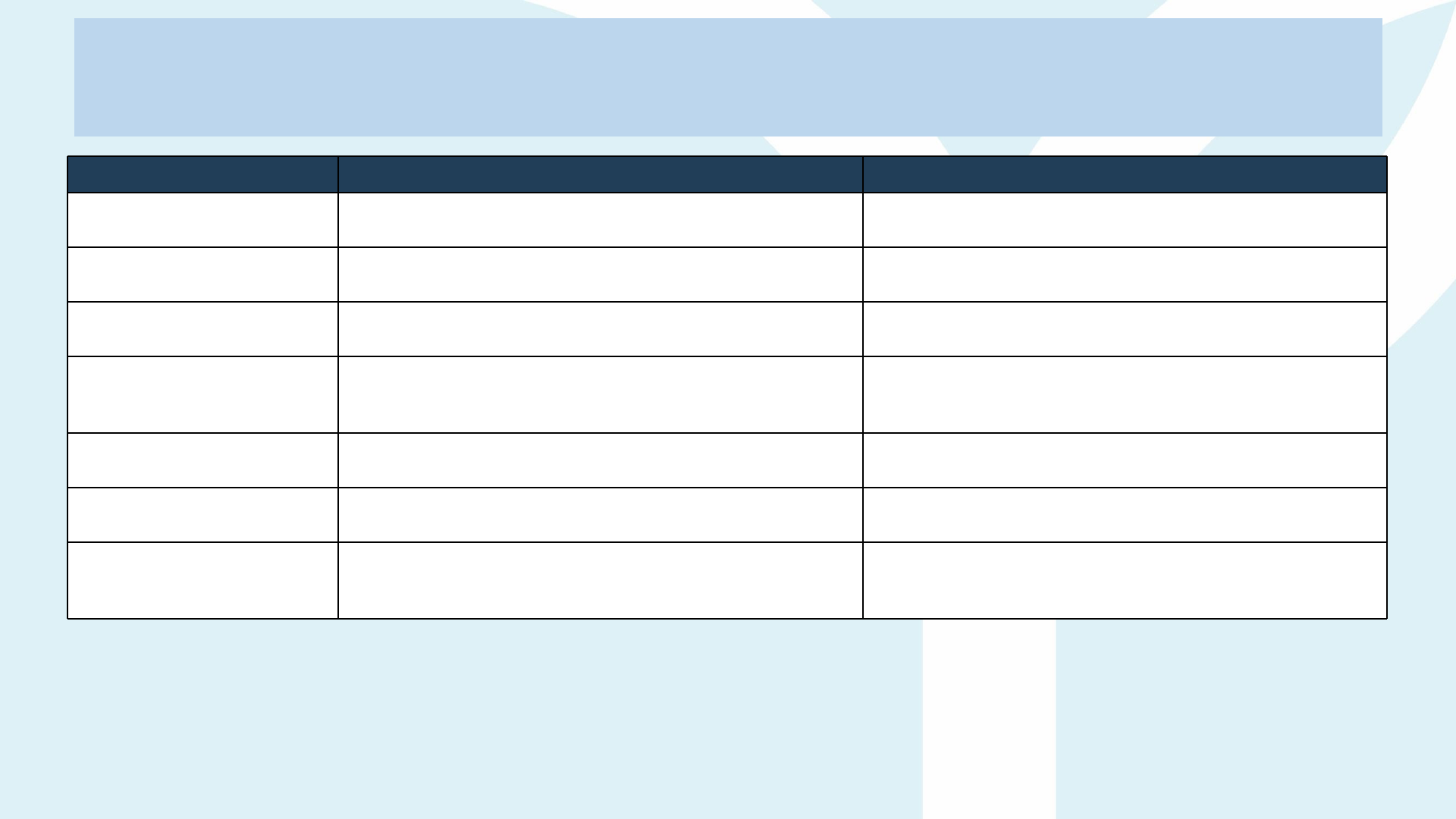
Scenario Correct Way to Submit
One receipt lists several fee types — e.g. Tuition, Exam,
and
Learning Materials appear on the same invoice/receipt.
Create a separate claim line for each item (Tuition
Fee, Exam Fee, Learning Materials Fee, etc.). Do NOT
lump them into a single line.
Proof-of-Payment and Supporting Docs
You may re-use the same PDF (scan of the official receipt
& bank slip, etc.) for each line, but…
o Enter only the amount that belongs to that specific
fee type.
o Make sure the figure matches exactly what the
receipt shows for that line.
*Portal rule: If you submit one line only hile the uploaded receipt clearly includes multiple fee items, the claim ill be
rejected.
Receipt Shows How to Enter in the Portal
Tuition Fee – RM 4,000 Line 1: Claim Type = Tuition Fee, Amount = RM 4,000
Exam Fee – RM 800 Line 2: Claim Type = Exam Fee, Amount = RM 800
Learning Materials – RM 200 Line 3: Claim Type = Learning Materials, Amount = RM 200
Upload the same official receipt + bank slip, etc. in both “Proof of Payment” and “Supporting Documents” slots for each
line.
*Submitting all three items under one claim line (e.g., Tuition Fee = RM 5,000), the claim ill be rejected.

Payment Method
Disbursement
(Proof of
Payment)
Disbursement Claim Submission Checklist
Claim Type Upload 1 – Proof of Payment / Invoice Upload 2 – Supporting Documents
1 Tuition Fee
• Official invoice from ALTI showing programme, semester,
dates, talent name, NRIC & amount
• Signed class timetable or semester schedule
• Offer/Acceptance letter referencing fee
2 Learning Materials Fee
• Vendor or ALTI invoice for books, e-books, software
licence, lab kit, etc.
• Course syllabus page that lists required materials
• Itemised purchase list (if bundled)
3 Exam Fee • Invoice from exam body (e.g., ACCA, ICAEW, etc.)
• Exam registration confirmation e-mail
• Exam timetable or admission ticket
4 Certification Fee
• Invoice from certification body (e.g., Microsoft, Google,
AWS, PMI, Oracle, ACCA, ICAEW, etc.)
• Confirmation that certification attempt has been
scheduled
• Candidate ID / eligibility letter
5 Professional Fee • Invoice for annual subscriptions fee (During Study)
• Notification e-mail or letter
• Screenshot of relevant details (if issued)
6 Registration Fee • ALTI invoice for one-off enrolment / matriculation fee
• Offer letter page showing registration charge
• Student ID confirmation
7 Allowance
Not available
• Class timetable provided by the ALTI
• Progress report or adviser confirmation that studies are
ongoing current semester (Start & End Date)
Guidelines to Submit Claim
Enter the Semester
Start Date & Semester
End
Date based on registration letter
etc.
Tick on "Final Claim" if you are
making a final claim, if not untick
this box.
Choose your submit claim
"Disbursement".
Disbursemen
t
Guidelines to Submit Claim
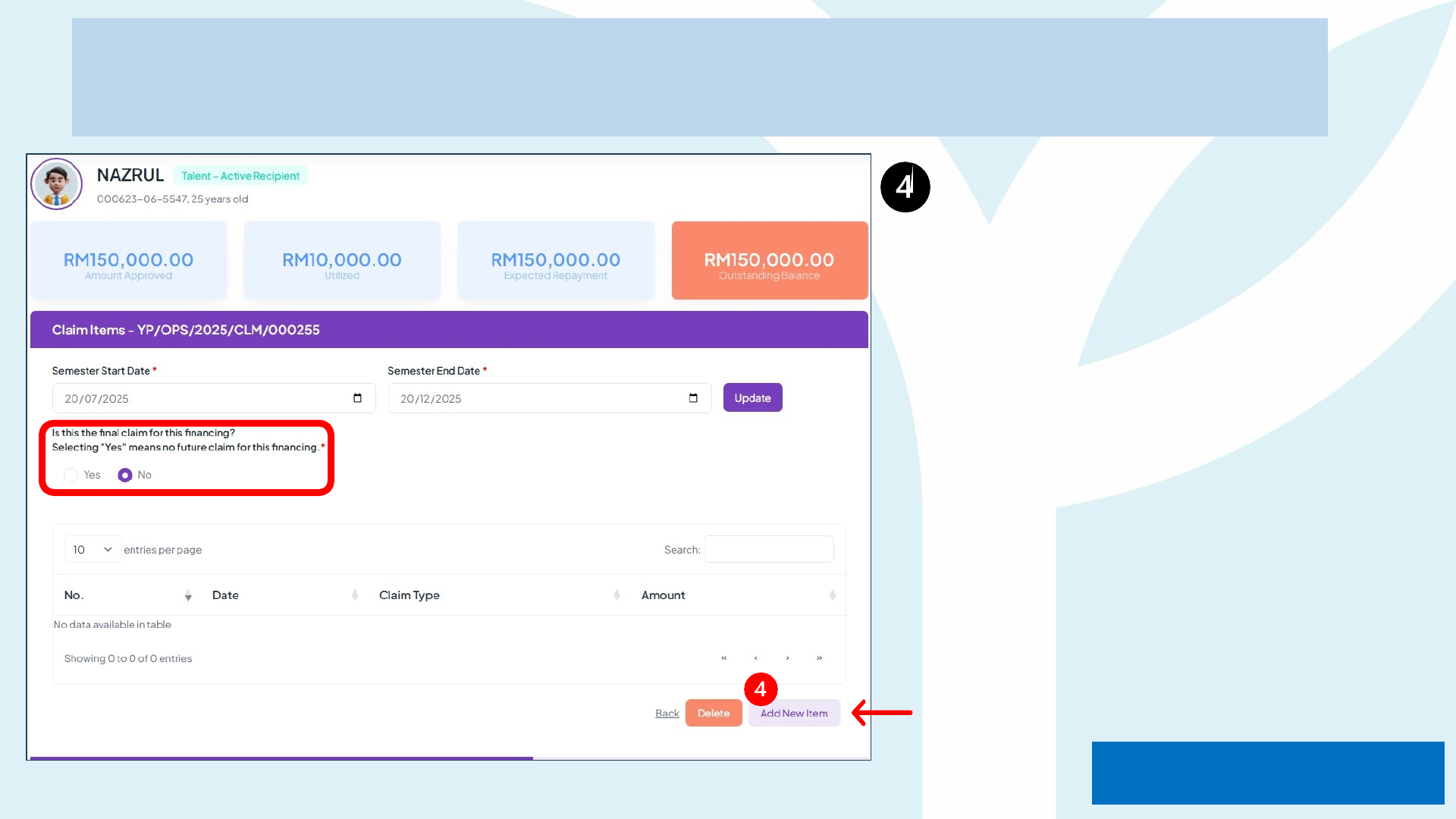
Click on "Add New Item" to
start your claim submission.
Tick 'Yes' or 'No' to confirm
whether the claim is final or
not.
Disbursemen
t
Guidelines to Submit Claim
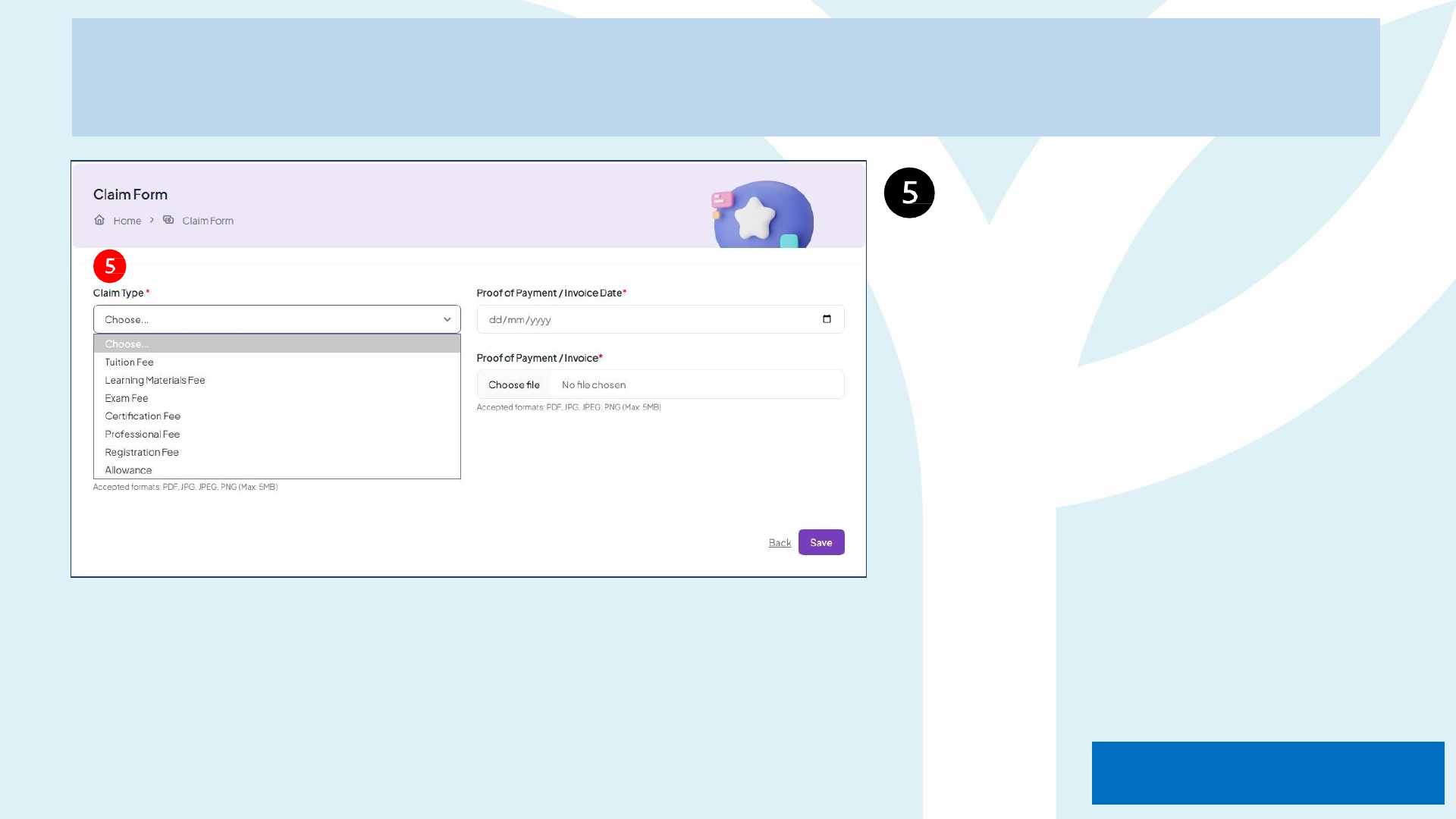
Please select the Claim Type
accordingly to the invoice
received.
Disbursemen
t
Guidelines to Submit Claim
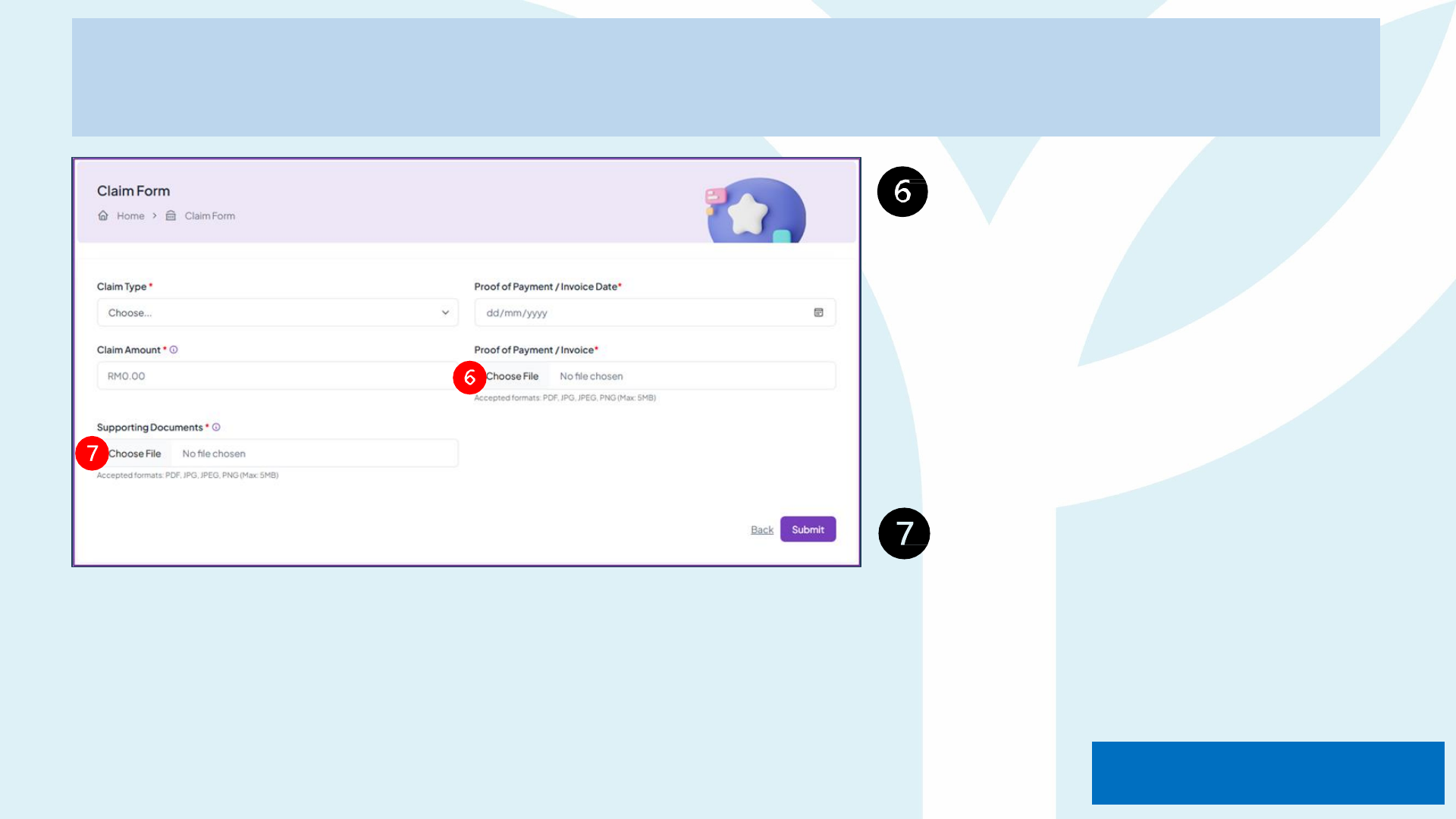
Compulsory to upload Proof of
Payment or Invoice. For
invoice or proof of payment
should not more than 30 days
during claim submission.
(Please rename the document
with claim type and your name
eg; Enrolment fee_Nazrul)
Upload Supporting
Documents eg; certification or
exam results
Disbursemen
t
*Disbursement ; provide receipt of payment in Proof of
Payment/Invoice
Guidelines to Submit Claim
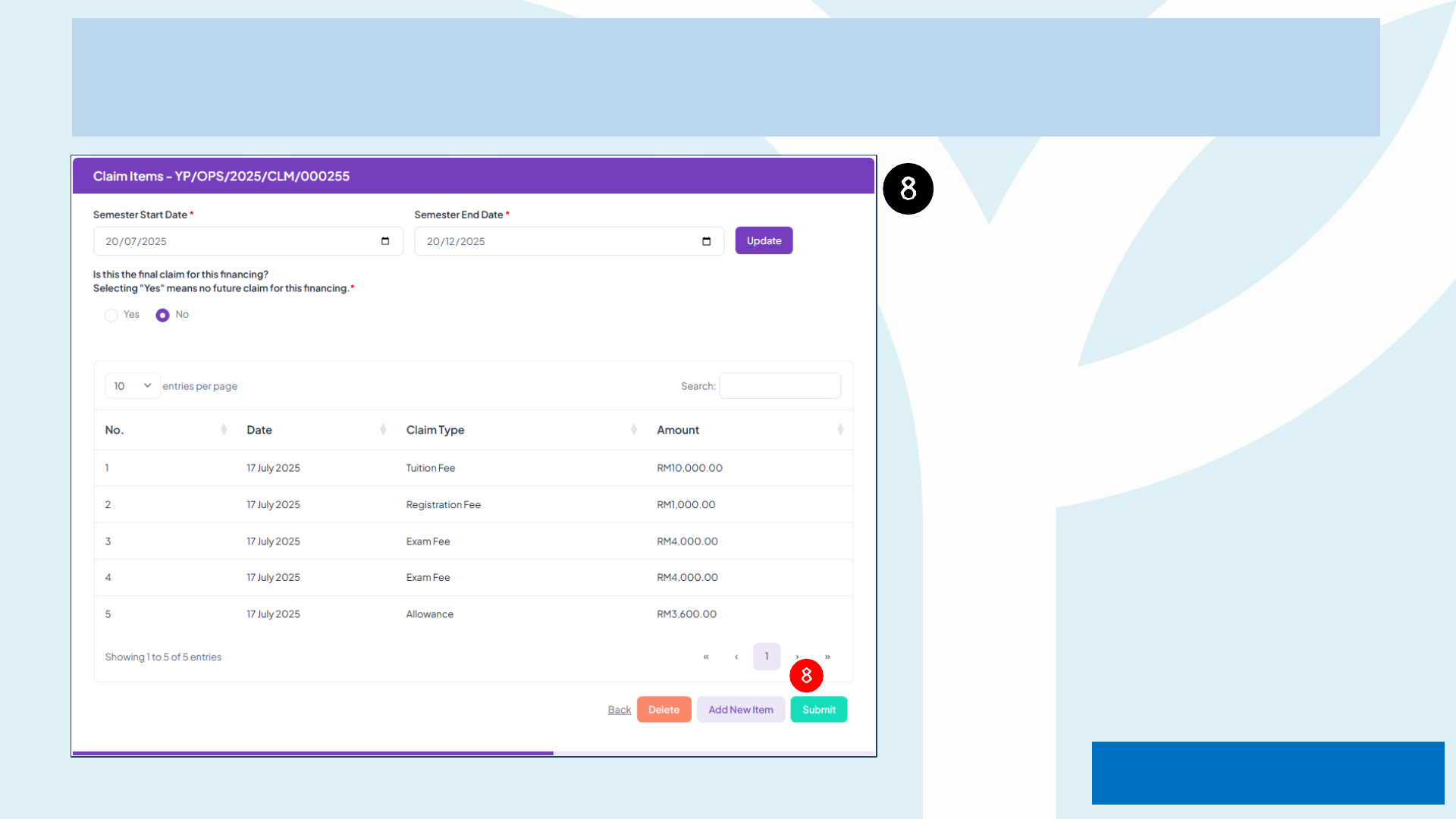
Once all information and
documents are completely
filled in and uploaded you may
submit your claim by clicking
the "Submit" button.
Disbursemen
t
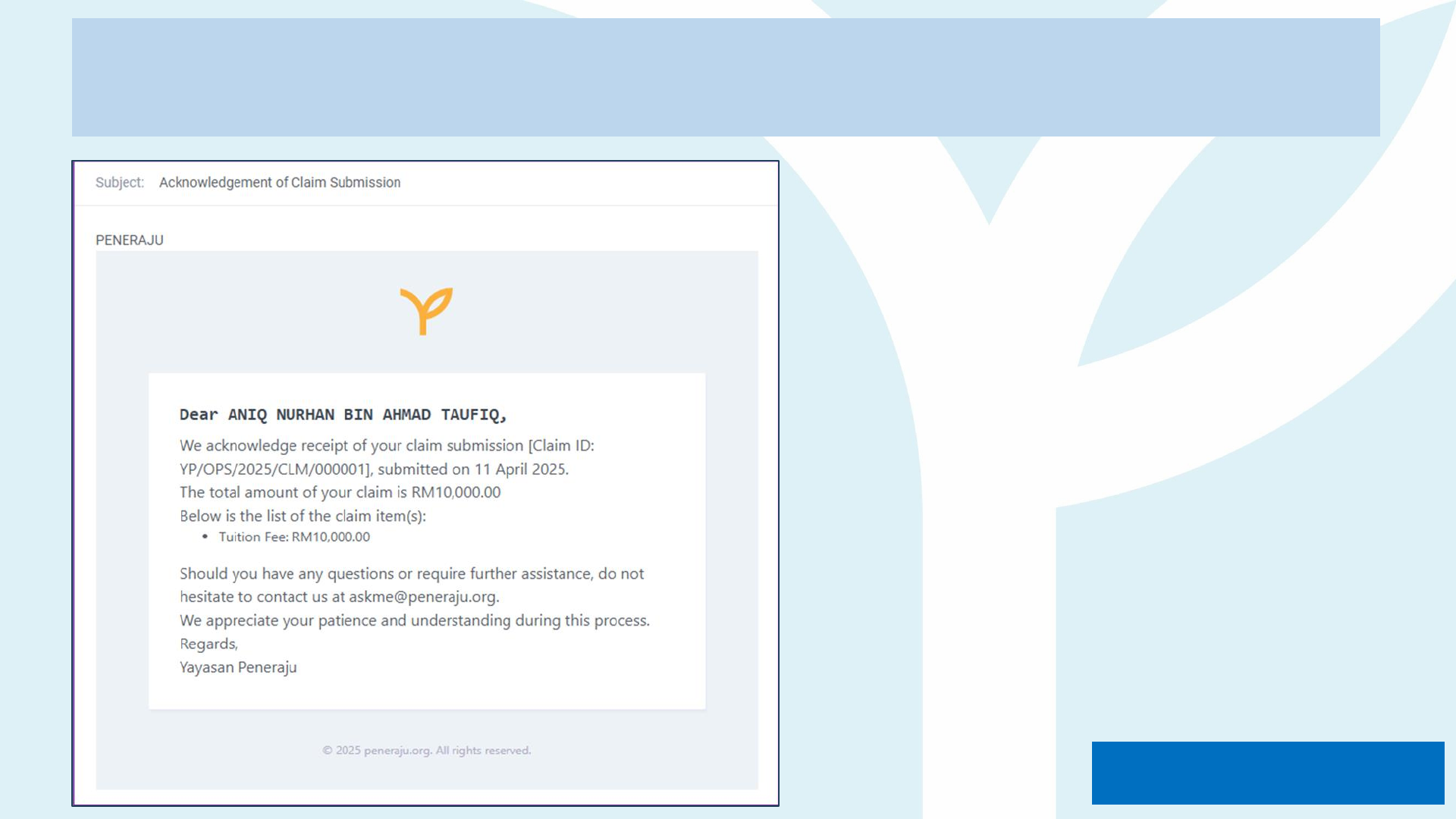
Guidelines to Submit Claim
You will receive an acknowledge email
of your claim submission from Yayasan
Peneraju.
Disbursemen
t
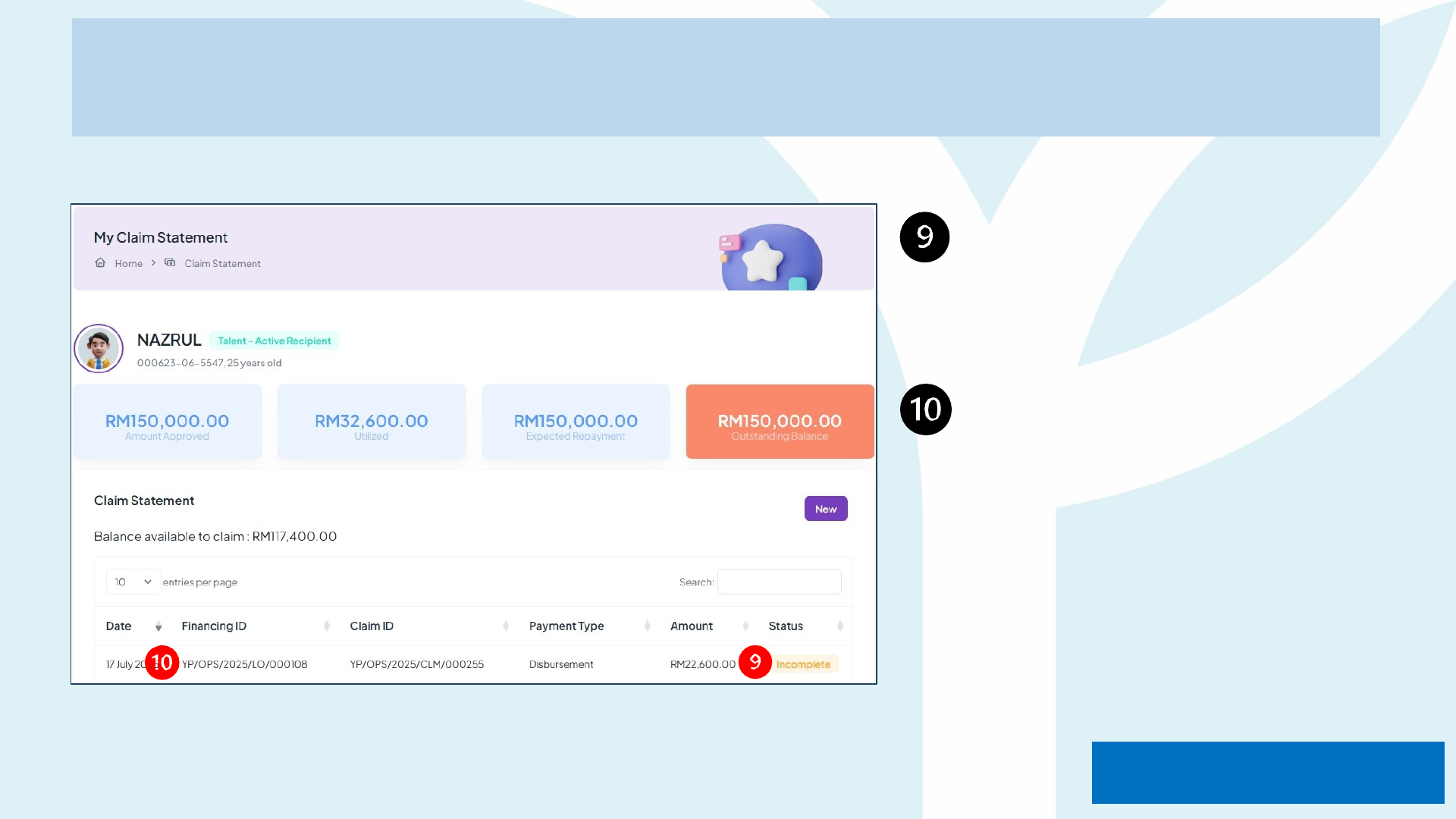
Guidelines to Submit Claim
The status in your account
will change to "Incomplete"
upon the acknowledgement
email received.
Click on "Financing ID"
to upload the "receipt"
for supporting document.
Disbursemen
t
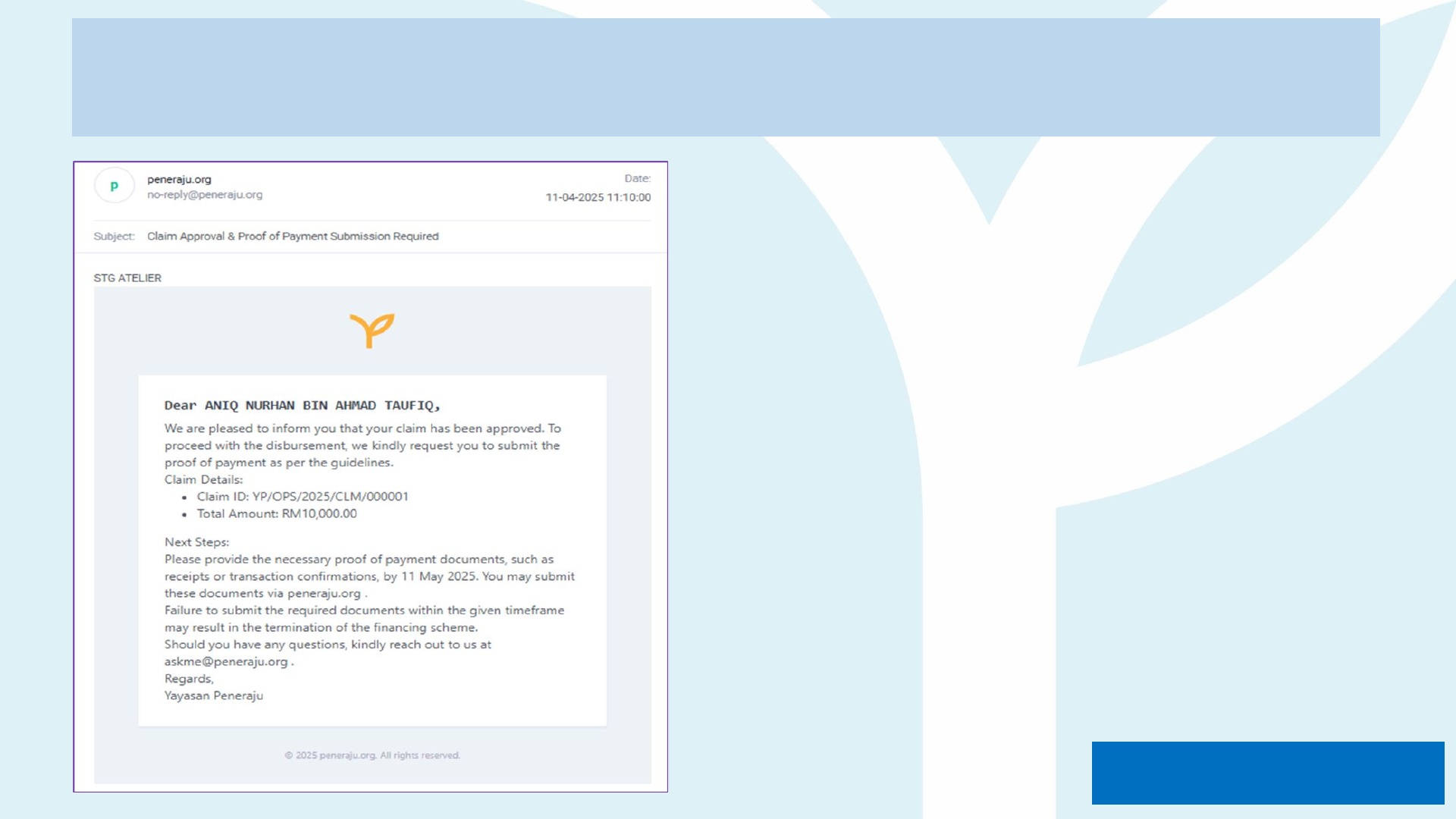
Guidelines to Submit Claim
You will receive a notification email
once your claim submission has
been approved by Yayasan
Peneraju.
You may proceed with the
necessary proof of payment
documents such as;
1) Receipts
2) Transaction confirmation
Disbursemen
t
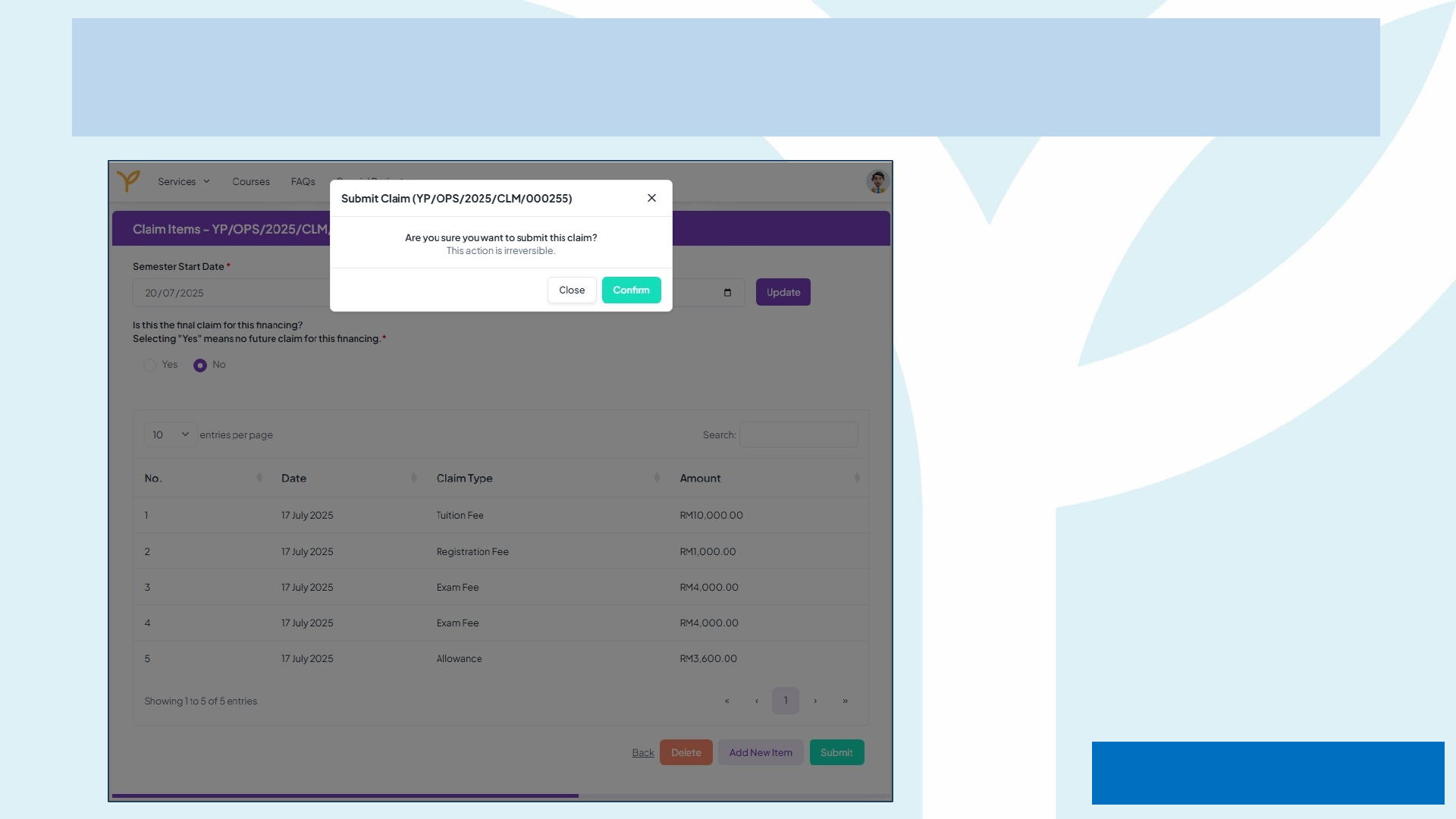
Guidelines to Submit Claim
Please make sure the uploaded
document/proof are accurate
before submitting the claim.
Disbursemen
t
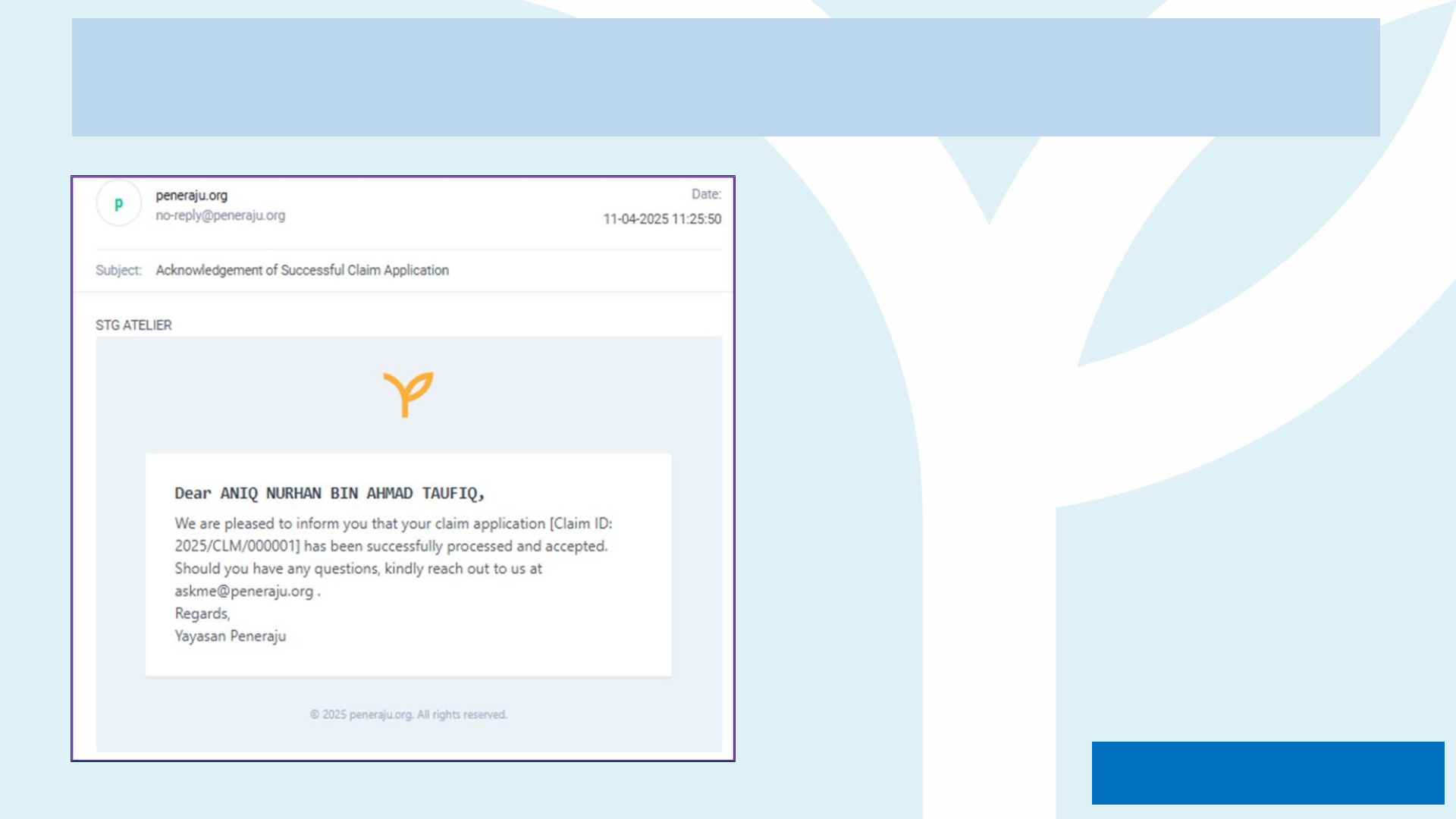
Guidelines to Submit Claim
You will receive an acknowledgement
email upon your successful claim
application.
Disbursemen
t
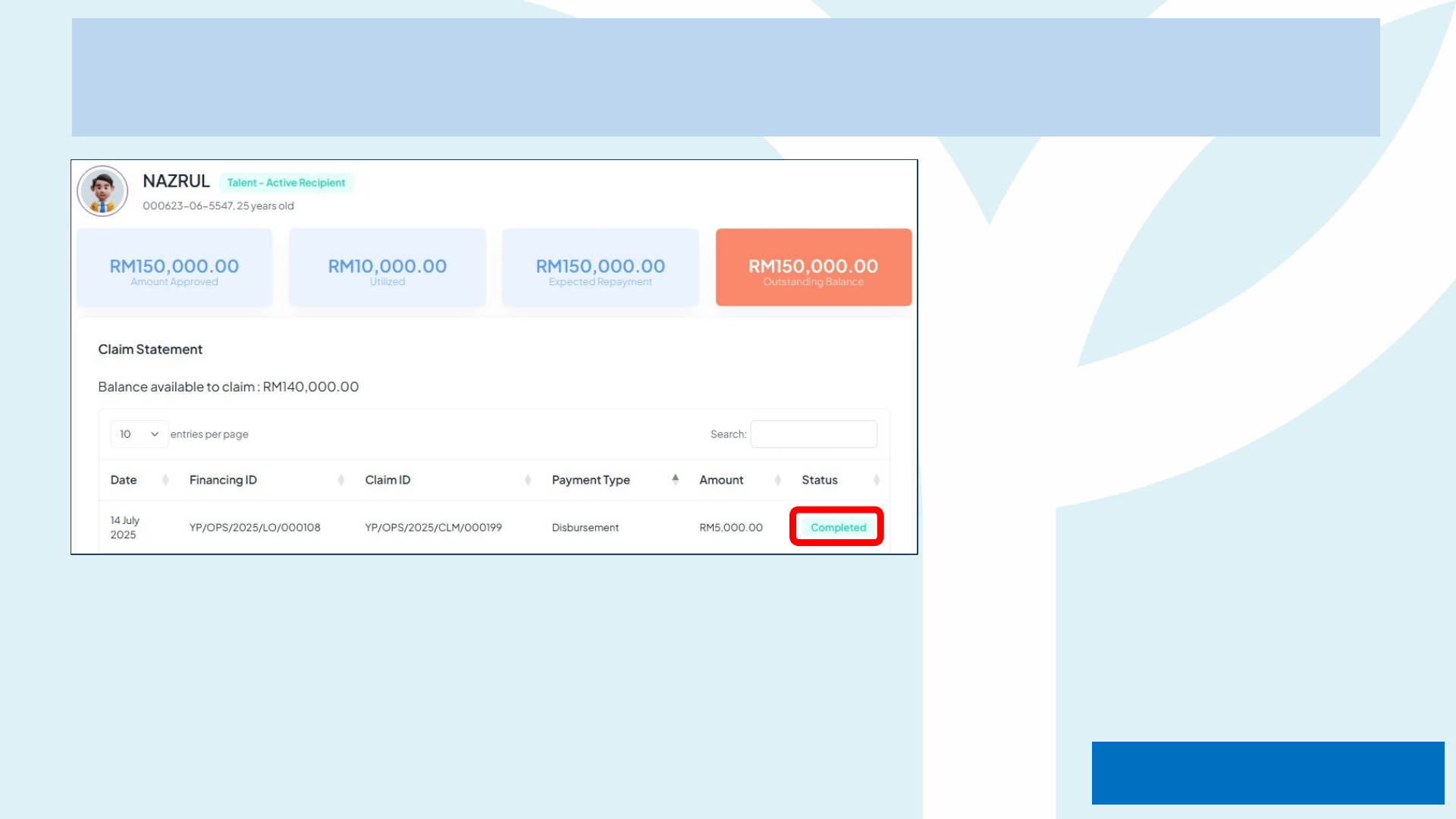
Guidelines to Submit Claim
Your status in the dashboard
will change to "Completed"
once the claim has been
successfully processed and
accepted.
Disbursemen
t

Payment Method
Reimbursement
(Pay & Claim)

Reimbursement Claim Submission Checklist
Claim Type Upload 1 – Proof of Payment / Invoice Upload 2 – Supporting Documents
1 Tuition Fee • ALTI receipt stamped “PAID”
• Official invoice from ALTI showing programme, semester,
dates, talent name, NRIC & amount
• Bank statement showing amount online payment
2 Learning Materials Fee • Vendor or ALTI receipt stamped “PAID”
• Official invoice from Vendor or ALTI showing programme,
semester, dates, talent name, NRIC & amount
• Course syllabus page that lists required materials
• Itemised purchase list (if bundled)
3 Exam Fee
• Online payment confirmation / receipt stamped “PAID”
from exam body (e.g., ACCA, ICAEW, etc.)
• Official invoice from exam body
• Bank statement showing amount online payment
• Exam registration confirmation e-mail
• Exam timetable or admission ticket
4 Certification Fee
• Certification body receipt proof of payment stamped
“PAID” (e.g., Microsoft, Google, AWS, PMI, Oracle,
ACCA, ICAEW, etc.)
• Official invoice from certification body
• Confirmation that certification attempt has been
scheduled
• Candidate ID / eligibility letter
5 Professional Fee
• Receipt proof of payment stamped “PAID” for
professional-body annual subscription fee
• Official invoice from professional-body
• Notification e-mail or letter
• Screenshot of relevant details (if issued)
6 Registration Fee
• ALTI / Professional-body receipt stamped “PAID” for one-
off registration / enrolment / matriculation fee
• Offer letter page showing registration charge
• Student ID confirmation
7 Allowance
Not available
• Class timetable provided by the ALTI
• Progress report or adviser confirmation that studies are
ongoing current semester (Start & End Date)
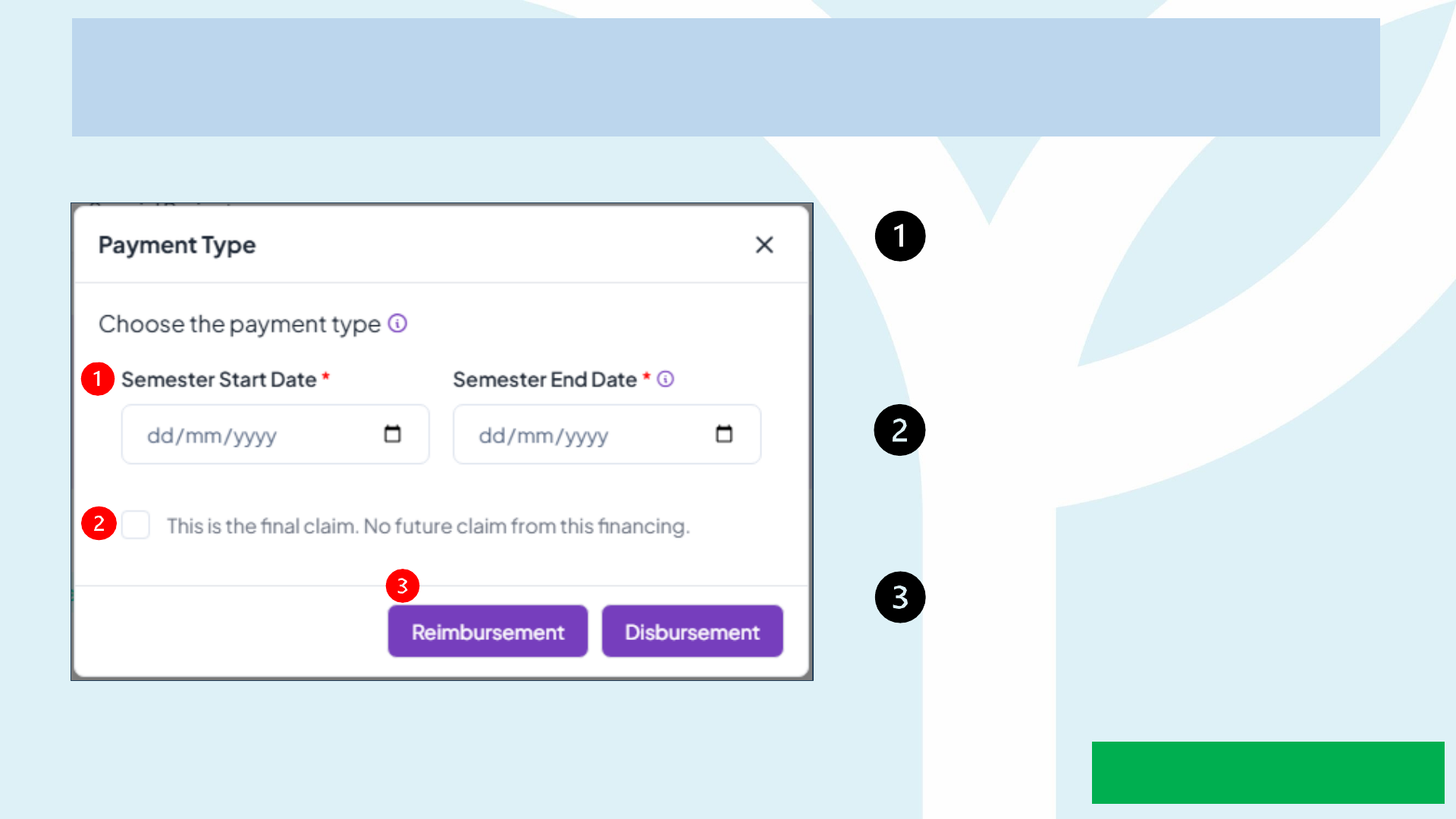
Guidelines to Submit Claim
Enter the Semester
Start Date & Semester
End
Date based on registration letter
etc.
Tick on "Final Claim" if you are
making a final claim, if not untick
this box.
Choose your submit claim
"Reimbursement".
Reimbursemen
t
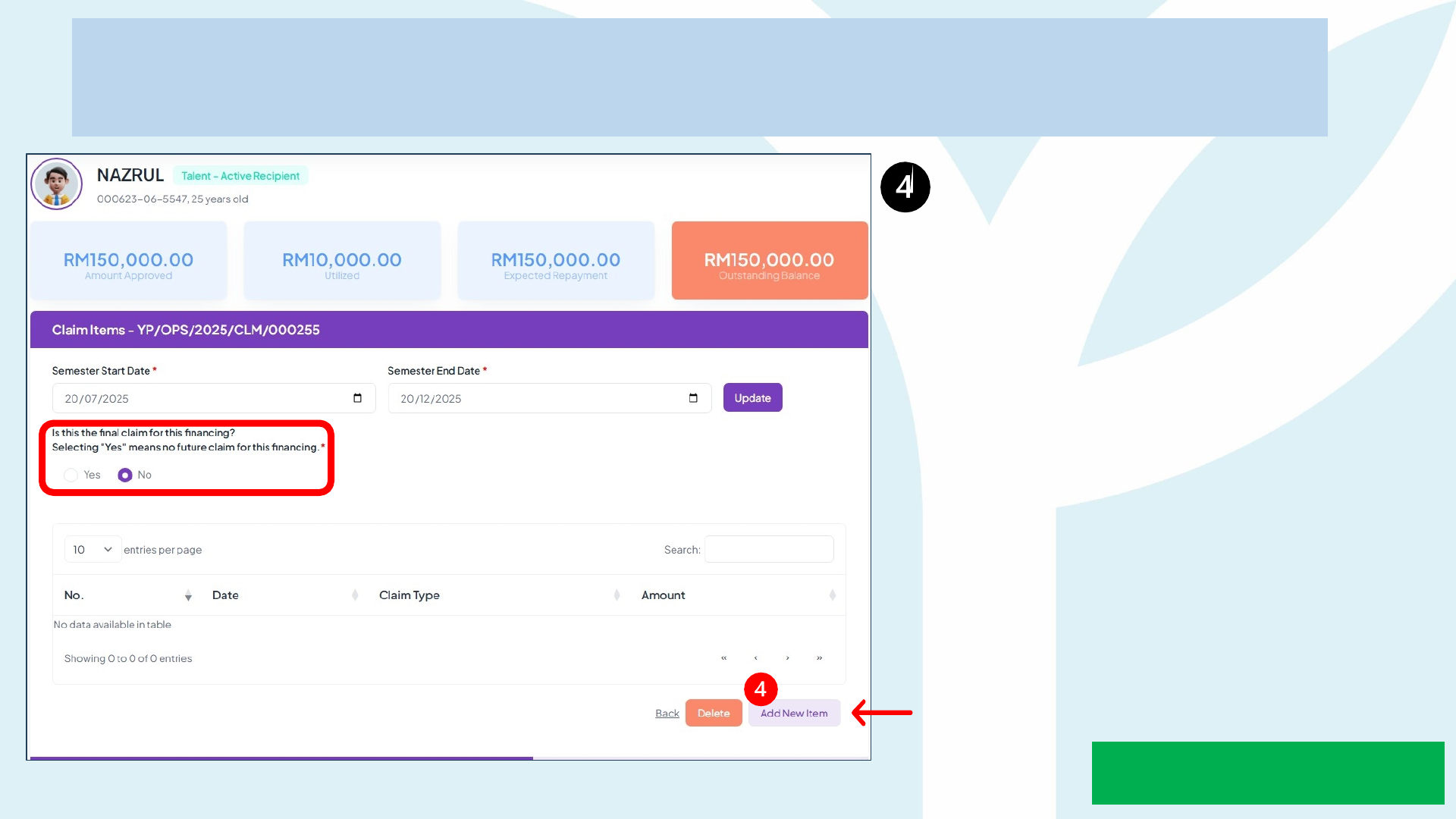
Guidelines to Submit Claim
Click on "Add New Item" to
start your claim submission.
Tick 'Yes' or 'No' to confirm
whether the claim is final or
not.
Reimbursemen
t
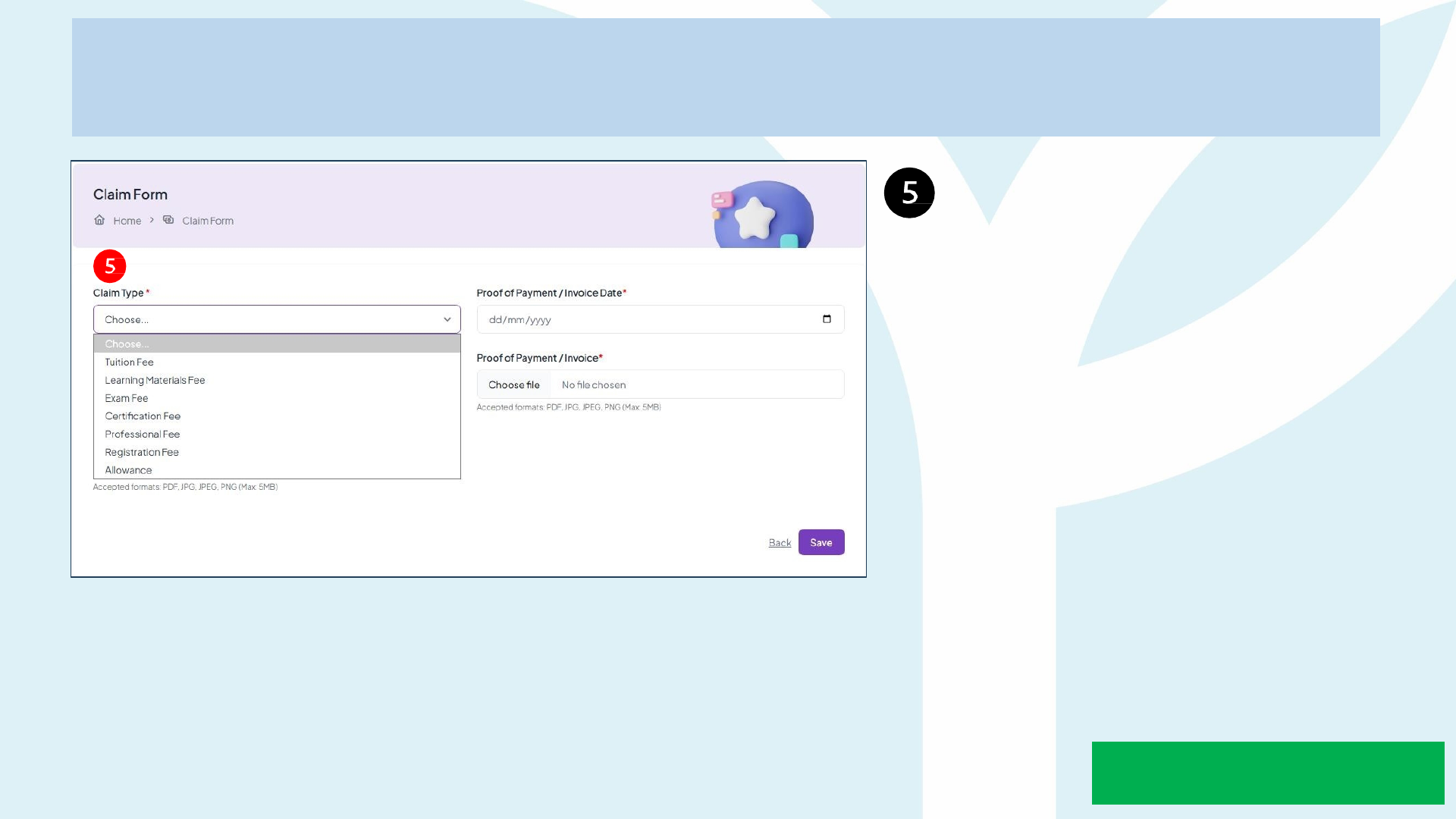
Guidelines to Submit Claim
Please select the Claim Type
accordingly to the invoice
received.
Reimbursemen
t
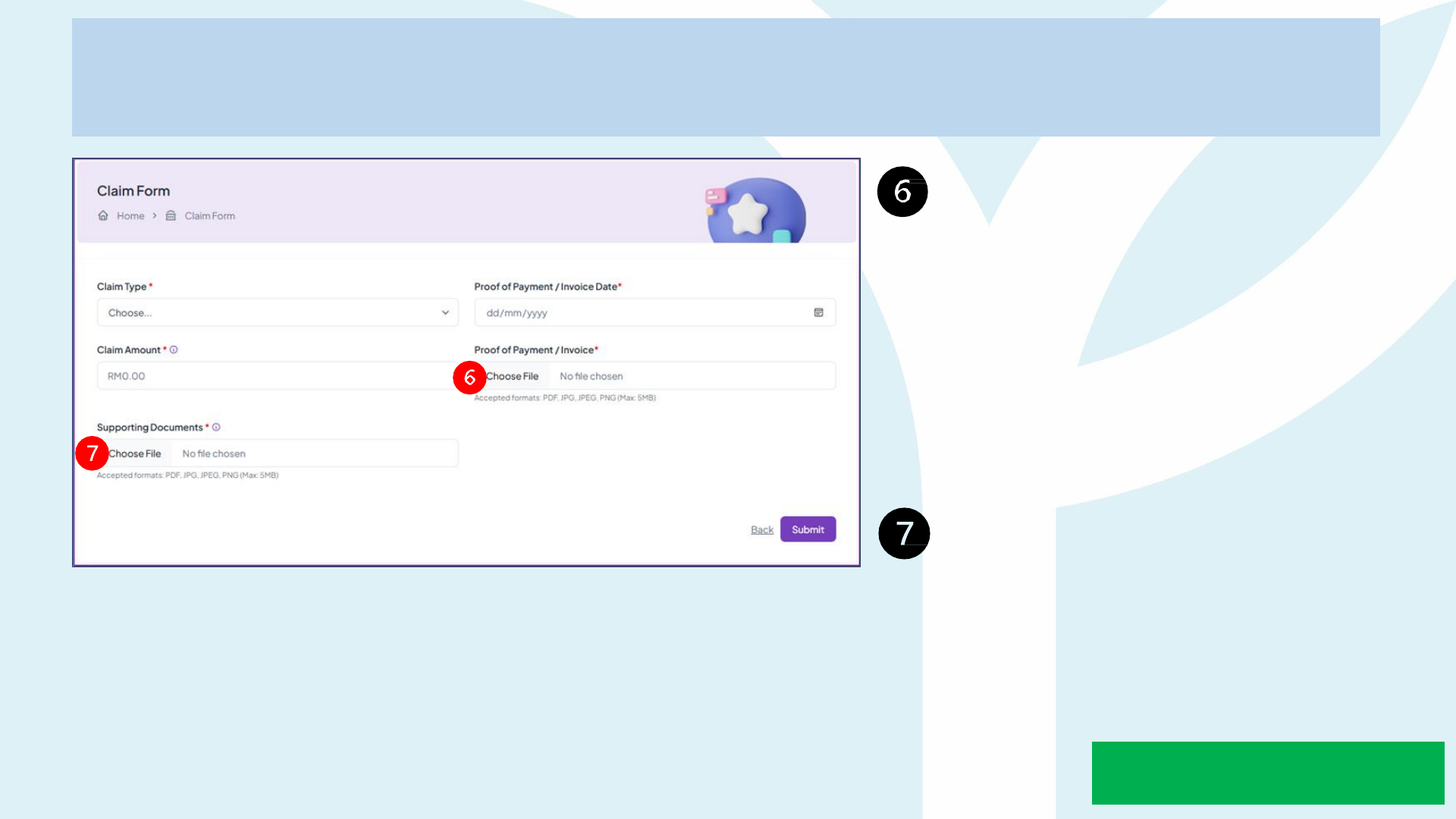
Guidelines to Submit Claim
Compulsory to upload Proof of
Payment or Invoice. For
invoice or proof of payment
should not more than 30 days
during claim submission.
(Please rename the document
with claim type and your name
eg; Enrolment fee_Nazrul)
Upload Supporting
Documents eg; certification or
exam results
*Reimbursement ; provide receipt of payment in Proof of
Payment/Invoice
Reimbursemen
t
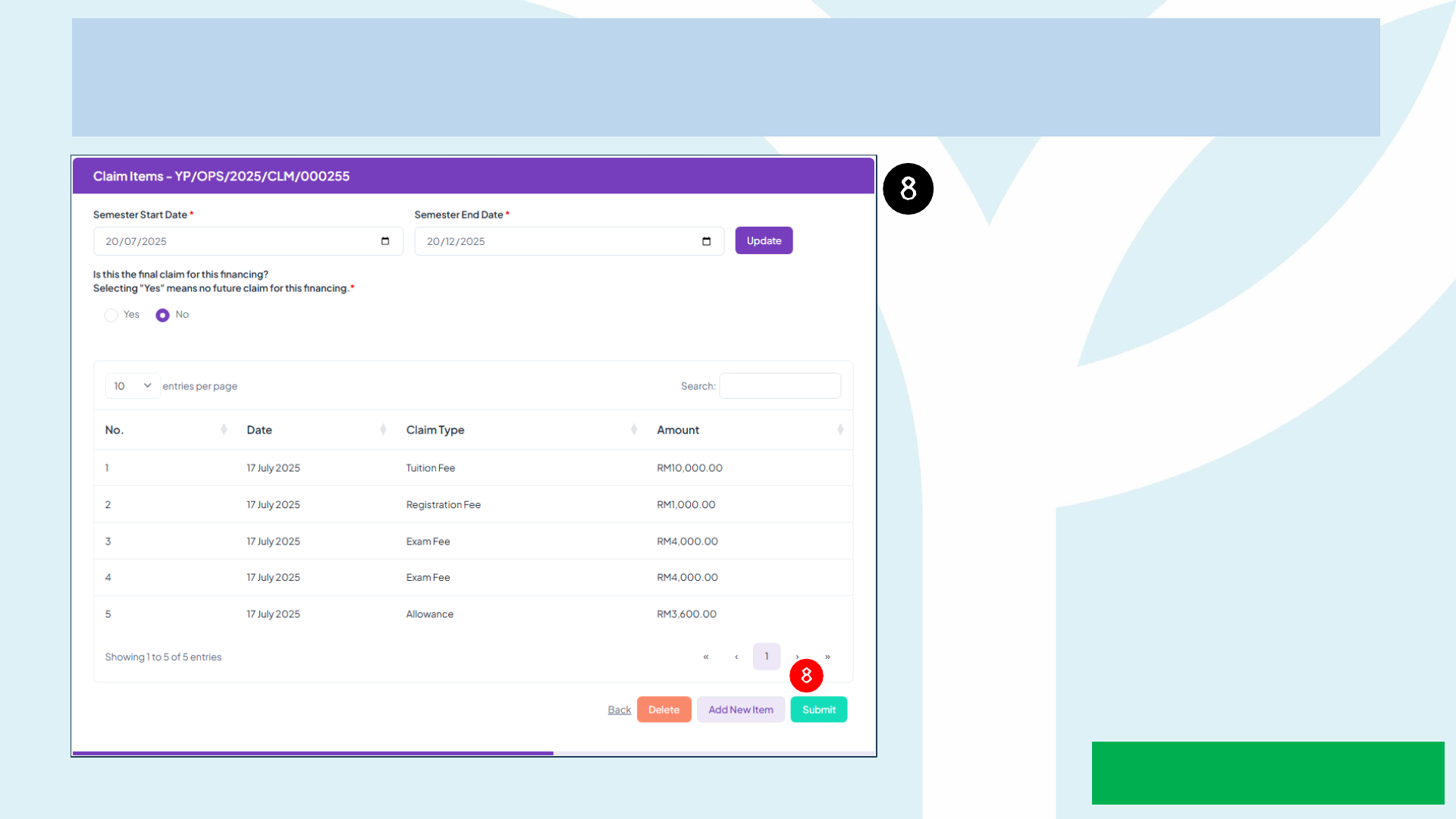
Guidelines to Submit Claim
Once all information and
documents are completely
filled in and uploaded you may
submit your claim by clicking
the "Submit" button.
Reimbursemen
t
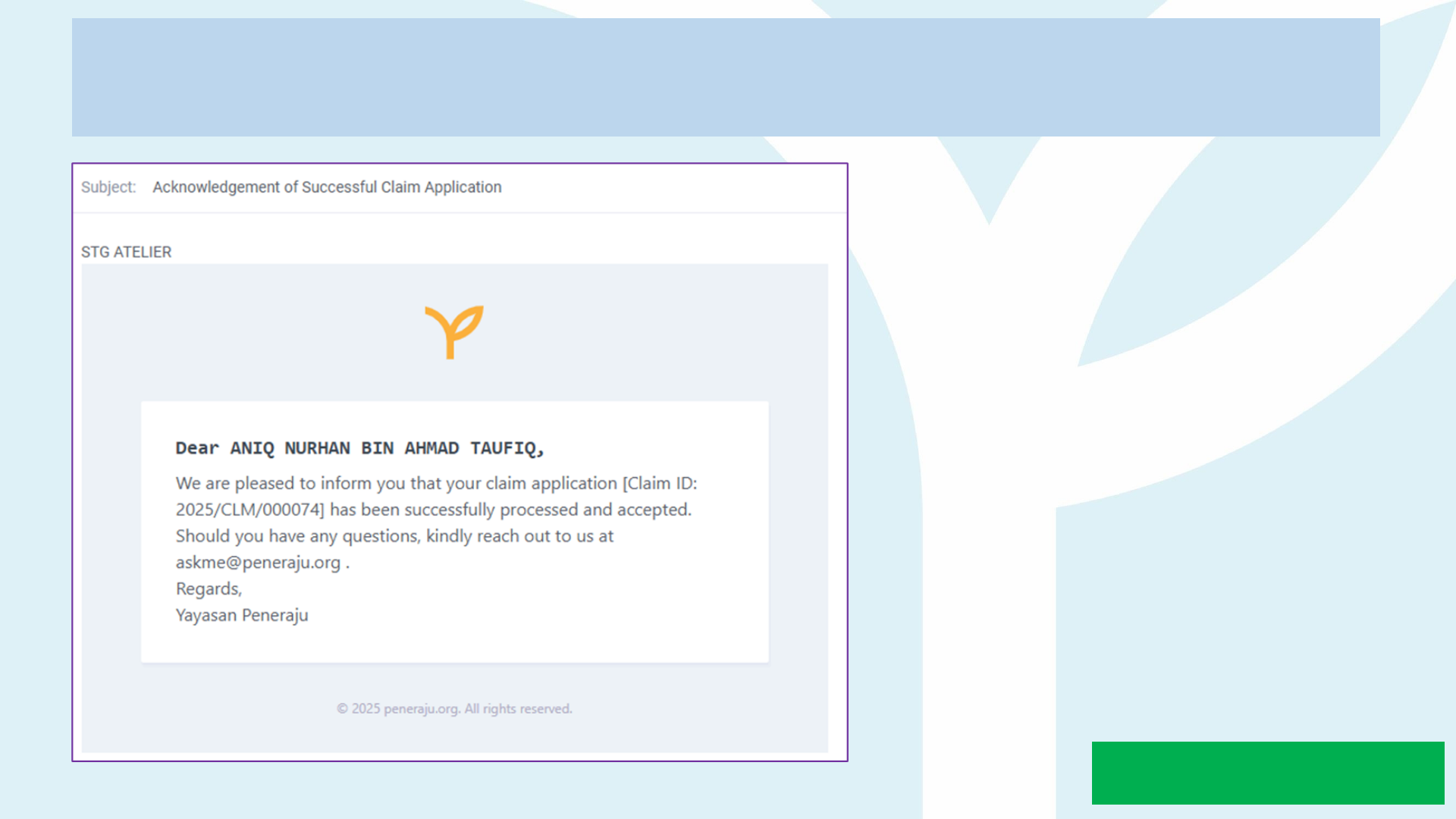
Guidelines to Submit Claim
You will receive a notification email
once your claim submission has
been successfully processed and
accepted by Yayasan Peneraju.
Reimbursemen
t
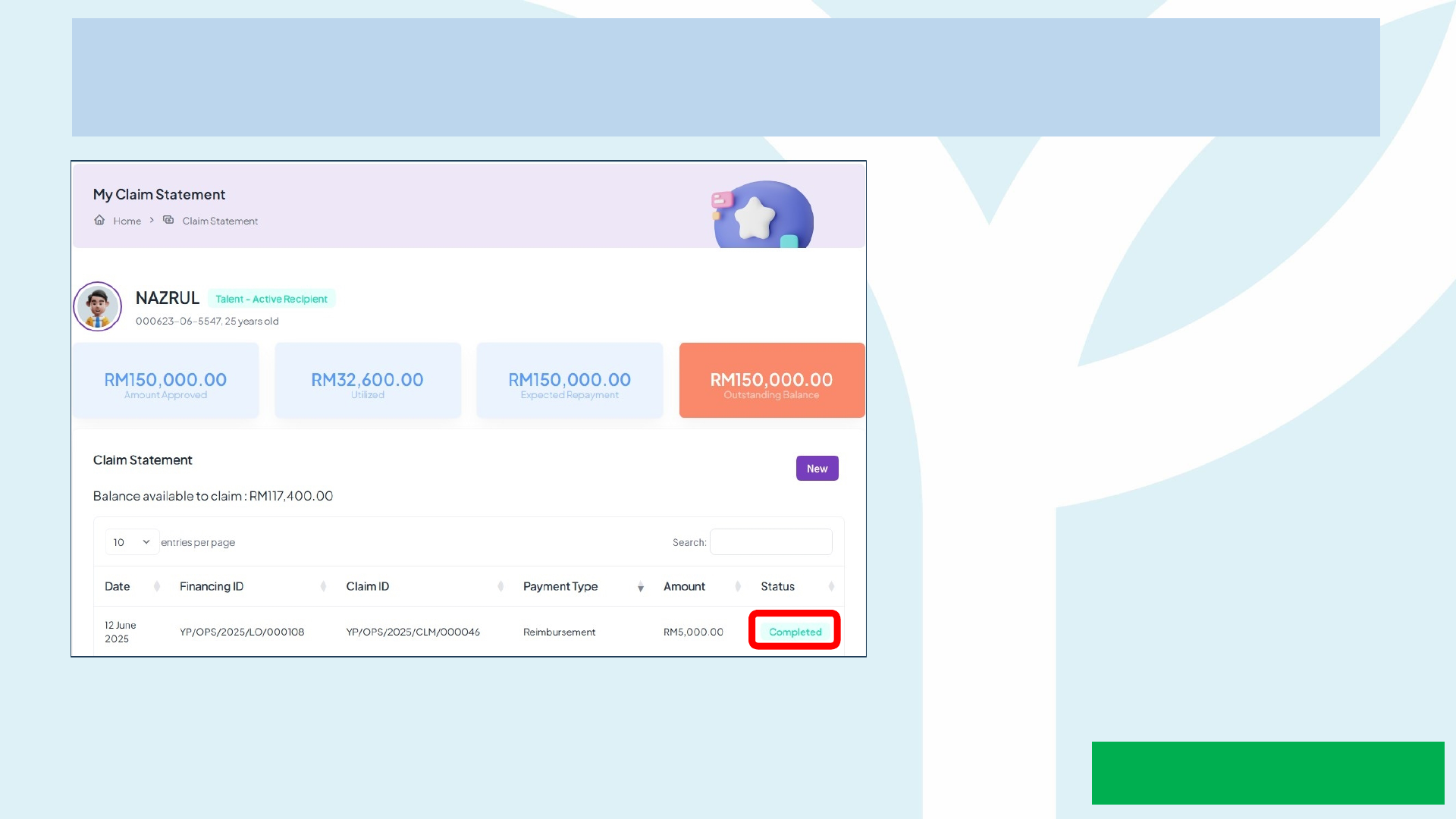
Guidelines to Submit Claim
Your status in the dashboard will
change to "Completed" once the
claim has been successfully
processed and accepted.
Reimbursemen
t

How to Claim Allowance
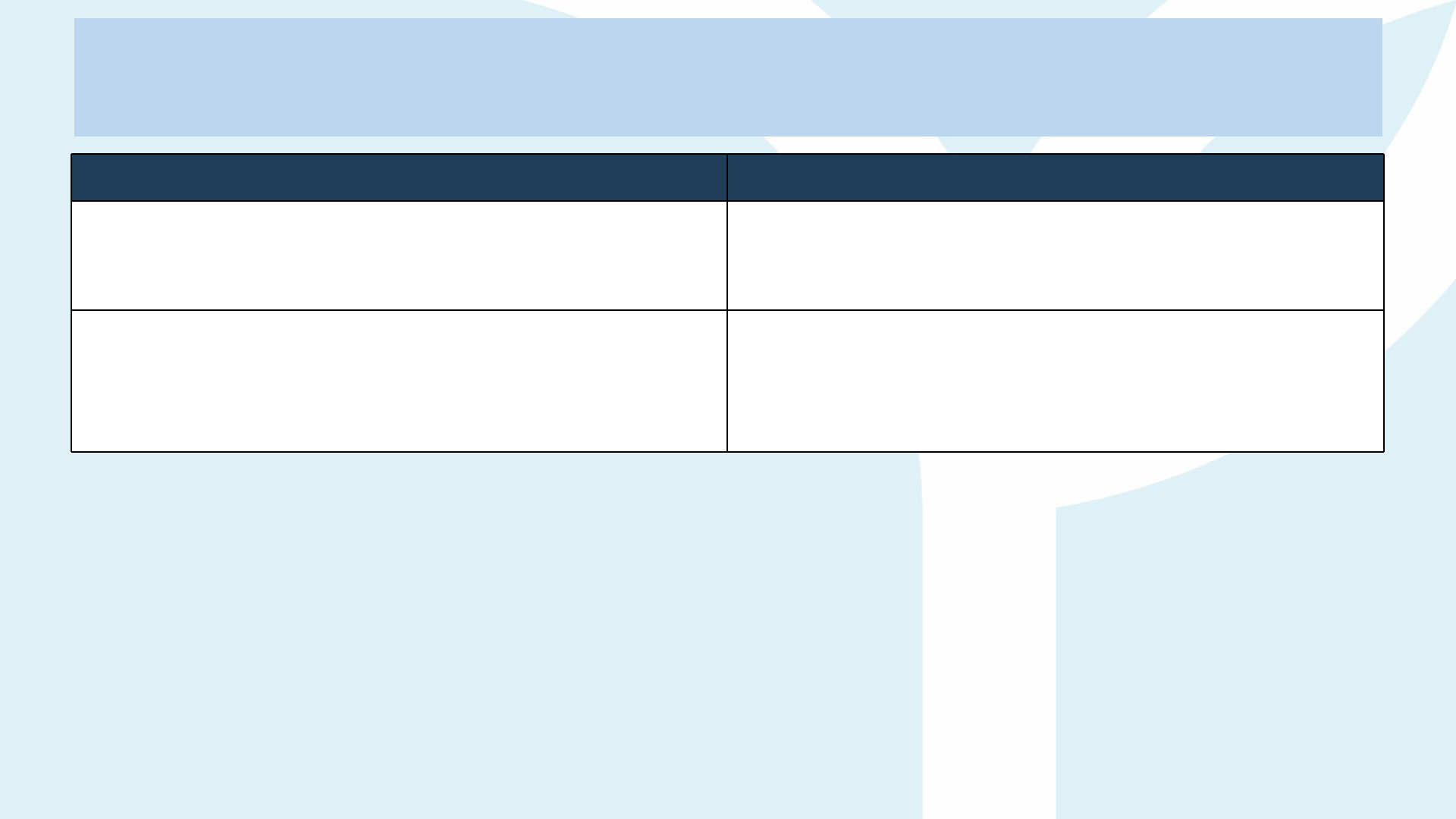
Allowance Workflow
**An Allowance claim cannot be submitted by itself. The form still requires at least one additional claim line (Tuition Fee, Exam
Fee, Registration Fee, etc.).
What’s Changing? Why It Matters
Single entry per semester – Active Scholars
now enter the Semester Start & Semester End
dates once.
Removes the need to create a separate claim every
3 months.
System-driven disbursement – The portal
automatically splits the semester span into
quarterly tranches (max 3 months each)
and triggers payment runs.
Fewer manual steps → faster, error-free allowance
payouts.
How to submit
o Go to Claim Statement → New.
o Choose payment type Reimbursement or Disbursement.
o Enter the official Semester Start and Semester End dates (as stated in the registration letter /
academic calendar / Confirmation that studies are ongoing current semester) that shows Start and
End date semester.
o Upload the usual supporting docs (timetable + attendance log).
o Click Submit. That’s it—no further action needed until the next semester.
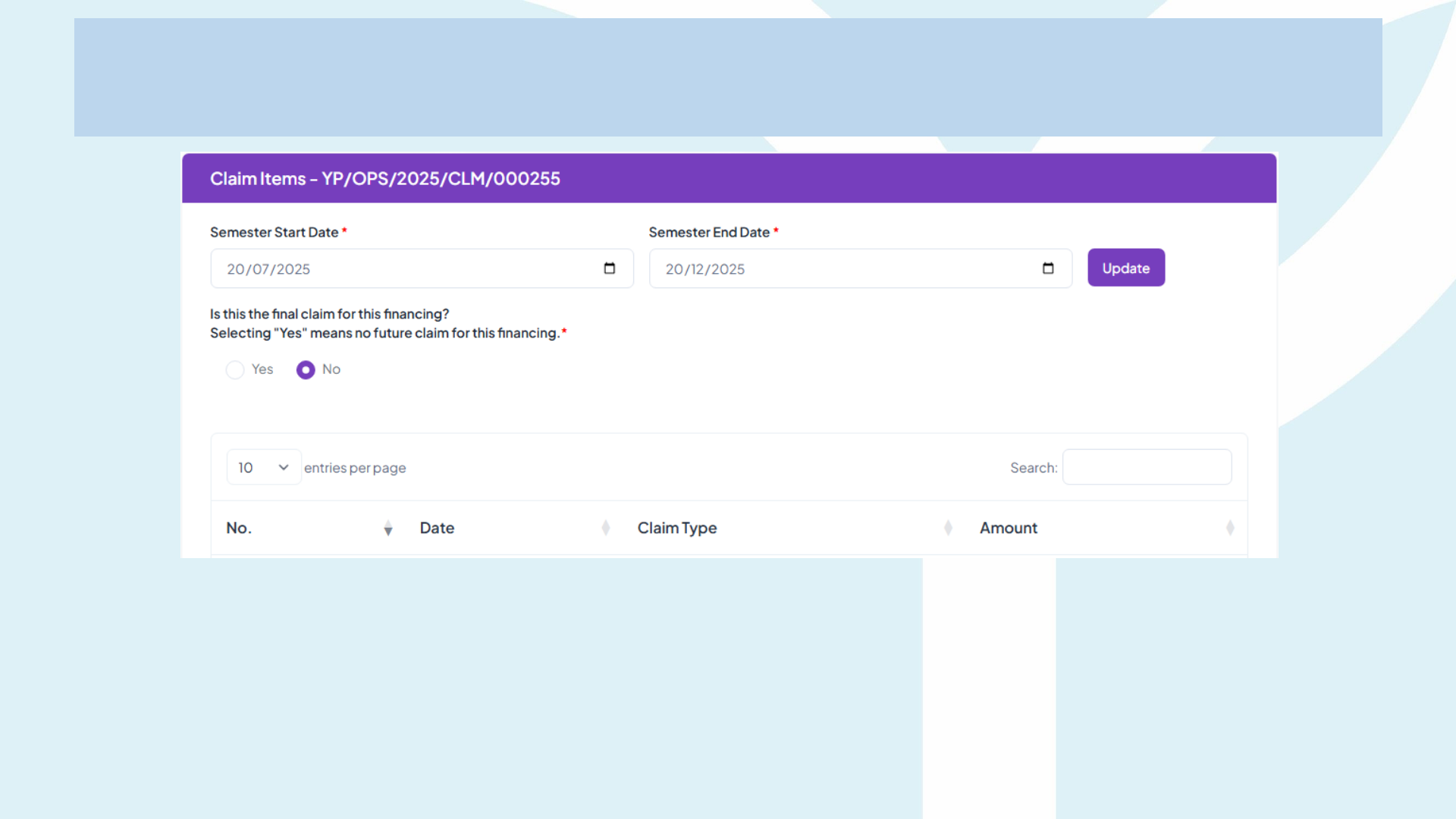
Allowance Workflow
Example
Timeline
Semester: 20 Jul 2025 → 20 Dec 2025 (5 months total)
│
├─ 1st tranche auto-disbursed: 20 Jul – 19 Oct = 3 months
│
└─ 2nd tranche auto-disbursed: 20 Oct – 20 Dec = 2 months
**An Allowance claim cannot be submitted by itself. The form still requires at least one additional claim line (Tuition Fee, Exam
Fee, Registration Fee, etc.).
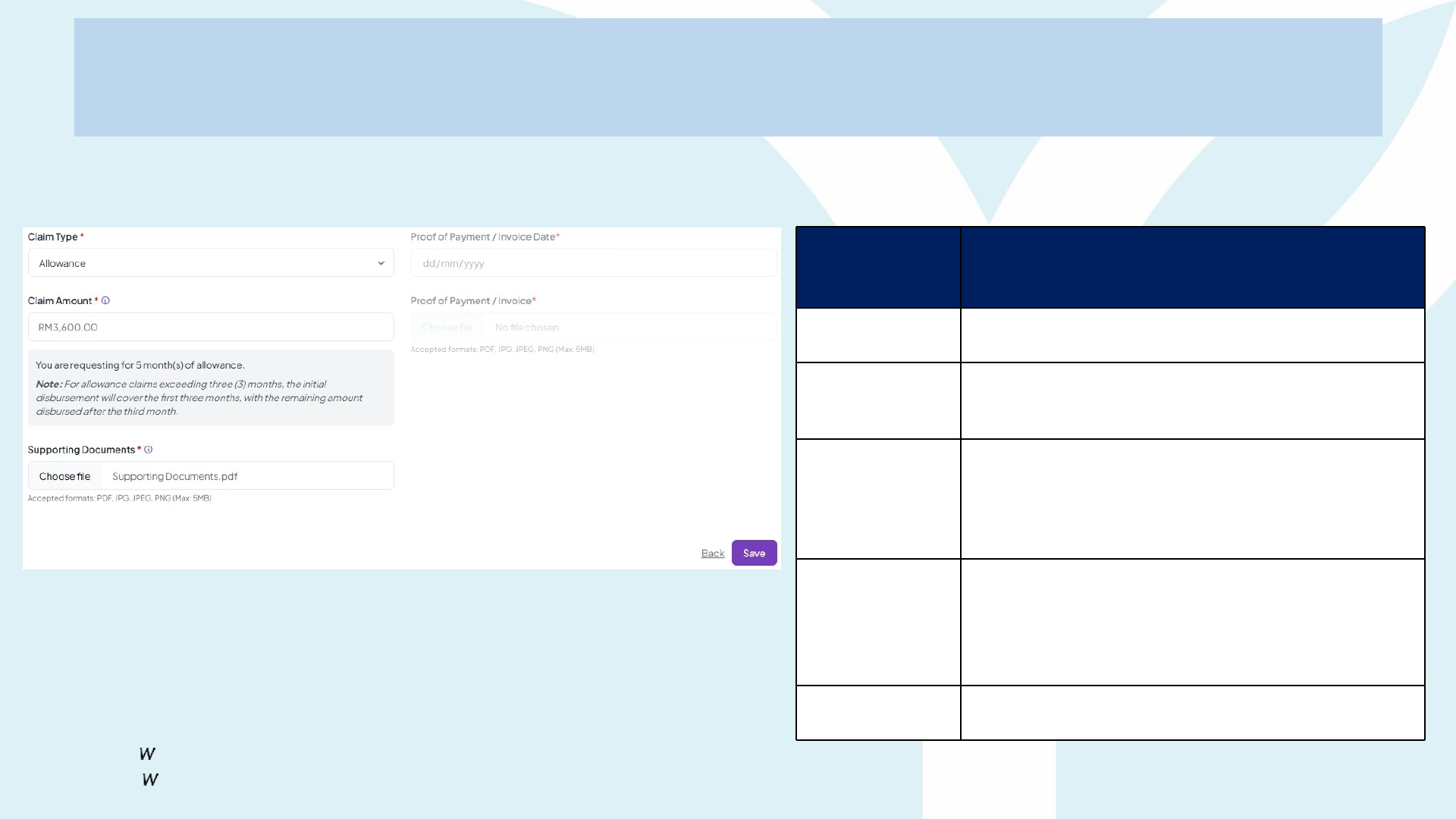
Allowance Workflow
Entering an Allowance
Claim
Screen
Elemen
t
What You Need to Know / Do
Claim Type
Pre-filled as Allowance once you choose it from the
drop-down.
Claim Amount
System auto-calculates based on the monthly rate ×
number of months you specified on the previous page.
Example: RM 3,600 for 5 months.
Grey Info Box
Confirms the number of months detected and reminds
you:
o If the claim covers > 3 months, YP will pay
the first 3 months now, then auto-disburse
the balance once Month 4 starts.
Supportin
g
Document
s
Mandatory. Combine into one PDF:
o Confirmation that studies are ongoing
current semester
o Class timetable
o Adviser / progress note (if any).
Save → Back to
Claim Table
The line will show Draft status until you add at least
one more fee line (Types 1-6) and press Submit.
**Allo ance cannot be submitted alone. Add more fee item (Tuition Fee, Exam Fee, Registration Fee, etc.) before clicking Submit
or the
claim ill be rejected.

Important Notice:
• The claim process takes 14 working days for response from the date of submission.
• Yayasan Peneraju will not be held responsible for any delays caused by such issues.
• After receiving the funds, the talent has 7 days to make payment to ALTI.
• When payment to ALTI has been made, the talent has to submit the Receipt of Payment
into Peneraju.org within 10 working days of receiving the funds in their bank account.
• FAILURE of payment and submitting Receipt of Payment into Peneraju.org, talent is
subjected to intervention and termination of contract by Yayasan Peneraju accordingly
Strict Compliance:
• If any content of the documents listed is found to be altered, Yayasan Peneraju holds
the absolute right to revoke the offer if fraud or forgery is detected.
Important Reminder

Claim Process
Review Incomplete Submitted Completed
Disbursemen
t
Pending
Completed
Reimbursement
Pending Review

Claim Stage – Who Does What?
Action by Key Actions & Deliverables
ALTI (Approved
Learning
Training
Institution)
1. Issue semester invoice (or exam/registration invoice, etc.) with programme details, student
name & NRIC, etc.
2. Provide confirmation that studies are ongoing current semester / class timetable /
attendance list and any learning-materials breakdown the student may claim.
3. Once paid, stamp the invoice “PAID” and give the receipt to the talent / student for upload.
4. Reply to YP clarifications on fee codes or intake dates.
Applicant / Talent
1. Log in → Claim Statement → New.
o Disbursement: attach unpaid invoice.
o Reimbursement: attach paid invoice and bank/FPX slip, etc.
2. Click Submit (status = Pending).
3. If claim returns Incomplete, upload clearer or corrected docs and Resubmit.
4. For Disbursement claims only: after YP credits the funds, pay the ALTI within 7 days and upload
o ALTI or Vendor receipt stamped “PAID”.
YP (Operation,
Finance &
Recovery Teams)
1. Review each claim: match amounts, verify documents, etc.
2. Mark Approved and pass to Finance for anti-duplicate check & Recovery for repayment check.
3. Once cleared, queue payment; update status to Completed and e-mail Payment Advice to the
Talent.
4. For disbursement claims, monitor proof-of-payment upload; revert to Incomplete if unclear /
missing.
5. Maintain audit trail and freeze new claims if outstanding issues persist.
Point of Reference
Item Department Email
Talent Application – matters relating to
application (for talents only)
1. Application Purposes
2. Technical Issues
Operations askme@peneraju.org
When sending an email to askme@peneraju.org include ;
1. Full Name as per NRIC
2. NRIC Number / Loan ID
3. Phone Number (Optional)
4. Screenshot/Photo of issue (FULL PAGE, if possible, don’t crop, include timing)
5. Describe Chronology of the issue - Description

Note to ALTI

ALTI Amendment Submission
Guideline
IMPORTANT TO NOTE
1. All proposals submitted are considered FINAL.
2. All published information must include pricing with SST.
3. Once course published on Peneraju.org, each ALTI is allowed to submit ONLY ONE round
of amendments with the provided template during the verification window.
4. The verification window is a scheduled period set by YP for ALTIs to submit change
requests, starting from the date the certification is published on Peneraju.org.
5. Any further changes after the deadline will be evaluated case-by-case.
REQUEST FOR CHANGE

MAKE THE
CHANGE